Keyword Research for Website SEO: How It Works, Step by Step
Keyword research for website SEO in 6 steps: mine Search Console, expand seeds with free tools, check intent, score keywords and map clusters to pages.
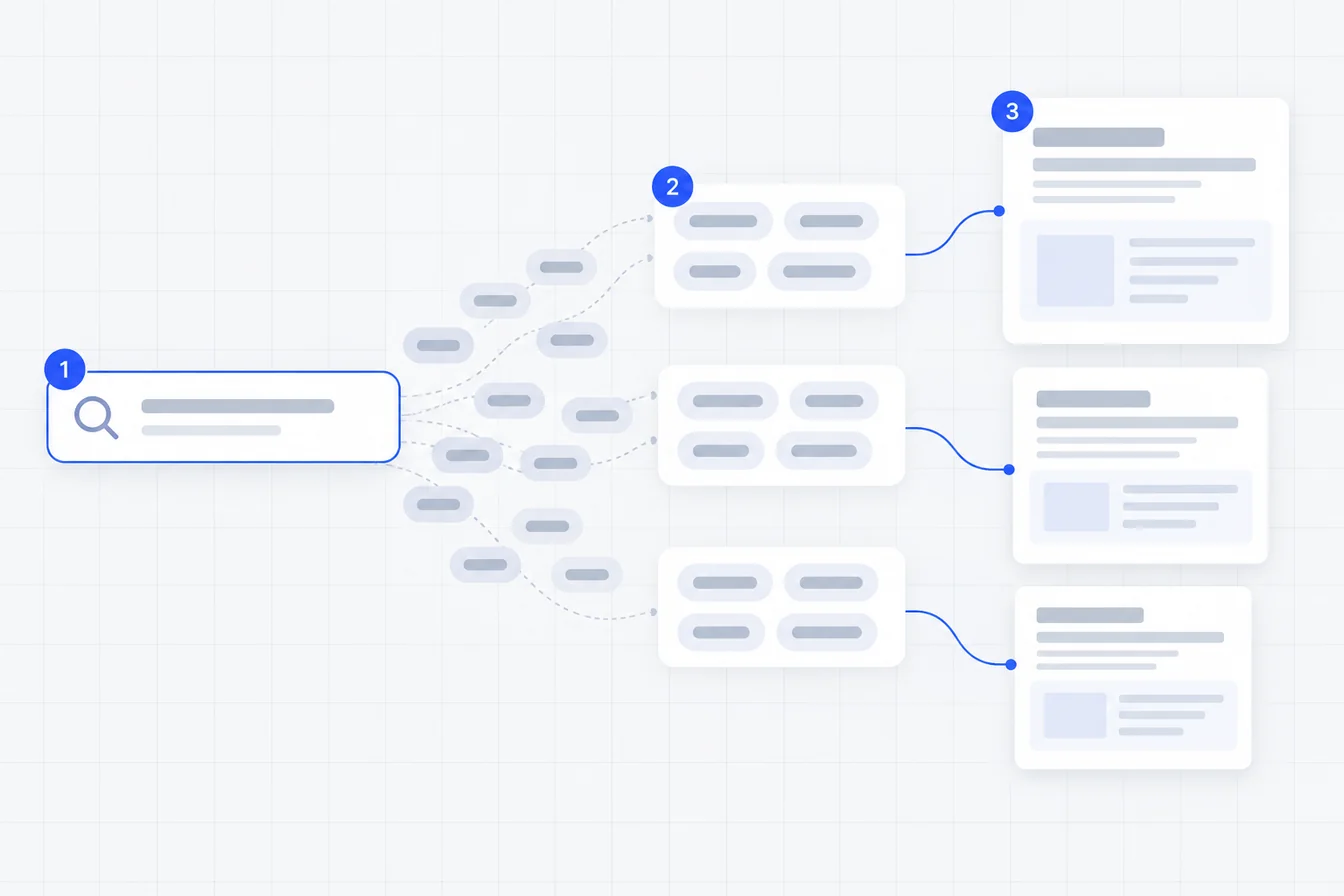
Keyword research for website SEO means finding the words people type into Google when they look for what your site offers, then deciding which of those searches each page should answer. You check four things for every keyword: how often it is searched, how hard it is to rank for, what the searcher wants, and what a visitor from it is worth to you. The result is a keyword map: one main keyword (plus its close variants) per page, so your pages never compete with each other.
TL;DR
- Start with your own data. Google Search Console shows the queries your site already appears for, for free.
- Expand from a short seed list with free tools (Keyword Planner, autocomplete tools, free tiers of Semrush, Ahrefs and KWFinder), then judge each keyword by volume, difficulty, intent and business value.
- Google the keyword before you commit. The top 10 tells you what kind of page ranks: for "keyword research for website seo" it is 9 tool pages out of 10.
- Group keywords that Google answers with the same pages into one cluster, and give each cluster exactly one page.
- Track the result in Search Console and refresh pages that slip. Keyword research is a loop, not a one-off project.
What is keyword research?
Mangools defines it as "an SEO practice of finding, analyzing and using the phrases people use to search for information on the internet," and calls it "usually the first step of search engine optimization of any website." Everything after it (what pages to create, what to call them, what to write in them) depends on the list it produces.
Google's own SEO Starter Guide puts the idea in one sentence: "Think about the words that a user might search for to find a piece of your content." Its example: experts might search for "charcuterie", while beginners search for "cheese board". Same topic, different words, sometimes different pages.
Two things keyword research is not:
- It is not keyword stuffing. Google says repeating the same words over and over "is tiring for users" and is "against Google's spam policies." It also states that Google Search doesn't use the keywords meta tag.
- It is not about matching every variation. Google's language matching systems "can understand how your page relates to many queries, even if you don't explicitly use the exact terms in them." You pick the main keyword for a page. You do not need a page per synonym.
The payoff is traffic. Ahrefs found that 90% of pages get no organic search traffic from Google, based on a study of over 1 billion pages. In most cases, nobody was searching for what those pages covered, or the page did not match what searchers wanted.
The four numbers that decide a keyword
Every keyword tool shows a variation of the same metrics. Here is what each one means and where it misleads you:
| Metric | What it tells you | Watch out for |
|---|---|---|
| Search volume | Average monthly searches for the exact keyword | It is an annual average. Ahrefs: 120K searches in December and none the rest of the year shows as 10K a month |
| Keyword difficulty (KD) | How hard it is to reach the top 10, on a scale of 0 to 100 | Each tool computes it differently. Ahrefs bases it on the number of unique websites linking to the top 10 pages |
| Search intent | What the searcher wants: to learn, compare, buy or reach a specific site | Tools add intent labels, but the live search results are the real answer |
| CPC and business value | What advertisers pay per click, and how well your product fits the topic | CPC is a snapshot and changes "any minute," says Ahrefs |
A few rules of thumb from the tool makers themselves:
- Volume. Semrush calls 100 to 1,000 monthly searches "a practical starting point" for newer or smaller sites. Ahrefs adds a counterpoint: "zero volume" keywords bring only a few visitors each, but if you publish a hundred articles targeting them, your annual traffic "may actually add up to a few thousand highly targeted visitors."
- Difficulty. Semrush suggests newer sites focus on KD under 30 and notes that anything above 80 "is usually dominated by major brands." Ahrefs warns against relying on any single score: "No single score can distill the complexity of Google's ranking algorithm into a single number." More on this in our guide to keyword difficulty.
- Value. CPC is a decent proxy for commercial value. Ahrefs' example: "project management software" costs about $30 per click, "project management methodologies" about $6, because the first searcher is shopping and the second is studying. Ahrefs also scores its own topics for "business potential" from 0 to 3, depending on how naturally the product fits into the article.
Ahrefs also uses "Traffic Potential": how much search traffic the top-ranking page for your keyword gets. A keyword with modest volume can lead to a page that earns far more traffic, because that page ranks for many related searches too.
How to do keyword research for your website in 6 steps
Step 1: Start with what your site already ranks for
If your site is live, you already have keyword data. The Performance report in Google Search Console shows "which queries are bringing traffic to your site." Open it, choose the Queries tab and sort by impressions.
Look for three groups:
- Queries with many impressions but few clicks. You appear, but people do not choose you. Better titles or a better-matched page can fix that.
- Queries where your average position is around 8 to 20. You are close to page 1. Improving the existing page is often faster than writing a new one.
- Queries your page was never meant for. They show demand you have not served yet, which makes them candidates for new pages.
Two caveats from Google's help page: the default view covers the past three months, and average position means "the average position of the topmost result from your site." Ahrefs also points out that Search Console only shows the top 1,000 keywords your site ranks for. For a small site, that is rarely a problem.
Step 2: Build a seed list and expand it
Seed keywords are the two or three word phrases that describe what you sell or write about. Write down 5 to 10 of them: your product categories, the problems you solve, the words customers use in emails and sales calls.
Then expand each seed:
- Google Keyword Planner gives you new keyword suggestions with "estimates of the searches they receive and the cost to target them." It is free, but you need a Google Ads account with billing information entered to reach "Get ideas for new keywords."
- Autocomplete tools like Keyword Tool use Google Autocomplete to generate long-tail variations, free and without an account. They are good for finding the exact phrasing people use. Our guide on long-tail keyword examples shows what to do with them.
- People also ask and related searches at the bottom of Google's results show the questions around your topic. For "keyword research for website seo", Google lists questions like "How to find out SEO keywords of a website?" and related searches like "Keyword research for website seo free". Several of them became the FAQ at the end of this article.
- ChatGPT and other chatbots are fine for brainstorming, but Ahrefs notes "you won't get realistic SEO metrics for your keywords, like keyword difficulty or monthly searches." Use them for ideas, then check every idea in a real tool.
- Your competitors. Every major tool shows the keywords a competing domain ranks for. The full method, including keyword gap reports, is in our guide to competitive keyword research.
Set the country and language before you pull numbers. Search volume, difficulty and the ranking pages all differ by market.
Step 3: Check search intent in the live results
This is the step most people skip, and it is the one that decides whether a page can rank at all. Mangools names 4 basic intent types (navigational, informational, transactional and commercial) and gives the simplest test: "Google it and see what ranks in the first SERP."
We did that for the keyword of this article and for a close variant on November 12, 2026:
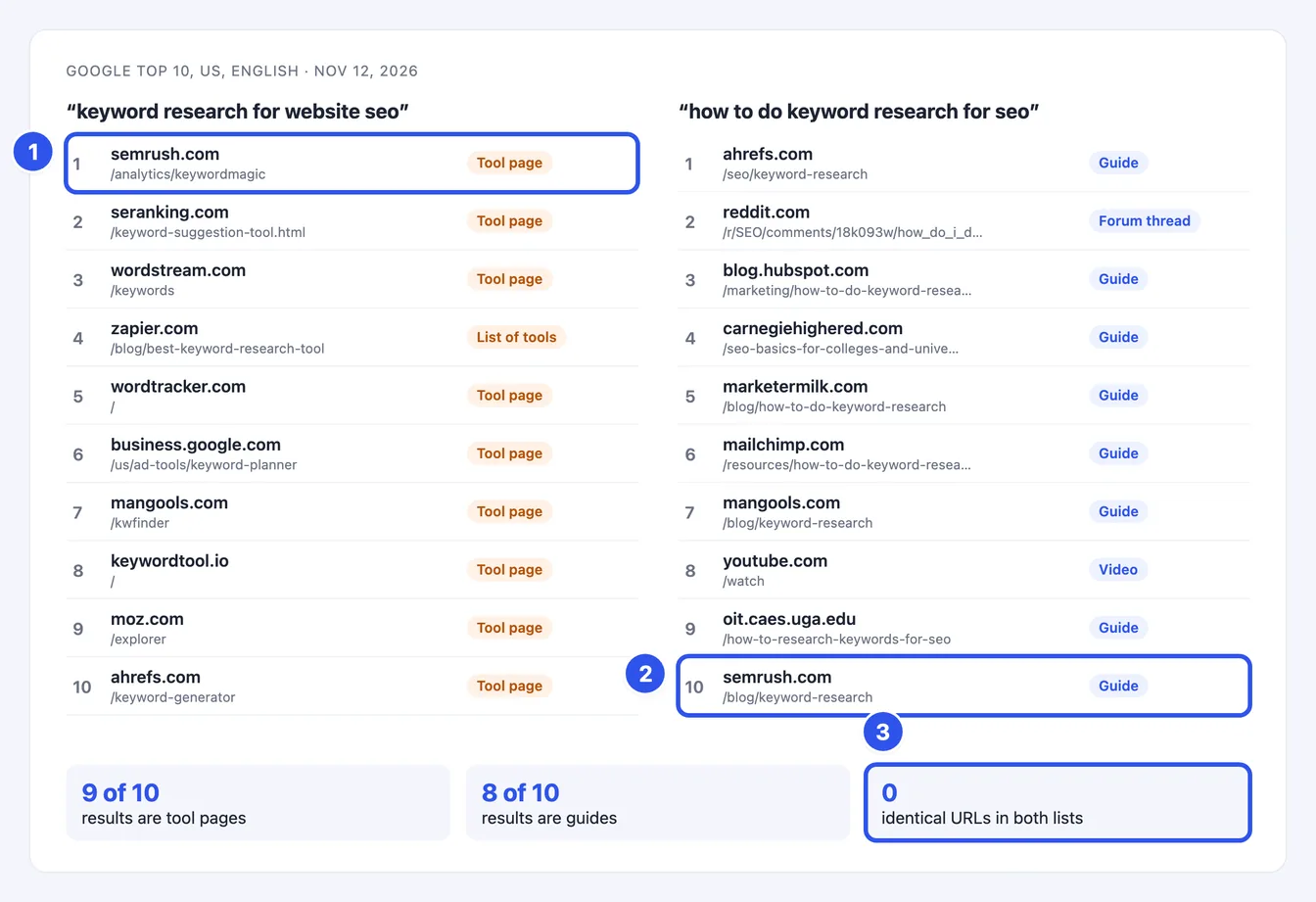
- Semrush ranks #1 for "keyword research for website seo" with its free keyword tool. 9 of the 10 results for this keyword are tool pages, and the remaining one is Zapier's list of tools. People searching this phrase mostly want to use a tool, not read about one.
- The same domain ranks for "how to do keyword research for seo" with a different page: its blog guide. Ahrefs and Mangools do the same. Each site matches the page type to the intent.
- The two keywords sound nearly identical, but their top 10 lists share no URLs at all. Google treats them as two different searches. One page cannot serve both well, so they belong to separate pages.
That is why this article combines a guide with a comparison of free tools (below): the keyword leans toward tools, and the guide explains how to use them.
If you sell a product, the same test protects you from writing the wrong page. When the top 10 is all category pages, a blog post will struggle. When it is all guides, a product page will.
Step 4: Score the list and pick your targets
Now cut the long list down to keywords you can actually win. Put them in a spreadsheet (our keyword research template gives you a ready layout) with volume, KD, intent and a relevance score, then filter:
- Drop mismatched intent. If the results show page types you cannot or do not want to build, cross the keyword off.
- Drop keywords with no business value. Ahrefs' example from a coffee site: "aeropress filters" scores high for a shop selling Aeropress accessories, "stanley thermos" scores low even though it is coffee-related.
- Match difficulty to your site. A new site should mostly target low-KD keywords. An established site can take on harder ones. Ahrefs suggests starting high-KD pages sooner, not later, because they need links and links take time. See how to find low competition keywords for filters that work.
- Sort what remains by value, then by difficulty. Volume decides last, not first.
Citapult automates this filtering. During setup it reads your site and your competitors, pulls search volume and difficulty from DataForSEO and rates every keyword from 1 to 5 for how close it sits to what you sell. You set the filters for count, minimum volume and maximum difficulty, and keywords you have already saved are never suggested again. See Citapult's keyword research for the full flow.
Step 5: Group keywords into clusters and map them to pages
By now you have keywords that mean the same thing, like "how to track keyword ranking" and "how to track keyword rankings". Writing one page for each would split your effort and make your own pages compete. Semrush's advice: "Assign each keyword or keyword group to a specific page so your own pages don't compete against each other in search results."
The reliable way to decide what belongs together is the same test as in step 3: compare the search results. If two keywords share several of the same top 10 pages, Google sees them as one topic. Ahrefs offers a "Parent Topic" metric for this. In its example, 28 keywords form a single "whipped coffee recipe" cluster that one guide can rank for.
Citapult clusters this way on its own:
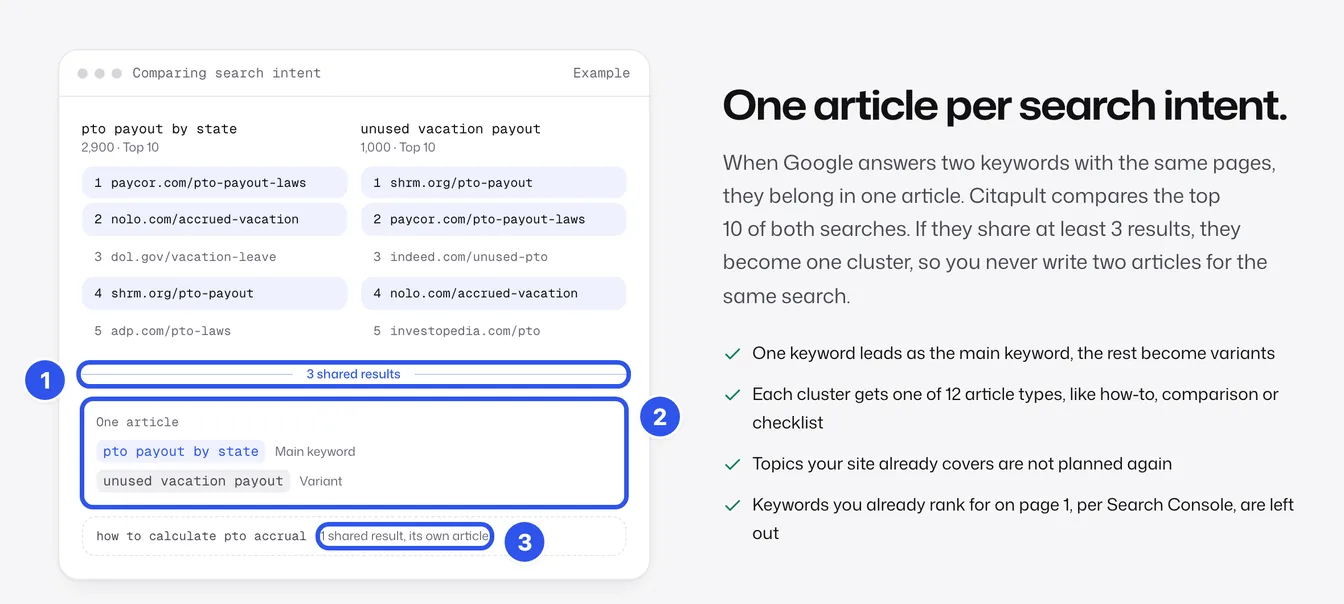
- Citapult compares the top 10 of both searches. "pto payout by state" and "unused vacation payout" share 3 results, which is the threshold for one cluster.
- The two keywords become one article. The stronger keyword leads as the main keyword, the other becomes a variant.
- "how to calculate pto accrual" shares only 1 result, so it gets its own article.
The output of this step is a keyword map. Here is part of the map behind this blog's keyword research section (US volumes and KD from DataForSEO):
| Main keyword | Monthly searches | KD | Variants in the cluster | Page type |
|---|---|---|---|---|
| keyword research for website seo | 390 | n/a | 0 | Guide (this page) |
| competitive keyword research | 1,300 | 14 | 17 | How-to |
| how to track keyword ranking | 720 | 30 | 1 | How-to |
| keyword strategy seo | 210 | 16 | 5 | Explainer |
| how to find low competition keywords | 140 | 13 | 26 | How-to |
| what is keyword difficulty | 140 | 17 | 0 | Glossary entry |
| keyword research template | 110 | 7 | 0 | Template |
Two details stand out. The cluster with the most variants (26) has one of the smallest main keywords, so its combined demand is much larger than the 140 searches suggest. And every row has exactly one page type: a how-to, a glossary entry or a template, chosen from what already ranks. To turn this map into a publishing plan, see our guide to keyword strategy for SEO.
Step 6: Publish, track and refresh
A keyword map is only a plan. Once a page is live, put its main keyword in the title, the H1 and the URL, answer the query early, and cover the questions from step 2. Google's starter guide is clear that there is "no magical word count target," so cover the topic fully and stop.
Then watch the results in Search Console:
- Rising pages: check which new queries they pick up. These often hint at sections worth adding.
- Falling pages: compare them with what now ranks above them and update the content.
- Queries you already rank for on page 1: do not write a second page for them. It would compete with the one that works.
Our guide on how to track keyword rankings covers tools and routines for this.
Citapult connects to Search Console with read-only access and syncs clicks and positions daily. When you already rank on Google's first page for a query (up to position 10, with at least 10 impressions in 28 days), Citapult plans no new article for it, and it flags articles it wrote when they start dropping. Details on the Search Console feature page.
Free keyword research tools compared
You can do everything above without paying. Here is what the free versions give you, checked on each tool's page on November 12, 2026:
| Tool | What you get for free | Limit | Best for |
|---|---|---|---|
| Google Search Console | Queries, clicks, impressions, CTR and average position for your own site | Your site only | Step 1: your existing rankings |
| Google Keyword Planner | Keyword ideas with search and cost estimates | Needs a Google Ads account with billing info | Volume and cost estimates |
| Google Trends | Relative interest over time, scaled from 0 to 100 | No absolute volumes; low-volume terms show as 0 | Seasonality and rising topics |
| Keyword Tool | Long-tail ideas from Google Autocomplete, no account needed | Search volume and CPC only in the paid Pro version | Finding real phrasing fast |
| Semrush Free Keyword Tool | Keyword ideas with volume, KD, intent and CPC | Free plan: up to 10 Analytics reports per day, per Zapier | Intent labels next to each keyword |
| Ahrefs Keyword Generator | Ideas from a database of over 8 billion queries; up to ten seed words and six report types | Free plan limits not stated on the tool page | Quick idea lists with KD |
| KWFinder | Volume, difficulty, related and competitor keywords | 5 lookups per 24 hours, 15 related and 5 competitor keywords per lookup | Occasional deep checks |
| WordStream Free Keyword Tool | Keyword ideas with metrics | First 25 keywords shown, full list as CSV | Exporting a list to a spreadsheet |
Zapier's July 2026 test also lists AnswerThePublic with 3 free searches per day, useful for question-style keywords. Its advice on upgrading is sound: pay only "when you need to." If a free plan covers your volume of research, stay on it.
Keyword research and AI search
AI Overviews and AI Mode change how results look, not whether keyword research matters. Mangools sums up Google's recommendation as "very familiar": crawlable, indexable pages, standard SEO practice, and helpful, people-first content.
What changes is the queries. Mangools' example: instead of "best hiking boots", someone may ask "What are the best lightweight hiking boots for a 3-day trip in the Alps in early autumn?" That favors pages that cover a topic in depth over pages built around one exact phrase.
One data caveat: Google Trends filters out searches made by Google products and services, "including internal searches made by AI Mode and AI Overviews." Trends tracks what people type, not what Google's AI features look up.
Common keyword research mistakes
- Chasing the biggest number. High-volume head terms are where established sites with many links compete. A new site gets more from ten keywords it can win than one it cannot.
- Trusting difficulty scores blindly. KD is an estimate. Ahrefs itself tells you to "always manually assess keywords before going after them."
- Skipping the intent check. A blog post for a keyword where Google shows nine tool pages will not rank, however good it is.
- One page per keyword variant. Variants with the same results belong on one page. Several near-identical pages compete with each other.
- Reading monthly volume literally. Seasonal keywords look steady in tools because volume is an annual average. Check Google Trends for the shape of the year.
- Putting keywords in the domain name. Google says keywords in the domain or URL path alone "have hardly any effect beyond appearing in breadcrumbs."
- Writing for the keyword instead of the reader. Google asks for "people-first content" rather than "search engine-first content made primarily to gain search engine rankings." Keyword research tells you what to write about. It does not tell you to repeat the phrase.
FAQ
Is keyword research part of SEO?
Yes. Mangools calls it "usually the first step of search engine optimization of any website." It decides which pages you create and which searches each page targets. Technical SEO and link building then help those pages rank.
How do I find out which keywords a website ranks for?
For your own site, use the Performance report in Google Search Console and open the Queries tab. For other sites, use an SEO tool's domain or organic keywords report: Ahrefs, Semrush and KWFinder all show the keywords a domain ranks for, with limited free access.
What is the best keyword research tool for SEO?
There is no single best tool. Google Search Console is the best free source for your own site, Keyword Planner for volume estimates, and Semrush or Ahrefs for large lists with difficulty and intent. If you research only a few keywords a day, KWFinder's free plan with 5 lookups per 24 hours can be enough.
Can I do keyword research for free?
Yes. Search Console, Keyword Planner, Google Trends and the free tiers of Keyword Tool, Semrush, Ahrefs, KWFinder and WordStream cover every step in this guide. The limits are speed and list size, not capability.
Can ChatGPT do keyword research?
It is useful for brainstorming ideas, but it does not have search data. Ahrefs notes that you "won't get realistic SEO metrics for your keywords, like keyword difficulty or monthly searches" from ChatGPT. Check its suggestions in a keyword tool before you plan pages around them.
How many keywords should one page target?
One main keyword plus its close variants: the keywords that Google answers with largely the same pages. Ahrefs shows a cluster of 28 keywords that one guide can rank for. Keywords with different results need separate pages.
Sources
- 1mangools.comKeyword Research for SEO: The Beginner's Guide
- 2developers.google.comSEO Starter Guide
- 3developers.google.comCreating helpful, reliable, people-first content
- 4ahrefs.comHow to Do Keyword Research for SEO
- 5semrush.comFree Keyword Tool
- 6support.google.comPerformance report (Search results)
- 7support.google.comUse Keyword Planner
- 8support.google.comFAQ about Google Trends data
- 9zapier.comThe best free keyword research tools
- 10ahrefs.comFree Keyword Generator
- 11mangools.comKWFinder
- 12wordstream.comFree Keyword Tool
- 13keywordtool.iokeywordtool.io
- 14serper.devGoogle search results API