SaaS SEO Strategies: A 9-Step Plan From First Keyword to Sign-up
SaaS SEO strategies in 9 steps: rendering, alternatives and integration pages, product-led content, links, AI answers and sign-up tracking, with real examples.
The SaaS SEO strategies that work start where buyers are closest to a decision (alternatives, comparisons, integrations, use cases) and only then move up to broad educational topics. Underneath sits a site Google can render, content that shows your product solving real problems, links you earn instead of buy, and measurement in sign-ups rather than traffic. This guide walks through the nine steps in the order a small SaaS team should do them, with real pages from ClickUp, Zapier and Ahrefs and what Google's own documentation says at each step.
TL;DR
- Pick the conversion (trial, demo, sign-up) and the buyer before you pick keywords. Traffic that never touches the product is a cost, not a result.
- Start with bottom-of-funnel pages: "X alternatives", "X vs Y", integration and use-case pages. They have less volume but buyers who are already comparing tools.
- Templates scale integration pages, but Google's spam policy calls out "many pages without adding value for users" as scaled content abuse. Each page needs content unique to that pair or use case.
- Earn links with free tools and original data. Google's starter guide says it "primarily finds pages through links from other pages it already crawled."
- AI answers now sit above many results. In Pew Research data, users clicked a result in 8% of visits with an AI summary against 15% without one, so measure sign-ups and AI mentions, not just clicks.
What is SaaS SEO?
SaaS SEO is search engine optimization for software-as-a-service companies: getting the marketing site, blog and product pages of a subscription software product to rank in Google (and to be cited in AI answers) for the searches your future users make, and turning those visits into trials, demos or paid accounts.
The mechanics are the same as any SEO. The economics are not. A SaaS product sells a recurring subscription, often to a team that compares several tools before it buys, and the website usually runs on a JavaScript framework. That changes which keywords pay off and which technical problems you will hit.
| Typical small-business SEO | SaaS SEO | |
|---|---|---|
| What a visit should lead to | Call, booking, purchase | Free trial, demo request, sign-up, upgrade |
| Keywords that convert first | "[service] near me", product names | "[competitor] alternatives", "[tool] vs [tool]", "[app] + [app] integration", "[job] software" |
| Typical content | Service pages, local pages | Comparison pages, integration pages, use-case pages, product-led guides, free tools |
| Common technical risk | Slow pages, thin service pages | JavaScript rendering, app subdomains, duplicate template pages |
| How you measure success | Leads and revenue | Trials, demos and paid accounts per page, plus how often AI answers name you |
If you sell to companies with a long buying process, the B2B side has its own quirks; the guide to B2B SaaS SEO covers those. The nine steps below apply to both.
Step 1: Choose the conversion and the buyer before the keywords
Most SaaS SEO plans fail before the first article, because they start with a keyword tool and a list of high-volume terms. Start with two decisions instead.
- What counts as a conversion. A free trial start, a demo request, a sign-up for the free plan, or an upgrade. Write it down, because every later step is judged by it. A page with modest traffic that brings in trials beats a viral guide that brings in students.
- Who searches before they buy. Name the job titles and the problems. "HR at small companies who still track time off in spreadsheets" is a buyer. "HR" is not. Then list the competitors those buyers compare you with, and the tools your product connects to. Those three lists (problems, competitors, integrations) are the seed of your keyword plan.
Set up the measuring before you publish anything. Google Search Console's Performance report shows clicks, impressions, click-through rate and average position per page and query, and its default view covers the past three months. Google's AI features documentation also suggests tracking conversions and time spent on your site in other tools, such as Google Analytics, because Search Console alone shows visits, not sign-ups.
Step 2: Make sure Google can render your marketing site
Many SaaS marketing sites are built with the same JavaScript framework as the product. That works for Google, but only if you avoid a few traps that classic HTML sites never meet.
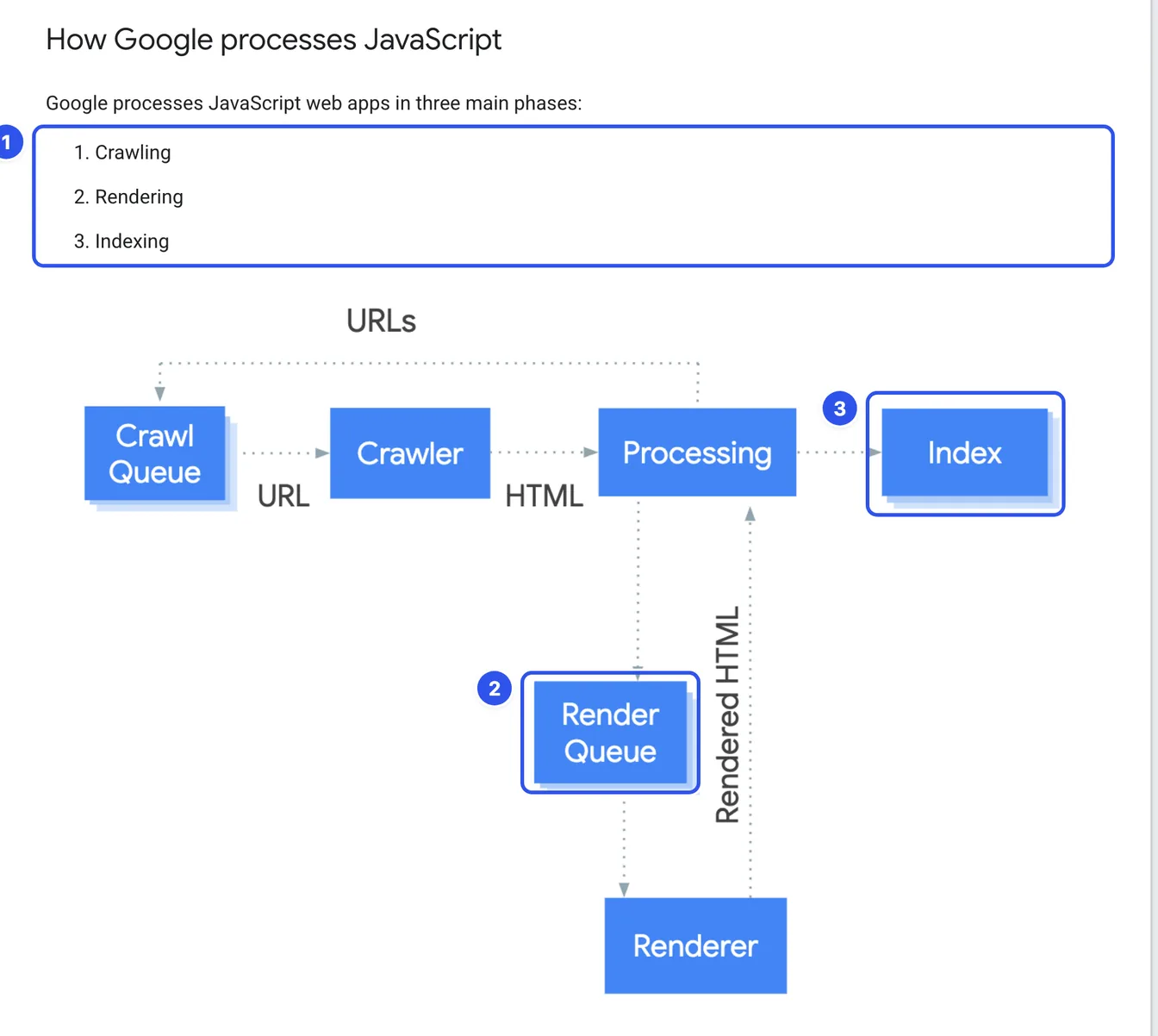
- Google processes JavaScript web apps "in three main phases": crawling, rendering and indexing. A plain HTML page can be understood after the first phase; a JavaScript page needs all three.
- Pages wait in a render queue before Google executes their JavaScript. If your page uses the "app shell model," where the first HTML contains no real content, Google sees nothing until rendering is done.
- Only after rendering does the content reach the index. Google still calls server-side or pre-rendering "a great idea because it makes your website faster for users and crawlers, and not all bots can run JavaScript."
What to check on a SaaS site:
- Render marketing pages on the server. Pricing, features, comparison and integration pages should deliver their text in the first HTML response. Most frameworks (Next.js, Nuxt, Astro and others) can do this per route.
- Use real URLs, not fragments. Google's guide says to use the History API for routing, because "Googlebot can't reliably resolve" content loaded through URL fragments (the part after
#). - Return real status codes. Client-side routing can hide errors as soft 404s, where a "page not found" view returns a 200 status. Google lists ways to avoid this in single-page apps, such as a JavaScript redirect to a URL that returns a 404.
- Keep the app and the marketing site apart. App screens should not compete with your marketing pages in the index. Moving the app to a subdomain doesn't keep it out on its own. Add a
noindexto every app route Google can reach, such as login, sign-up and shared views, whether the app runs on your main domain or a subdomain.
Step 3: Start at the bottom of the funnel
Bottom-of-funnel keywords have small volumes and very clear intent. Someone searching "asana alternatives" already pays for a tool and is unhappy with it. That is the closest an organic visitor gets to a sales call, and it is why most SaaS SEO plans should start here rather than with "what is project management."
ClickUp's page for that exact search shows what a strong alternatives page contains.
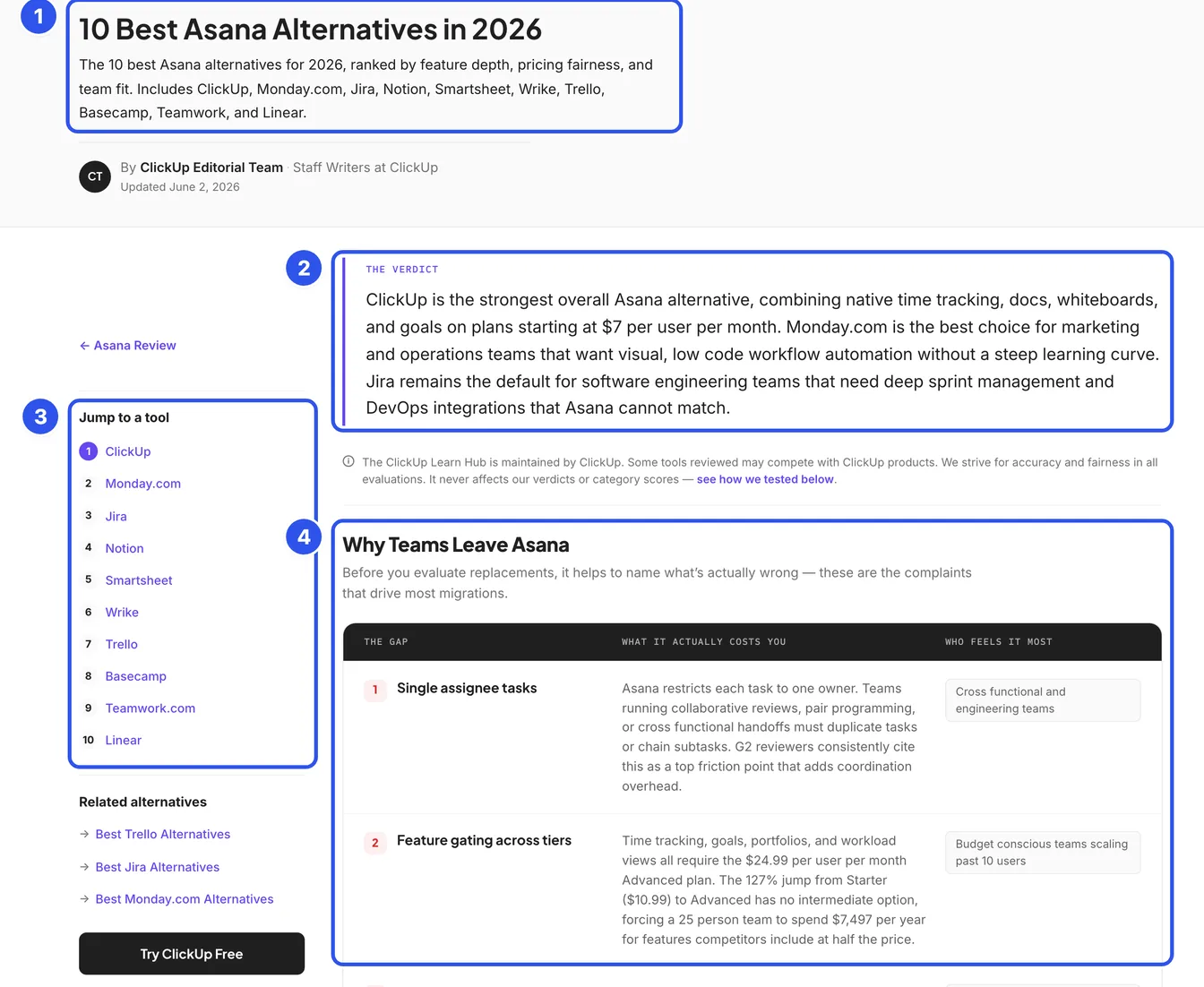
- The title repeats the search ("Asana alternatives") and the summary names all ten tools right away, so the reader and Google know what the page covers before scrolling.
- A verdict box answers the question in a few sentences: which tool fits which team. ClickUp puts itself first, and the note under the box says openly that the hub "is maintained by ClickUp." Disclose your bias the same way; readers compare these pages with independent reviews.
- A jump list with all ten tools lets a buyer go straight to the option they are considering.
- Before any tool, the page lists why teams leave Asana, with the cost of each problem and who feels it most. That is the reader's actual question, answered before the sales pitch.
The bottom-of-funnel page types worth planning first:
| Page type | Example search | What the page must contain |
|---|---|---|
| Alternatives | "[competitor] alternatives" | Why people switch, an honest list including tools that are not yours, who each option fits |
| Comparison | "[you] vs [competitor]" | Verdict first, a feature and pricing table checked on both live sites, migration steps |
| Integration | "[your app] [other app] integration" | What the connection does, setup steps, real workflows |
| Use case | "[job] software", "software for [industry]" | The workflow in your product with screenshots, limits, pricing |
| Pricing | "[you] pricing", "[category] pricing" | Plans, what each includes, what costs extra |
| Glossary | "what is [term]" | A short definition that links to the use case or feature |
These are small keyword sets, which is the point: you can cover them in a few weeks and they keep converting for years. If you want a ready-made list of the elements every SaaS page needs, the SaaS SEO checklist has it in one place.
Citapult's keyword research is built around exactly these page types. When you set up a website, it reads the site, suggests the competitors and audiences, and offers seven playbooks to generate keywords from.
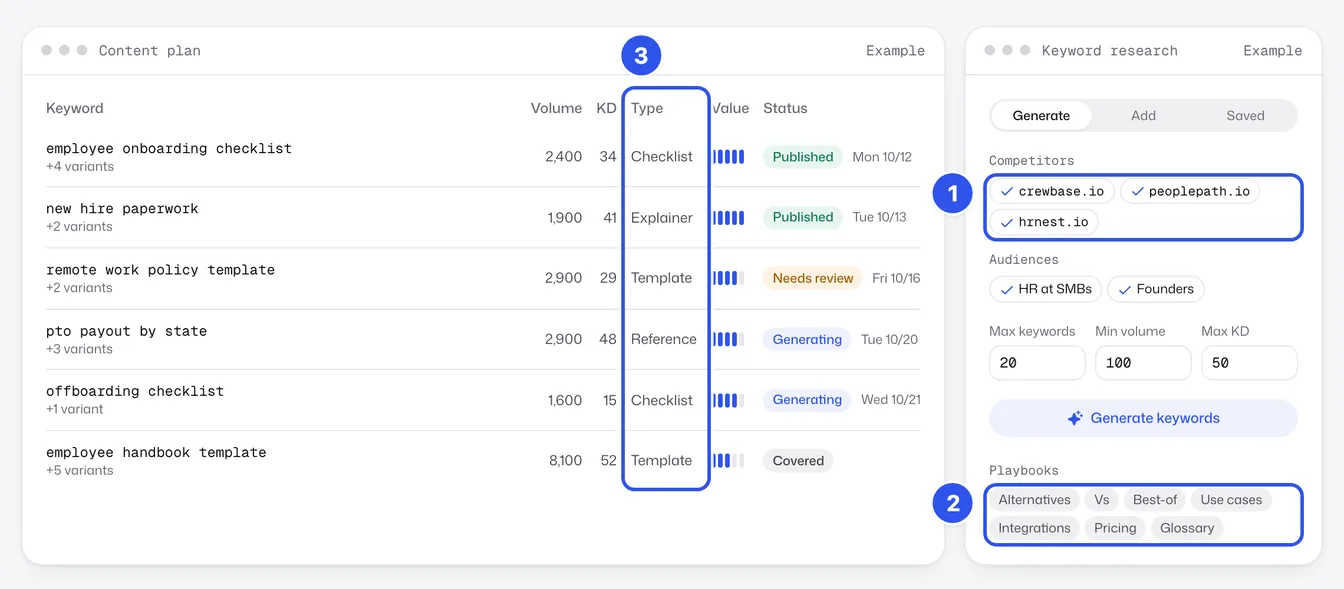
- The competitors found on your site. Keyword ideas start from them, with volume and difficulty from DataForSEO.
- The seven playbooks: Alternatives, Vs, Best-of, Use cases, Integrations, Pricing and Glossary. They map to the table above.
- Each planned article gets a type (checklist, explainer, template, reference). Keywords that share at least 3 of the same top 10 results become one article, so you never write two pages for one search.
Step 4: Build integration and use-case pages that each say something new
Integration pages are the classic SaaS case for programmatic SEO: one template, many pages, one per app pair. Zapier is the best-known example, with pages for pairs drawn from what its site calls "9,000+ apps."
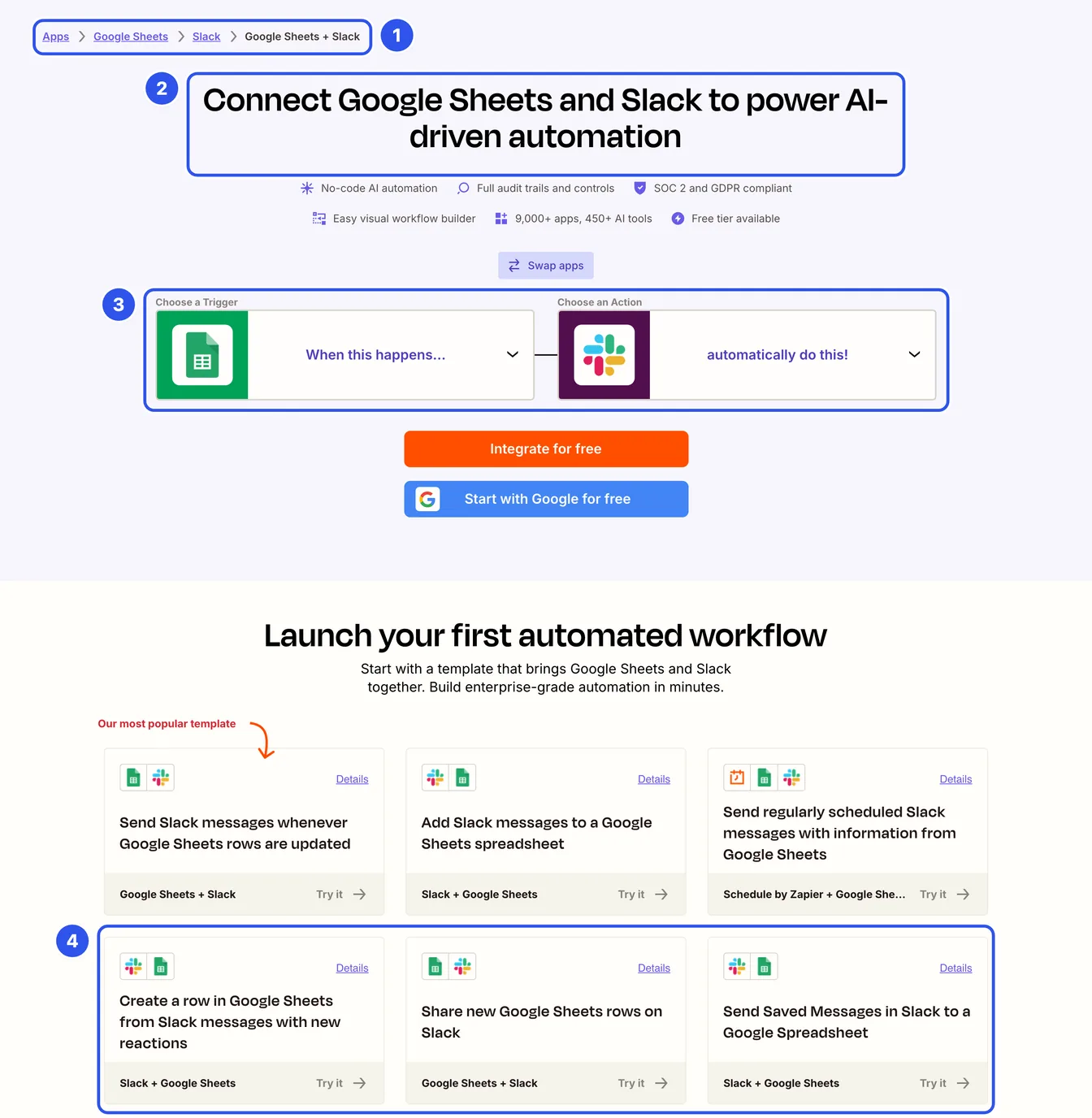
- The breadcrumb places the page in a clear hierarchy: Apps, then each app, then the pair. Google and readers can see where the page sits, and every level is a page of its own.
- The title names both apps and what the connection is for. That is the search ("google sheets slack integration") and the promise in one line.
- The trigger and action picker lets the visitor start building right on the page. The page is part of the product, not an article about it.
- The templates below are specific to this pair, such as "Create a row in Google Sheets from Slack messages with new reactions." That is what separates this page from a page that only swaps two app names.
That last point is the line you must not cross. Google's spam policy defines scaled content abuse as "when many pages are generated for the primary purpose of manipulating search rankings and not helping users," and adds "no matter how it's created." Its examples include "using generative AI tools or other similar tools to generate many pages without adding value for users" and "creating many pages where the content makes little or no sense to a reader but contains search keywords."
A simple test before you publish a templated page: if you deleted the two app names, would anything on the page still be unique? If not, wait until you have real setup steps, workflows, screenshots or limits for that pair. Fifty pages with something to say beat five hundred that only swap names.
Step 5: Write product-led content for the problems you solve
Once the bottom of the funnel is covered, move up to the problems your buyers search for before they know your category exists. For a time-off tool, that is "how to calculate pto accrual," not "best HR software." The difference from generic blogging: each article solves the problem with your product in it, with screenshots of the real workflow, and names the steps that work without it too.
Google's helpful content guidance gives you the bar. It asks whether the content provides "substantial value when compared to other pages in search results" and whether it shows "first-hand expertise," for example "expertise that comes from having actually used a product or service." A SaaS team has that by default: you know the edge cases, the support tickets and the numbers. Put them in.
Three habits that make product-led articles work:
- Answer first, product second. Give the full answer to the search in the first paragraphs. Show the product where it saves a step, not in the intro.
- Use your own data. Support questions, onboarding drop-off points and feature usage are material no competitor can copy.
- Name the author. Google's guidance asks: "Do pages carry a byline, where one might be expected?" A product manager or support lead as author is more believable than "Admin."
Step 6: Group articles into clusters and link them on purpose
A SaaS blog without structure turns into a pile of disconnected posts. Group the articles from steps 3 to 5 into clusters around your main use cases: one pillar page per use case, with the bottom-of-funnel pages, integration pages and guides linked from it and back to it.
Internal links do two jobs. They help Google find pages (its starter guide says Google "primarily finds pages through links from other pages it already crawled") and they move readers from a guide toward a feature, pricing or sign-up page. Google also asks for good link text: anchor text "tells users and Google something about the page you're linking to," so "time-off tracking for small teams" beats "click here."
Two rules that keep the structure clean:
- One page per search intent. When two keywords show the same top results, they belong in one article. Two pages for the same search split your signals and compete with each other.
- Link only to pages that exist. Broken internal links and links to staging URLs are common on SaaS sites that move fast.
Step 7: Earn links with free tools and original data
Links still decide which of two good pages ranks. Google's starter guide says other sites linking to you "happens naturally over time," and its spam policy names "buying or selling links for ranking purposes" as link spam. So the question for a SaaS team is what you can build that others link to on their own.
Free tools are the strongest answer, and Ahrefs shows how far the idea goes.
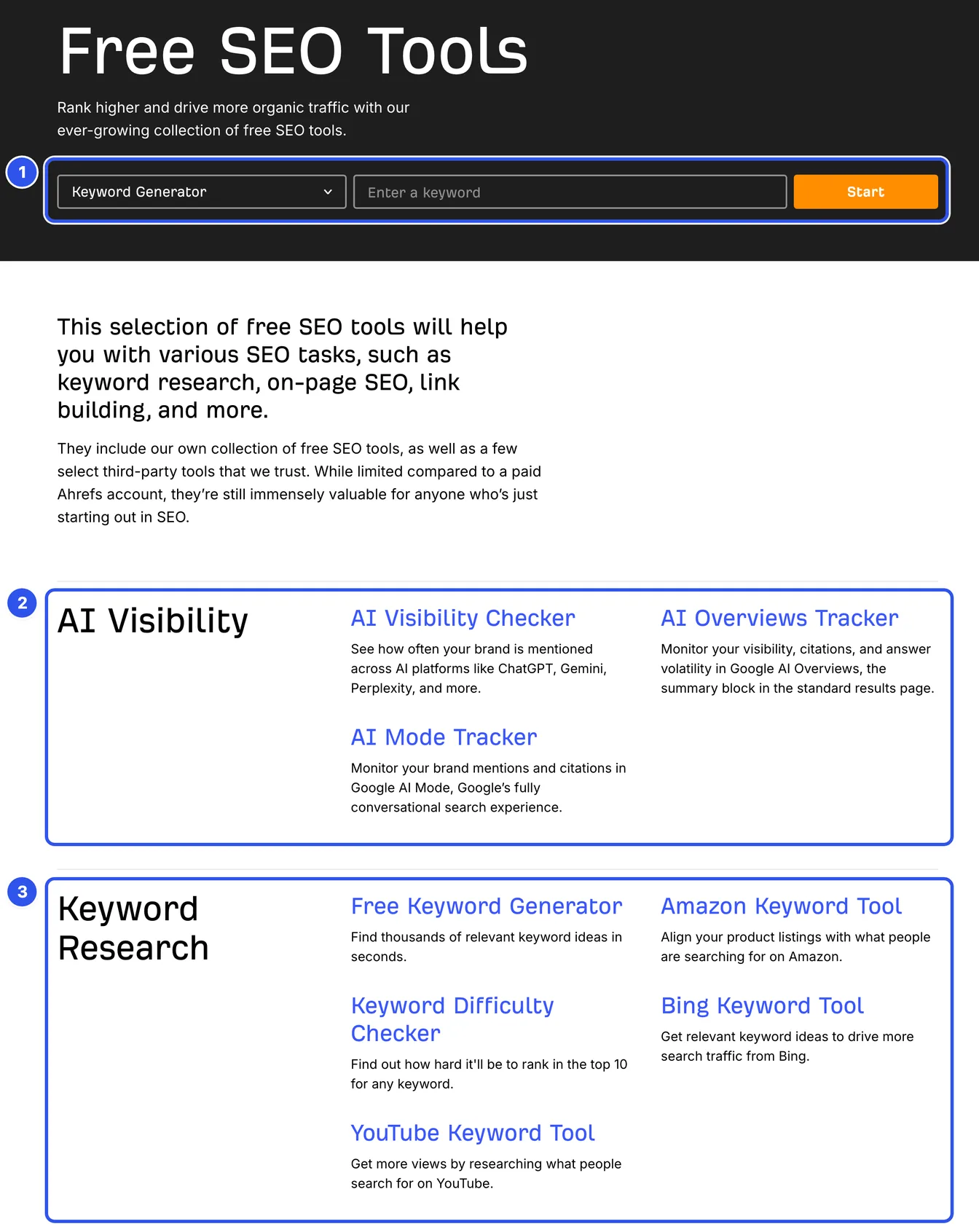
- The tool works right on the page: pick a tool, enter a keyword, press Start. No sign-up stands between the visitor and the result.
- Newer tools follow the newest searches: an AI Visibility Checker, an AI Mode Tracker and an AI Overviews Tracker.
- Each free tool is a small version of the paid product, such as the Free Keyword Generator and the Keyword Difficulty Checker. The page says the tools are "limited compared to a paid Ahrefs account," which is the upgrade path in one sentence.
You do not need a large engineering team for this. Ideas that suit most SaaS products:
- A calculator or generator built on your product's core logic (a pricing calculator, a template generator, a checker).
- Templates your buyers download and use, with a link back to the tool that automates them.
- Original data from anonymized product usage: benchmarks, averages, trends. Journalists and bloggers link to numbers they cannot get elsewhere.
- Integration partners. Most apps you connect to list their integrations in a directory with a link to you.
Step 8: Get your product named in AI answers
Google's AI Overviews and AI Mode, ChatGPT, Perplexity and Gemini now answer many software questions directly. The effect on clicks is measurable: in a Pew Research Center analysis of 900 U.S. adults' browsing in March 2025, users who saw an AI summary clicked a regular result in 8% of visits, against 15% without one, and clicked a link inside the summary in just 1% of visits. About 18% of the searches in the study produced an AI summary.
For SaaS that has two consequences. First, "what is" and other informational searches lose clicks first, which is one more reason to start at the bottom of the funnel. Second, being named in the answer becomes a goal of its own, because buyers ask AI assistants which tool to pick.
Google's documentation is clear about what that takes: "There are no additional requirements to appear in AI Overviews or AI Mode, nor other special optimizations necessary," and you don't need "new machine readable files, AI text files, or markup." The same practices apply. Google also notes that AI Overviews and AI Mode may use "query fan-out," issuing several related searches across subtopics, so pages that answer the follow-up questions too (pricing, limits, setup) have more chances to be picked.
What helps in practice:
- Answer in the first sentences. A definition or verdict at the top is what an AI answer can quote.
- Be specific and sourced. Prices, limits, numbers and the source in the same sentence make a page easier to cite than general claims.
- Keep comparison pages current. AI answers repeat what they find. An outdated price on your "vs" page gets repeated too.
- Track where you are named. Ask the AI assistants your buyers' questions regularly and note who gets mentioned.
That last task is what Citapult Visibility does every week: it asks five AI searches (ChatGPT, Google AI Overview, Google AI Mode, Perplexity and Gemini) the same questions, shows who gets mentioned, cited or recommended next to the competitors you pick, and turns gaps into suggested articles.
Step 9: Measure sign-ups, then refresh what slips
SEO results take time to show. Google's starter guide says some changes "might take effect in a few hours, others could take several months," and suggests waiting "a few weeks to assess whether your work had beneficial effects." Plan in quarters, not weeks.
Track three levels:
| Level | Metric | Where to find it |
|---|---|---|
| Visibility | Impressions, average position per query and page | Search Console Performance report |
| Traffic | Clicks and click-through rate per page | Search Console, Google Analytics |
| Business | Trials, demos and sign-ups per landing page | Google Analytics or your product analytics |
Then make refreshing a routine. Comparison and pricing pages go stale as competitors change their plans, and articles slowly lose positions as newer pages appear. Once a month, compare each page's last 28 days with the 28 before and update the ones that dropped: new prices, new screenshots, missing questions the current top results answer.
Citapult does this check for the articles it wrote: it reads Search Console every day, flags an article as falling when it loses positions or click-through rate against the previous 28 days, and prepares a revision you approve before anything changes on your site. Details are on the Search Console feature page.
Which SaaS SEO strategy to start with
You cannot do all nine steps at once. This order works for most teams:
| Your stage | Do first | Do later |
|---|---|---|
| Just launched, few pages | Steps 1 and 2, then 5 to 10 bottom-of-funnel pages (step 3) | Free tools, large clusters |
| Some traffic, few sign-ups | Step 3 for all competitors and integrations, conversion tracking per page | Glossary and broad guides |
| Steady sign-ups from search | Steps 4 to 7: integration pages, product-led clusters, a free tool | Rewriting pages that already convert |
| Large site, many pages | Step 9 refreshes, step 8 AI visibility, pruning thin template pages | New page types |
If you have no writer, the bottleneck is usually steps 3, 5 and 9: researching, writing and updating articles every week. That is the part Citapult automates, from keyword plan to published article on WordPress, Webflow, Next.js or a webhook, for currently $99 a month per website and 30 articles (pricing). If you would rather hand the whole strategy to people, the guide to choosing a SaaS SEO agency covers what to ask, and the overview of SaaS SEO tools helps if you want to run it yourself.
Common SaaS SEO mistakes
- Starting with high-volume, top-of-funnel keywords. They take the longest to rank, convert the least and lose the most clicks to AI answers.
- Client-side-only marketing pages. If your pricing page shows nothing until JavaScript runs, you depend on Google's render queue for your most important page.
- Templated pages that only swap names. One integration template with no unique content per pair is the pattern Google's scaled content abuse policy describes.
- Comparison pages without honesty. A "vs" page that never admits where the competitor is better loses the reader to an independent review.
- Measuring traffic instead of sign-ups. A guide with high traffic and no trials is a cost line. Judge every page by the conversion you chose in step 1.
- Publishing and forgetting. Prices, screenshots and features change. A page that was right a year ago can now be wrong in every AI answer that quotes it.
FAQ
What is the best SEO strategy for SaaS companies?
Start at the bottom of the funnel. Pages for "[competitor] alternatives", "[you] vs [competitor]", integrations and use cases reach buyers who are already comparing tools, so they convert better than broad guides. Build product-led content and free tools after that, and measure every page by trials or demos, not traffic.
What is SaaS SEO?
SaaS SEO is search engine optimization for software-as-a-service companies. It covers the technical setup of usually JavaScript-based marketing sites, keyword research around competitors, integrations and use cases, content that shows the product in use, link building, and measuring trials and sign-ups from search.
How long does SaaS SEO take to work?
Google says some changes take effect in a few hours and others take several months, and suggests waiting a few weeks before judging a change. Bottom-of-funnel pages with low competition tend to show results first; broad topics and new domains take longer. Plan and review in quarters.
Is SEO dead or evolving in 2026?
It is changing, not dead. AI summaries reduce clicks on informational searches (8% of visits with a click on a result with an AI summary against 15% without, in Pew's data), but Google says the same SEO best practices apply to its AI features, and AI answers draw on pages that rank. For SaaS, that shifts the focus to bottom-of-funnel pages and to being named in AI answers.
What are the top 5 SEO strategies for SaaS?
Bottom-of-funnel comparison and alternatives pages, integration and use-case pages with unique content per page, product-led articles for the problems you solve, free tools and original data that earn links, and regular refreshes of pages that lose positions. All five rest on a site Google can render and on tracking sign-ups per page.
Should SaaS companies do programmatic SEO?
Yes, if each page adds something real: setup steps, workflows, screenshots or data specific to that page. Google's spam policy treats generating "many pages without adding value for users" as scaled content abuse, no matter how the pages are created. Start with the pages where you have real content and add more as you have something to say.
Sources
- 1developers.google.com"Understand JavaScript SEO Basics"
- 2developers.google.com"Spam Policies for Google Web Search"
- 3developers.google.com"AI Features and Your Website"
- 4developers.google.com"SEO Starter Guide: The Basics"
- 5developers.google.com"Creating Helpful, Reliable, People-First Content"
- 6support.google.com"Performance report (Search results)"
- 7pewresearch.org"Google users are less likely to click on links when an AI summary appears in the results"
- 8clickup.com"10 Best Asana Alternatives in 2026"
- 9zapier.com"Google Sheets Slack Integration"
- 10ahrefs.com"Free SEO Tools"
- 11developers.google.com"Block Search indexing with noindex"