SEO and Content Strategy: How to Build One in 8 Steps (+ Template)
Build an SEO and content strategy in 8 steps: group keywords by intent, score topics by business fit, plan clusters, measure in Search Console. Template inside.
An SEO content strategy is a plan for which pages you publish, in which order, and how you keep them ranking, built from what your customers actually search. SEO tells you what people look for and what Google rewards; content strategy decides what you publish, for whom and why. Put together, they answer one question: which page should we write next, and how will we know it worked? Below are the eight steps to build one, a copy-and-paste SEO content strategy template, and the real prioritization behind this very article.
TL;DR
- Most pages never get search traffic. In Ahrefs' study of around 14 billion pages, 96.55% got zero visits from Google, mostly because of no search demand, no backlinks or a mismatch with search intent. A strategy exists to avoid those three.
- Group keywords by what Google shows for them, not by how they look. Two keywords whose top 10 results overlap belong in one article.
- Prioritize with a score that weighs business fit above search volume. A topic close to what you sell beats a bigger topic that is far from it.
- Organize topics into clusters around a pillar page and link them both ways.
- Measure in Search Console and refresh what slips. Publishing is the middle of the work, not the end.
What is an SEO content strategy?
An SEO content strategy is the plan that connects your business goals to the searches your customers make. It lists the topics you will cover, the keyword each page targets, the order you will publish in, how pages link to each other, and how you will measure and update them.
The two halves answer different questions, and a strategy needs both:
| SEO answers | Content strategy answers | |
|---|---|---|
| Topic | What do people search, and how often? | Which of those topics matter to our business? |
| Format | What does Google rank for this query today (guides, lists, tools, product pages)? | What can we make that is better or different? |
| Order | Which keywords can we realistically rank for? | Which pages bring us closest to a sale or a signup? |
| Quality | Is the page crawlable, linked and matched to intent? | Is it written from real expertise, for a real reader? |
| Success | Clicks, impressions, average position | Leads, signups, revenue, saved support time |
Content marketing without SEO publishes what the team finds interesting and hopes people come. SEO without content strategy chases every keyword with volume, including the ones your buyers never type. Google's own guidance warns against the second pattern directly (more on that in Step 6).
Why most content gets no search traffic
Before planning what to publish, it helps to know how most published pages fail. Ahrefs ran the numbers on its own index.
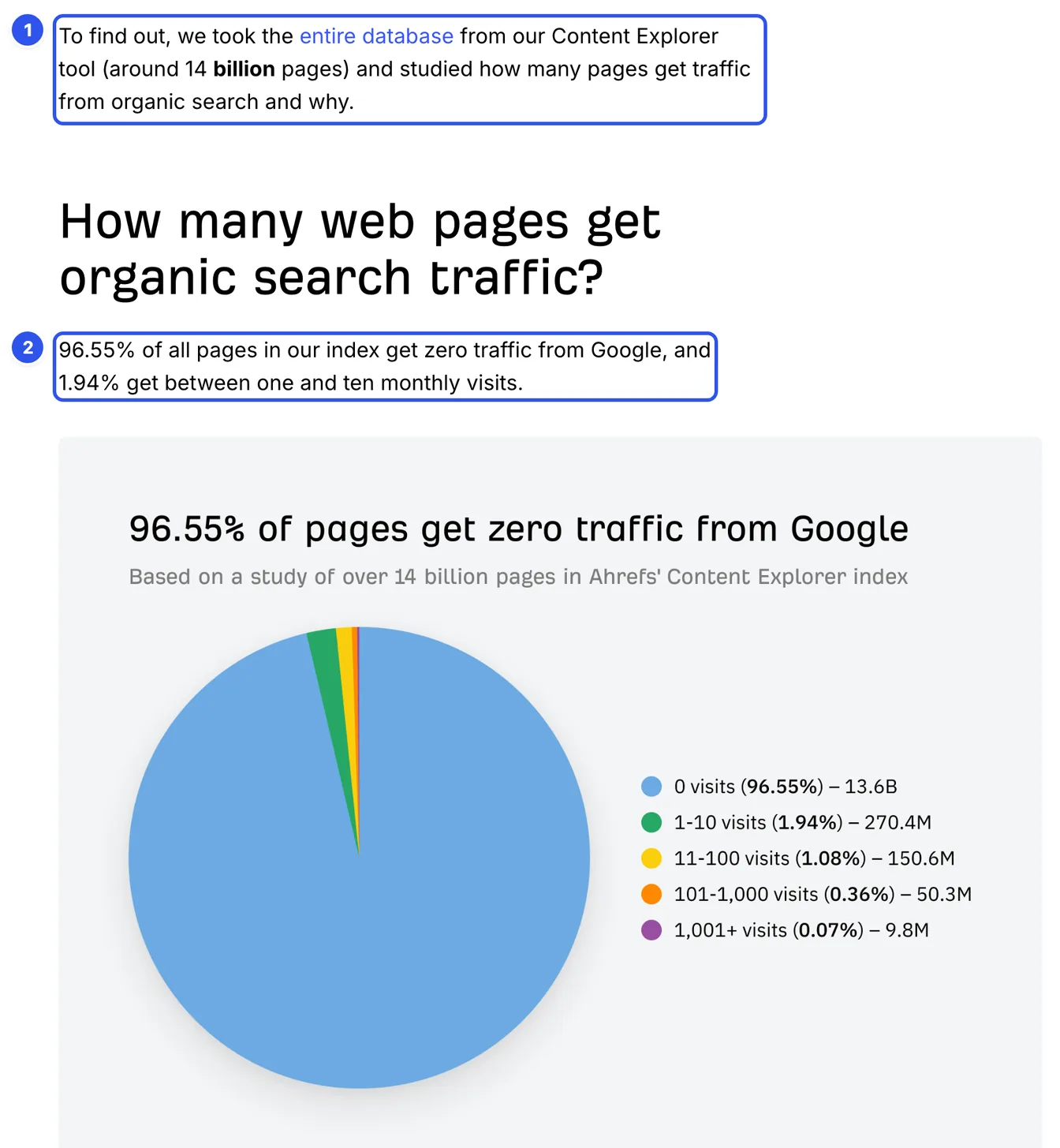
- The sample: Ahrefs took the entire database of its Content Explorer tool, around 14 billion pages, and studied how many get traffic from organic search and why.
- The result: 96.55% of all pages in that index get zero traffic from Google, and another 1.94% get between one and ten visits a month.
Ahrefs names three common reasons, assuming the page is indexed:
- The topic has no search demand. If nobody searches for it, ranking first brings nothing.
- The page has no backlinks. Ahrefs found "a clear correlation" between the number of websites linking to a page and its traffic. Its index holds about 20 million pages with no referring domains, and only 2,997 of them get more than 1K search visits a month.
- The page doesn't match search intent. People wanted a different kind of page than the one you wrote.
Every step below protects you from at least one of these. Steps 3 and 4 handle demand, Steps 3 and 6 handle intent, and Step 5 builds the internal links that a new page needs before outside links arrive.
How to build an SEO content strategy in 8 steps
Step 1: Pick one business goal and the pages that serve it
Write down what organic traffic should do for the business in one sentence: "bring trial signups from people comparing tools", "cut support tickets about setup", "get our agency hired for local SEO". The goal decides which topics count and which metric you report.
Then list the pages where that goal happens: the pricing page, the signup page, a demo form, the product pages. Every article in the strategy should have a reason to link to one of them. If you cannot name the page a topic would send readers to, the topic is probably out of scope.
Step 2: Write down who you write for and what they ask
Describe the reader in two or three lines: their job, what they already know, and the problem that sends them to Google. Then collect the questions they ask in their own words. The best sources are ones you already have:
- Sales calls and demo notes (the objections people raise)
- Support tickets and onboarding emails (where people get stuck)
- The "Queries" tab in Google Search Console (what people already find you for)
- "People also ask" boxes and related searches on Google for your main topics
The wording matters because beginners and experts search differently. Google's SEO Starter Guide gives the example of people searching "charcuterie" while others search "cheese board" for the same thing. It also says you do not need to anticipate every variation, because its language matching understands related terms. So your list is about questions and intent, not exact phrases.
Step 3: Research keywords and group them by search intent
Turn the questions into keywords with search volume and keyword difficulty (KD) from a keyword tool. Then do the step most keyword lists skip: group the keywords by what Google shows for them.
The test is simple. Search two keywords and compare the top 10. If Google answers both with largely the same pages, one article can rank for both. If the results differ, you are looking at two intents and two articles. Writing two pages for one intent splits your links and makes your own pages compete.
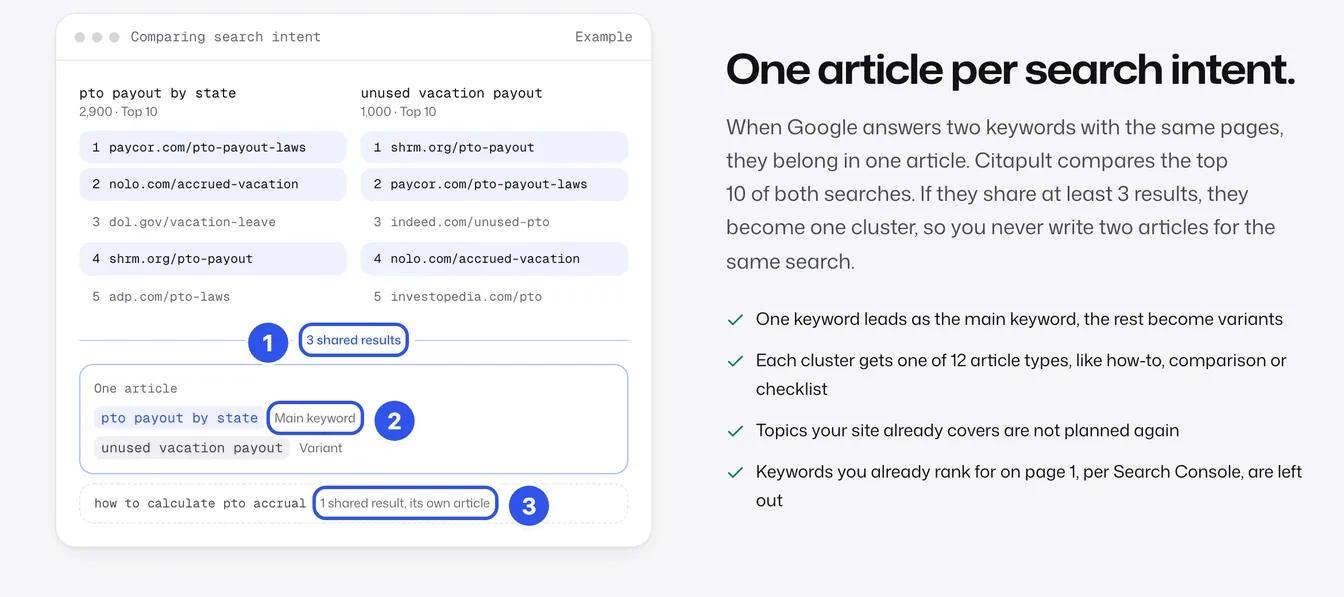
- "pto payout by state" and "unused vacation payout" share 3 of their top results, so Google treats them as the same question.
- They become one article: one keyword leads as the main keyword, the other becomes a variant to cover in the text.
- "how to calculate pto accrual" shares only 1 result, so it gets its own article.
Also look at the type of page that ranks. If the top 10 is all templates, a long essay will not break in; if it is all product pages, a blog post is the wrong format. Note the format next to each cluster.
This is the step Citapult's keyword research automates: it compares the top 10 of related keywords, and when two share at least 3 results they become one cluster and one planned article. Keywords you already rank for on page 1, according to Search Console, are left out, so the plan never makes you compete with your own pages.
Step 4: Score each topic and publish in that order
A long list of clusters is not a strategy until it has an order. Three numbers decide it:
- Business fit: how close the topic sits to what you sell, on a scale from 1 to 5. A 5 is a page where your product is the answer; a 1 is loosely related traffic.
- Search volume: for the whole cluster, not only the main keyword.
- Keyword difficulty: how hard the current top 10 is to beat.
When we planned the content strategy section of this blog, we used this score:
Priority = fit² × log10(total volume + 10) × (1 − KD/100)
Squaring the fit makes relevance count more than anything else. The logarithm keeps a keyword with ten times the volume from getting ten times the priority. The last factor discounts hard keywords. We also set hard limits first: a primary keyword needs a KD of 30 or less and a volume of 5,000 or less, otherwise it goes to the backlog.
Here is what that produced for a few of the 30 topics in that section (US volumes from DataForSEO):
| Topic | Main keyword volume | Cluster volume | KD | Fit | Score |
|---|---|---|---|---|---|
| seo & content marketing | 1,600 | 4,200 | 1 | 4 | 57.41 |
| content briefing | 260 | 1,510 | 0 | 4 | 50.91 |
| seo and content strategy (this article) | 720 | 1,480 | 1 | 4 | 50.26 |
| marketing content planner | 880 | 2,220 | 23 | 4 | 41.25 |
| lead generation content marketing | 3,600 | 21,000 | 11 | 3 | 34.62 |
| seo content planner | 50 | 100 | 0 | 4 | 32.66 |
Look at the last two rows. "lead generation content marketing" has a cluster more than 200 times larger than "seo content planner", yet it barely outscores it, because it sits further from what we sell. And "content briefing", with a main keyword of only 260 searches, ranks second because its variants add up and nobody strong competes for it. Volume alone would have put these in a very different order.
Use whatever scale you like for fit, but write the rule down. The value of a score is that the next person can rerun it and get the same order.
Step 5: Organize topics into clusters around pillar pages
A topic cluster is a group of articles on one subject: a broad pillar page that covers the subject end to end, and supporting articles that each answer one narrower question in depth. The pillar links to every supporting article, and each supporting article links back to the pillar and to its closest siblings.
This article is the pillar of a cluster. Its supporting pieces include how to write a content brief, how to run a content calendar and how to do an SEO content audit (all linked in the steps below), and each links back here.
Links do two jobs. Google's SEO Starter Guide says "the vast majority of the new pages Google finds every day are through links", so a new article that nothing links to is slow to be found. Links also show how pages relate. The guide adds that link text "tells users and Google something about the page you're linking to", so use descriptive anchors such as "how to write a content brief", not "click here".
A practical rule: when you publish a supporting article, update the pillar and one or two siblings in the same session to link to it. For larger sites, the starter guide also suggests grouping topically similar pages in directories (for example /blog/content-strategy/...) once you have more than a few thousand URLs.
Step 6: Brief and write people-first content
Every article gets a short brief before anyone writes: the goal, the reader, the main keyword and its variants, what the ranking pages cover and miss, an outline, and what only your team can add. The content briefing guide walks through each field.
Then write for the reader, not for the ranking. Google lists the warning signs of "search engine-first" content, and three of them describe what bad SEO content strategies do by design:
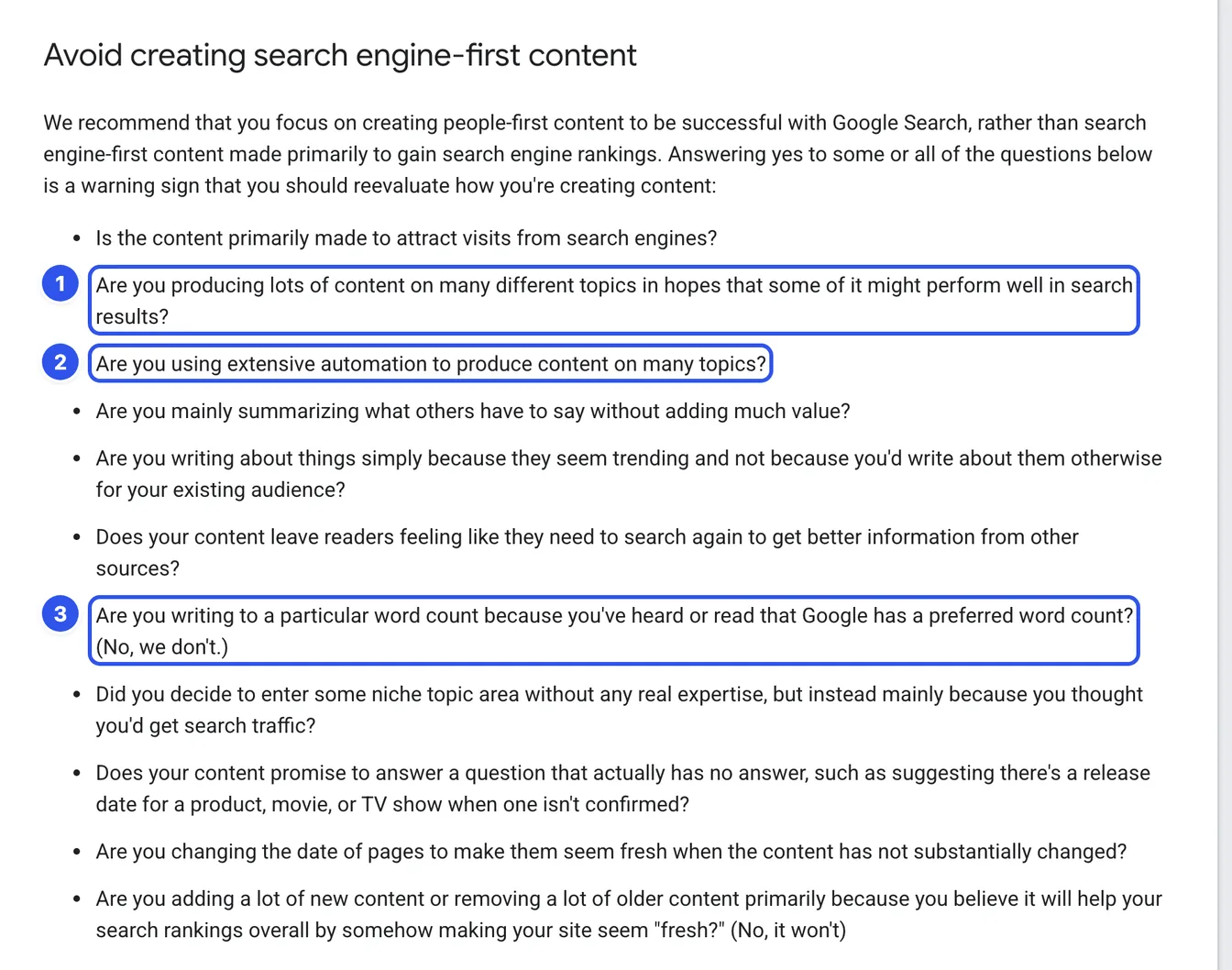
- Producing lots of content on many different topics "in hopes that some of it might perform well". The scoring in Step 4 is the cure: you publish fewer, better-chosen topics.
- Using extensive automation to produce content on many topics. The warning is about volume without care: if you use automation, keep a person who checks the facts and adds what only your team knows.
- Writing to a particular word count. Google says plainly that it has no preferred word count. Let the ranking pages and the reader's question set the length.
Two things make an article worth ranking: it answers the query better than what ranks today, and it contains something only you know. Google's guidance asks whether content shows "first-hand expertise and a depth of knowledge", for example from having actually used a product or service. That is your numbers, your mistakes, your process.
Citapult's article agent follows this order. It reads the top 10 for the keyword, the questions Google shows and the AI Overview when there is one, turns that into a brief with a target length of the median of the top articles plus 10 percent, and asks you four questions about real numbers, common mistakes and how you do things. Your answers go into the text.
Step 7: Publish on a calendar you can keep
A strategy without a cadence stays a spreadsheet. Put the scored topics on a content calendar with a date, an owner and a status for each one (planned, briefed, drafted, in review, published).
Pick a pace you can keep for months, not one you can keep for a few weeks. Google's list from Step 6 is a reminder that piling up pages is not a goal in itself: a few well-researched articles from the top of the score list are worth more than many rushed ones from the bottom.
Publish in cluster order where you can: the pillar first or early, then its supporting articles, linking each new piece into the cluster as it goes live.
Step 8: Measure in Search Console and refresh what slips
Google Search Console is the free source of truth for how your pages do in Google. Its Performance report shows four numbers:
| Metric | What it means (Search Console Help) | What it tells you |
|---|---|---|
| Clicks | How often a user clicked your site from Google Search results | Real traffic from search |
| Impressions | How many times your site appeared in Search results | Whether Google shows the page at all |
| CTR | Clicks divided by impressions | Whether your title and snippet win the click |
| Average position | The average position of your topmost result | Where you rank, per query or page in the table |
The report's default view covers the past three months. Use the "Pages" tab to see each article and the "Queries" tab to see what it ranks for; new queries there are often your next topics.
Give changes time. Google's starter guide says some changes take effect in a few hours and others take several months, and suggests waiting a few weeks before judging whether a change helped. Then look for pages that slip: fewer clicks, falling average position or a dropping CTR. Compare the page with what ranks today and fill the gaps. A regular SEO content audit catches the slow decliners too.
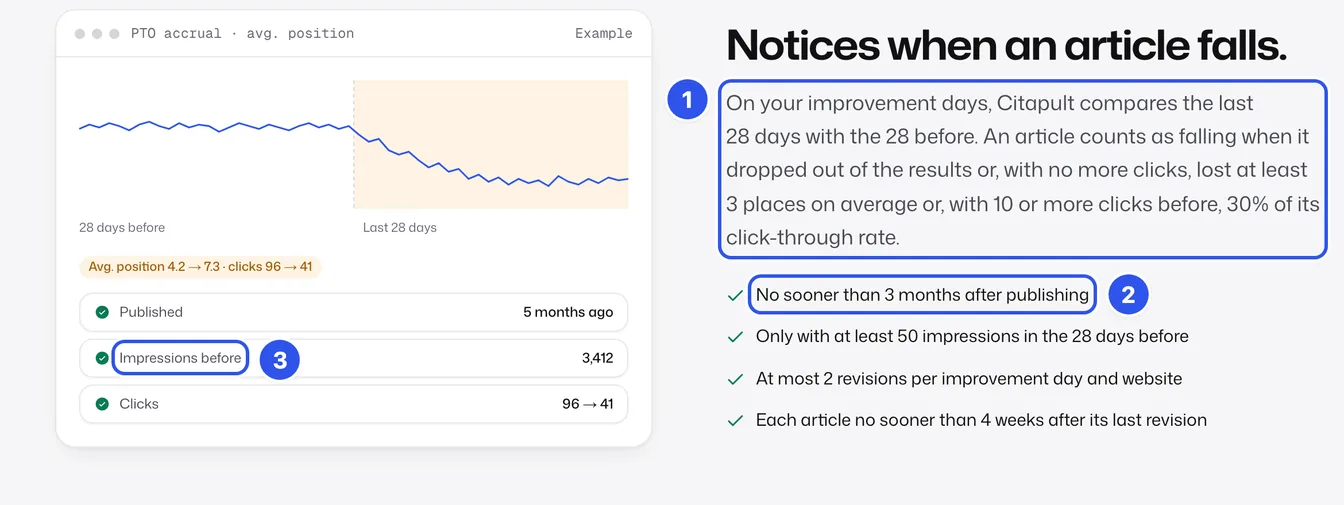
- The rule: compare the last 28 days with the 28 before. An article counts as falling when it dropped out of the results, or lost at least 3 places on average, or (with 10 or more clicks before) lost 30% of its click-through rate.
- No judgment in the first 3 months after publishing, when rankings still move around.
- Enough data: the check only runs with at least 50 impressions in the 28 days before.
You can run this rule by hand in a spreadsheet each month. Citapult's Search Console integration runs it for you and drafts a revision against the pages that rank today; nothing changes on your site until you approve it.
Where AI search fits
AI Overviews and AI Mode do not need a separate strategy. Google's documentation on AI features says the best practices for SEO "remain relevant" and that there are "no additional requirements to appear in AI Overviews or AI Mode". To be shown as a supporting link there, a page must be indexed and eligible to appear in Google Search with a snippet.
So the eight steps above already cover Google's AI answers. What changes is what you measure: whether AI assistants mention or cite your brand for your topics, which Search Console does not show. If that matters for your business, track it separately, for example with Citapult's AI visibility check for ChatGPT, Perplexity, Gemini and Google's AI features.
SEO content strategy template
Copy this into a doc or a spreadsheet. One page for the strategy, one row per cluster for the plan.
SEO CONTENT STRATEGY

1. Goal
   Business goal (one sentence):
   Conversion pages articles should lead to:
   Main metric we report:

2. Reader
   Who they are:
   What they already know:
   Problems that send them to Google:
   Where we collected their questions (sales, support, Search Console, People also ask):

3. Scoring rule
   Fit scale (1 to 5) with one example per level:
   Limits (max KD, max volume):
   Formula:

4. Clusters and pillars
   Pillar topic -> supporting topics:

5. Cadence
   Articles per week:
   Owner per stage (brief, draft, review, publish):

6. Measurement and refresh
   Report we check and how often:
   When a page counts as falling:
   Who revises it:
And the plan, one row per cluster:
| Cluster | Main keyword | Variants | Volume | KD | Intent and format | Fit | Score | Pillar | Status | URL |
|---|---|---|---|---|---|---|---|---|---|---|
Common mistakes
- One article per keyword instead of per intent. Two pages for the same search compete with each other. Check the top 10 overlap first.
- Sorting by volume. The biggest keywords are usually the hardest and furthest from the sale. Score fit first.
- Publishing orphans. An article nothing links to is hard for Google to find and gets no help from the rest of the site. Link every new piece into its cluster on the day it goes live.
- Writing to a word count. Google has no preferred length. Match the depth of the ranking pages and stop when the question is answered.
- Never looking back. Without a monthly look at Search Console, pages decline quietly. Plan refresh time into the calendar from the start.
- No first-hand input. If every fact in the article could come from the top 10, there is no reason for Google or a reader to prefer yours.
FAQ
What is the difference between SEO and content strategy?
SEO is about being found: which searches exist, what Google ranks for them, and whether your pages are crawlable, linked and matched to intent. Content strategy is about what you publish and why: which topics serve the business, for which reader, in which format and order. An SEO content strategy combines both into one plan.
What is the 80/20 rule in SEO?
It is the Pareto principle applied to search: a small share of your pages and keywords tends to bring most of the results. In practice it means checking the Pages tab in Search Console regularly, protecting and updating the pages that already bring clicks, and spending more effort on the top of your priority list than on the long tail.
Is SEO still relevant in 2026?
Yes. Google's documentation on AI features says SEO best practices remain relevant for AI Overviews and AI Mode, with no additional requirements, and pages must be indexed and eligible for a snippet to appear as supporting links there. Search engine optimization now also feeds the AI answers built on top of search.
What are the top 5 SEO strategies?
For content, five carry most of the weight: choose topics with real search demand, match the search intent of each query, organize pages into linked topic clusters, write people-first content with first-hand expertise, and measure and refresh pages in Search Console. They map directly onto the three reasons Ahrefs found for pages getting no traffic.
How long does an SEO content strategy take to show results?
Expect months, not days. Google says some changes take effect in a few hours and others take several months, and recommends waiting a few weeks before judging a change. Judge new articles after about three months, when their rankings have settled.
What should an SEO content strategy template include?
The business goal, the reader and their questions, a written scoring rule, the clusters with their pillar pages, a publishing cadence with owners, and the rules for measuring and refreshing pages. The template above has all six, plus a plan table with one row per cluster.
Sources
- 1ahrefs.com96.55% of Content Gets No Traffic From Google. Here's How to Be in the Other 3.45%
- 2developers.google.comSEO Starter Guide: The Basics
- 3developers.google.comCreating Helpful, Reliable, People-First Content
- 4support.google.comPerformance report (Search results)
- 5developers.google.comAI Features and Your Website
- 6citapult.comKeyword research and content plan
- 7citapult.comSearch Console: revise falling articles