Writing SEO Content: 10 Steps From Keyword to a Page That Ranks
Writing SEO content step by step: read the search results, build a brief, answer first, add experience, get titles and links right, then measure and update.
Writing SEO content means writing a page that answers what people search for, in a shape Google can find, understand and show. In practice that is ten steps: pick one keyword, read its search results, build a brief, outline, answer first, write for scanners, add what only you know, get the title and metadata right, link with care, then measure and update. Google says there are "no secrets here that'll automatically rank your site first," so each step below comes with what Google, usability research and real pages show, not with tricks.
TL;DR
- Start from the search results, not from a blank page. The top 10 show the format, depth and subtopics searchers expect.
- Answer the query in the first two or three sentences, then explain. Use headings that say something, short paragraphs, lists and tables.
- Add what other pages cannot: first-hand experience, your own numbers, real examples. Google asks whether content shows "first-hand expertise" and "mainly summarizing what others have to say" as a warning sign.
- Google has no preferred word count, no ideal number of headings and no special requirements for AI Overviews. Write for the reader, then check the on-page basics.
- Publish, check clicks and positions in Search Console after a few months, and update pages that slip.
What SEO content writing is (and what it is not)
SEO content writing is writing for the person who searches, with the search engine as the way they find you. Google draws the line itself. It asks site owners to create "people-first content" and calls SEO "a helpful activity" when it is applied to that kind of content. What it warns against is "search engine-first content made primarily to gain search engine rankings."
That gives a simple test for every decision in this guide: does this help the reader who typed the query, or does it only help a ranking tool? Repeating a keyword ten times fails the test. Putting the answer in the first paragraph passes it.
| SEO content | Search engine-first content |
|---|---|
| Starts from what the searcher wants to know | Starts from a keyword list |
| Answers the question early, then explains | Delays the answer to make the page longer |
| Adds experience, data or examples | Summarizes the pages that already rank |
| Uses the keyword where it reads naturally | Repeats the keyword and its variations |
| Long enough to answer, no longer | Written to a word count |
| Updated when the facts change | Re-dated to look fresh |
Step 1: Pick one keyword and read its search results
Every SEO article targets one main query. Before you write a word, search that query and look at what ranks. The results tell you the search intent: whether people want a definition, a step-by-step guide, a list, a comparison or a product.
Take the keyword this article targets. On November 12, 2026, half of the top 10 for "writing seo content" in the US were guides and tip lists (AWAI's "The Ultimate Guide to SEO Content Writing", Bynder's "12 tips for writing SEO-optimized content in 2026", Semrush's "12 SEO writing tips to earn visibility" among them). The other half were two YouTube tutorials, a Reddit thread and two Quora answers. Google's related searches added "Writing seo content examples", "SEO content writing for beginners" and "SEO content writing tools". That is a clear signal: searchers want a practical how-to with examples, so a short definition page would miss the intent.
Google's SEO Starter Guide adds one more angle. People who know a topic search differently from beginners: "some users might search for 'charcuterie', while others might search for 'cheese board'." Write with both in mind. You do not need to cover every variant, though. Google says its "language matching systems are sophisticated" and can connect your page to queries you never wrote out.
Step 2: Build a brief from the top results
A brief turns your reading of the results into a plan. Open the five to ten results that are real articles (skip videos, forums and PDFs, which compete differently) and write down three things: what every top page covers, what they all miss, and roughly how long they are.
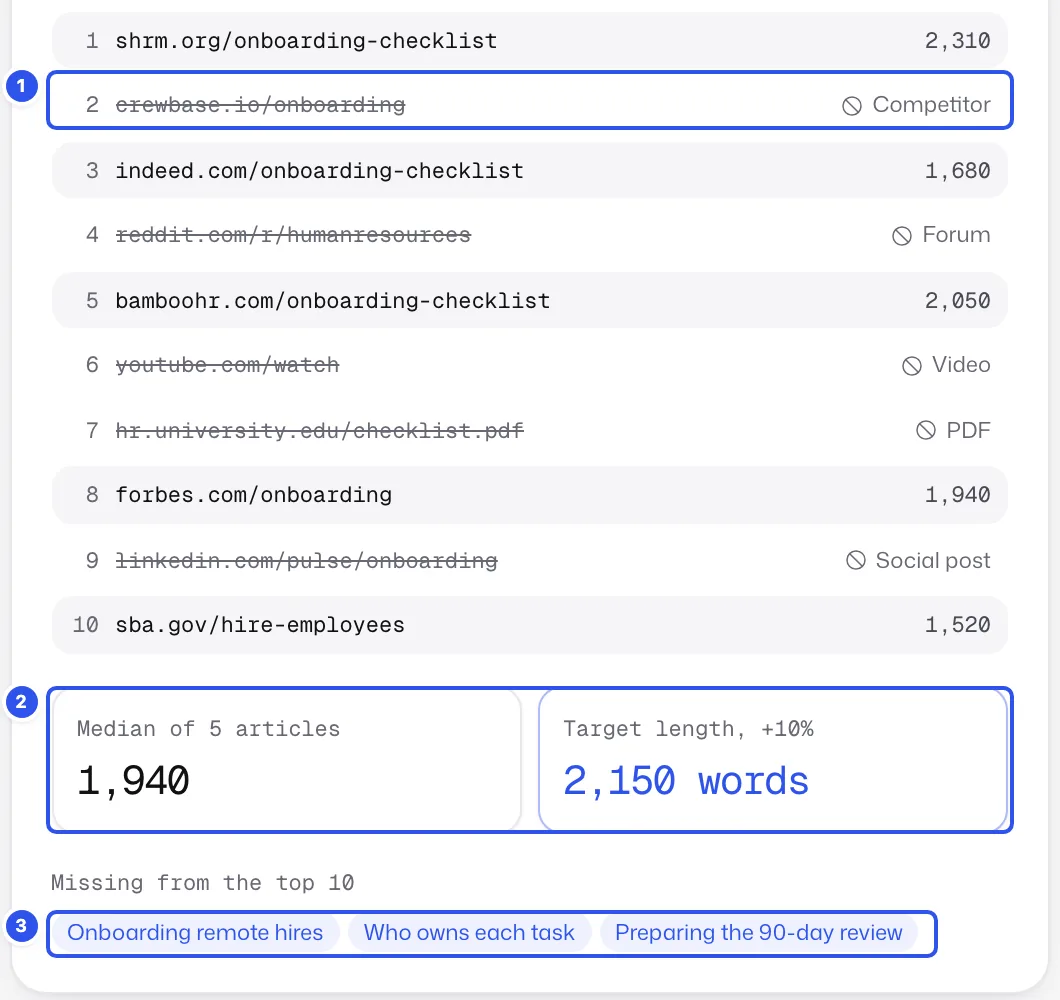
- Results that are not comparable articles are struck out: a competitor, a forum thread, a video, a PDF and a social post. Only the five real articles are measured, from 1,520 to 2,310 words.
- The median of those 5 articles is 1,940 words. The target length adds 10% and lands at 2,150 words. Treat it as a reference for how much the topic needs, not as a ranking rule.
- The gaps: "Onboarding remote hires", "Who owns each task" and "Preparing the 90-day review". Covering what the top 10 miss is the most direct way to be more useful than they are.
The length point matters because it is the most common myth in SEO writing. Google's helpful content page lists "writing to a particular word count because you've heard or read that Google has a preferred word count" as a warning sign, and answers its own question: "(No, we don't.)" A target length from the top results only tells you how deep the competition goes. For more on that, see our guide on how long a blog post should be.
This step is what Citapult's article agent does before it writes: it reads the top 10 for your keyword, the questions Google shows and the AI Overview when there is one, and builds the brief in the screenshot. Forums, videos, social posts, PDFs, competitors and your own site do not count toward the target length.
Step 3: Outline with headings that answer questions
Turn the brief into headings before you write paragraphs. A good outline for an SEO article usually has:
- One H1 with the main keyword, phrased the way a person would say it.
- H2s for the main subtopics, often taken from the questions searchers ask ("How long do coffee beans stay fresh?" beats "Freshness").
- H3s only where a section has real parts, such as steps or options.
- A FAQ at the end for the short questions that do not deserve their own section.
Write headings for people who read only headings. Nielsen Norman Group's eye-tracking research describes a "layer-cake pattern" where the eyes scan headings and subheadings and skip the text below. Its advice: start headings "with the words carrying most information: if users see only the first 2 words, they should still get the gist of the following section."
You can stop worrying about two technical details. Google says heading order "doesn't matter" for Search (semantic order still helps screen readers), and there is "no magical, ideal amount of headings a given page should have. However, if you think it's too much, then it probably is." Our guide on how to outline a blog post goes through the outline step by step.
Step 4: Answer the query in the first paragraph
The reader came with a question. Answer it in the first two or three sentences, then explain how and why. A short TL;DR under the intro serves people who want the summary, and a table of contents built from your H2s shows everyone else where to jump.
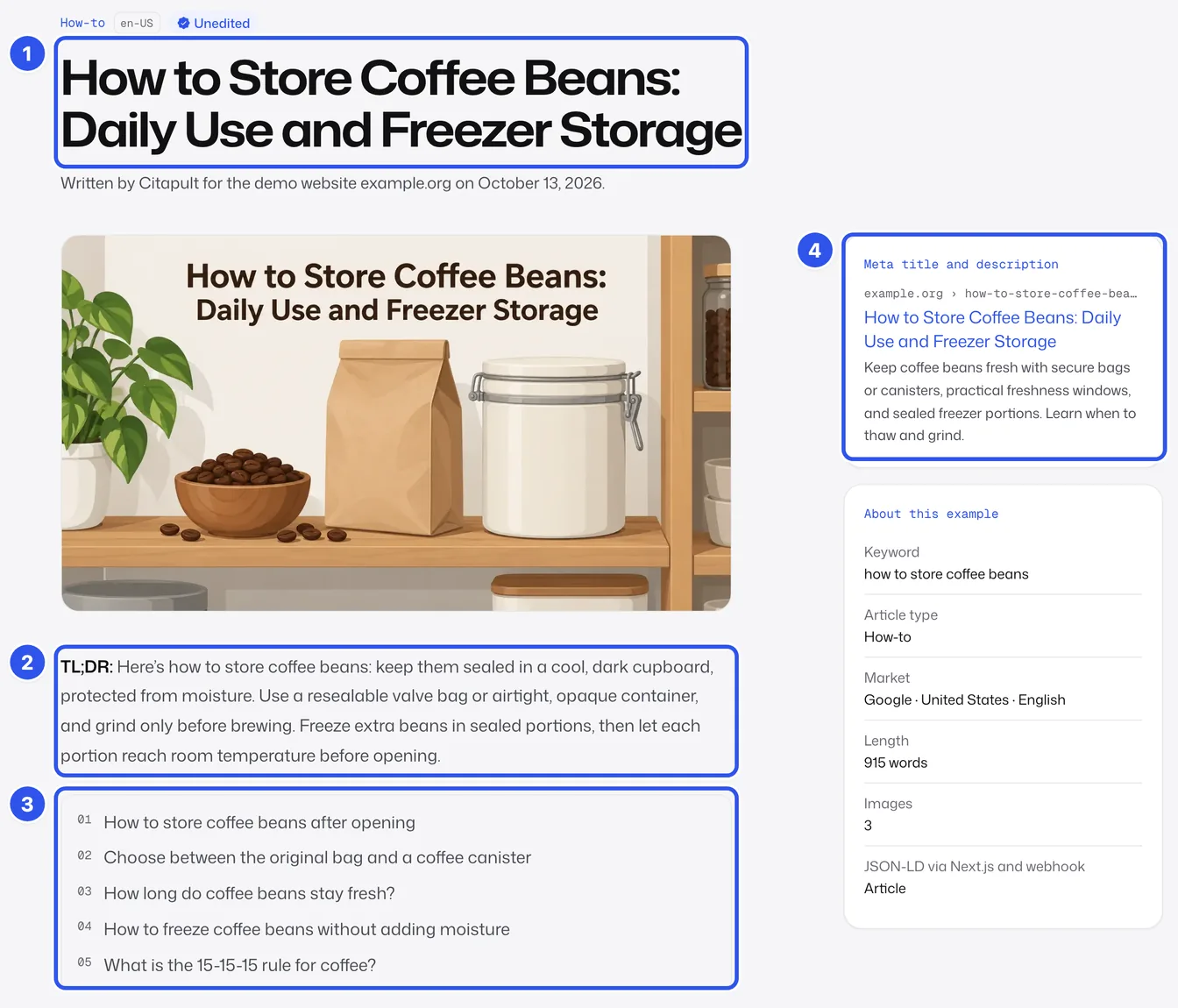
- The H1 contains the keyword ("How to Store Coffee Beans") and says what the page covers beyond it: daily use and freezer storage.
- The TL;DR answers the query in three sentences: sealed, cool, dark, grind before brewing, freeze in portions. A reader who stops here still leaves with the answer.
- The table of contents lists the H2s. Two are phrased as the questions people search for ("How long do coffee beans stay fresh?"), the others as the tasks they want to do.
- The meta title and description, as they would appear in a search result. The description summarizes the whole page rather than repeating the title.
Two things to avoid in an intro: a paragraph of background before the answer, and a promise ("In this article, we will explore...") instead of the answer. For more patterns, see our guide on how to begin an article.
Step 5: Write for people who scan
Most readers do not read a web page from top to bottom. In Nielsen Norman Group's study, 79 percent of test users always scanned a new page and only 16 percent read word by word. The same study tested rewritten versions of one website against the original promotional text:
| Change to the text | Usability improvement |
|---|---|
| Concise text (about half the words) | 58% |
| Scannable layout (same text, easier to scan) | 47% |
| Objective language (no boastful claims) | 27% |
| All three combined | 124% |
The study dates from 1997, but NN/g's 2017 follow-up on the F-shaped reading pattern found that this scanning behavior is "alive and well," on desktop and on mobile. What it means for your draft:
- Short paragraphs, one idea each. If a paragraph needs a subheading to be understood, it is two paragraphs.
- Bold the words that matter, not whole sentences. NN/g lists bolding "important words and phrases" as a way to guide scanners.
- Lists for steps and options, tables for comparisons and numbers. Readers spot digits and short lines first.
- Plain, specific language. "Freeze beans in airtight portions" beats "Unlock maximum freshness with smart storage solutions."
- One term per thing. If you call it "meta description" in one section, do not switch to "SERP blurb" in the next.
Google's Starter Guide asks for the same thing in its own words: content that is "easy-to-read and well organized," broken into "paragraphs and sections," with "headings to help users navigate your pages."
Step 6: Add what only you can add
This is the step that separates content that ranks from content that merely exists. If your article only rearranges what the top 10 already say, Google has no reason to rank it above them. Its helpful content guidelines ask directly whether your content "provide[s] original information, reporting, research, or analysis" and whether it shows "first-hand expertise and a depth of knowledge (for example, expertise that comes from having actually used a product or service, or visiting a place)."
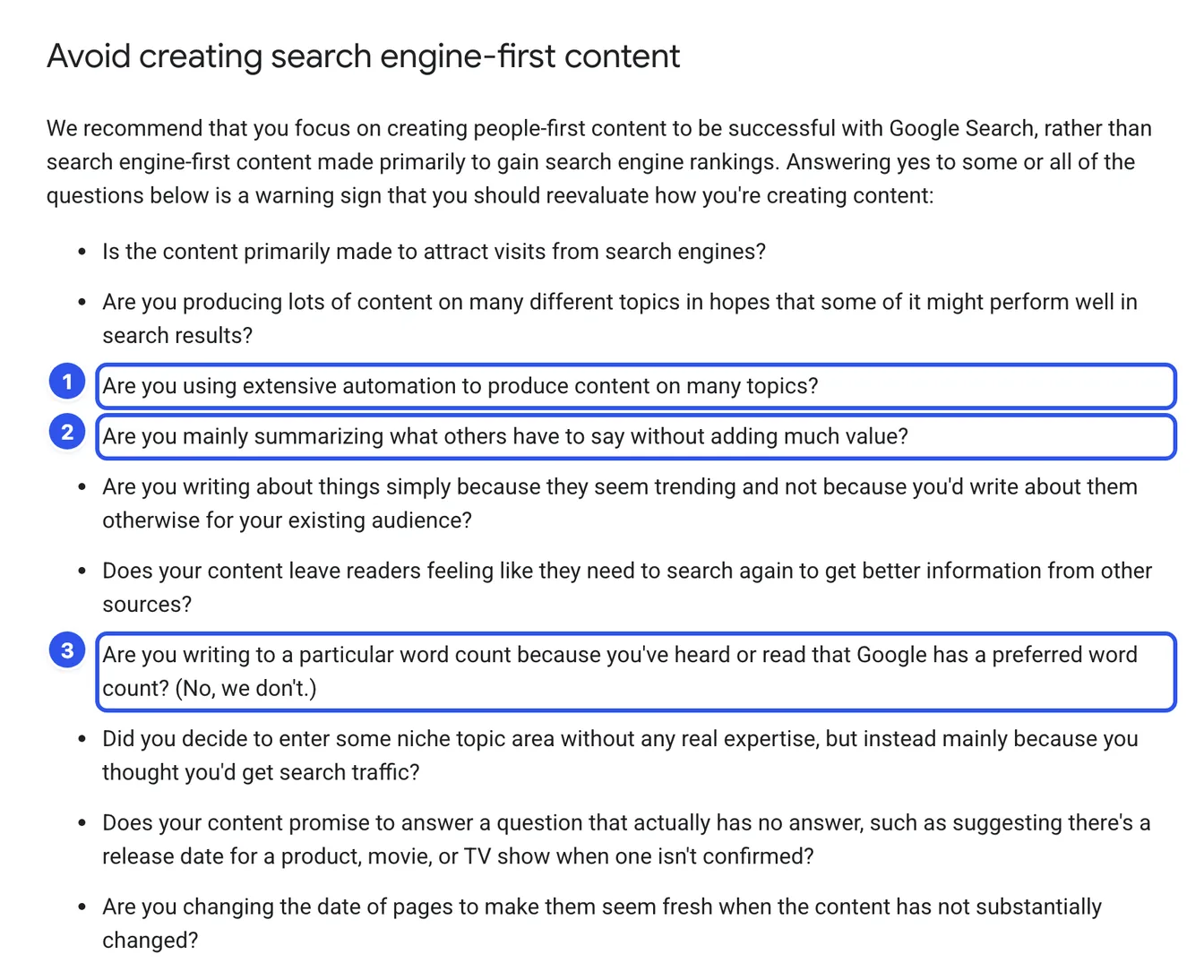
- "Are you using extensive automation to produce content on many topics?" Automation is not banned, but volume without value is a warning sign.
- "Are you mainly summarizing what others have to say without adding much value?" This is the trap of writing only from the top results.
- The word count question again, with Google's answer in brackets: "(No, we don't.)"
What counts as "adding value" in practice:
| What you add | Example |
|---|---|
| Your own numbers | "We first reach out to new hires ten days before their start date, with the plan for week one." |
| A mistake you made and fixed | "The laptop was not set up on day one. Now IT gets it three days early." |
| A real example, screenshot or result | A before and after of a page you rewrote |
| An opinion with a reason | Which of two options you would pick, and why |
| Who wrote it | A byline with the author's role and background |
Google also says that "of these aspects, trust is most important" and "strongly encourage[s] adding accurate authorship information, such as bylines." A named author with a short bio is the easiest trust signal to add.
Citapult builds this step into its process: before an article is written, it asks you a few questions about real numbers, common mistakes and how you do things, and your answers go into the text. The first two examples in the table above are adapted from the answers in that example run. Every article also ends with an author, role and short bio.
Step 7: Write the title, meta description, URL and alt text
These are the parts of the page that show up outside the page: in search results, in browser tabs, in image search. Google's own guidance for each is short and specific:
| Element | What to do | What Google says |
|---|---|---|
Title (<title>) |
Unique per page, main keyword near the start, says what the page is | "Write descriptive and concise text"; there is no length limit, but the title link "is truncated in Google Search results as needed, typically to fit the device width" |
| H1 | One clear main heading | Google uses headings when it builds title links, and multiple equally prominent headings can make the main title unclear |
| Meta description | One or two sentences that summarize the whole page | "Create unique descriptions for each page"; Google may use it for the snippet "if we think it gives users a more accurate description" than the page text |
| URL | Short, readable words | The Starter Guide's advice is to "use descriptive URLs" |
| Image alt text | Describe what the image shows in context | Alt text is "the most important attribute" for image metadata; avoid "filling alt attributes with keywords" |
| Image file name | Short and descriptive | "my-new-black-kitten.jpg is better than IMG00023.JPG" |
A practical note on length: since Google truncates to the device width rather than to a character count, put the words that matter first in both the title and the meta description. Whatever gets cut off then costs you the least.
Step 8: Link to your own pages and cite your sources
Links do two jobs in SEO content. Internal links help readers and Google find related pages on your site. External links show where your facts come from. Google's link best practices cover both, and the core of it fits in one screenshot:
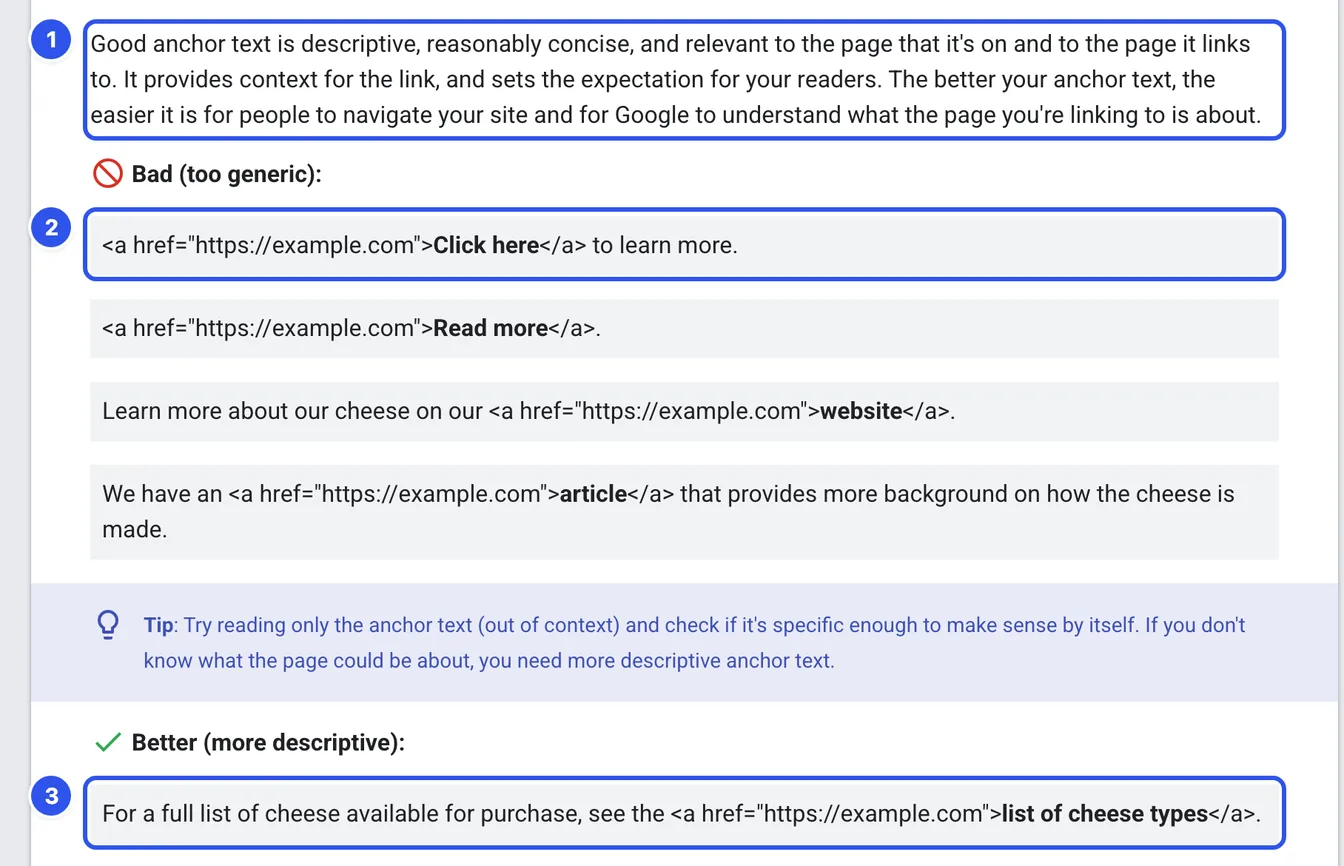
- Good anchor text is "descriptive, reasonably concise, and relevant to the page that it's on and to the page it links to."
- The bad example: "Click here" tells neither the reader nor Google what is behind the link.
- The better example puts the description into the link itself: "list of cheese types."
Three rules follow from the same page:
- Every important page needs an internal link. Google: "Every page you care about should have a link from at least one other page on your site."
- No fixed number. "There's no magical ideal number of links a given page should contain. However, if you think it's too much, then it probably is."
- Cite sources. "Using external links can help establish trustworthiness (for example, citing your sources)." Link the original source of a number, not a blog that repeated it.
The common failure with internal links is linking pages that do not exist, or exist only in another language. Citapult's internal linking picks links only from your sitemap's page list, in the article's language, and checks each one against that list. You set the number per article, from 0 to 5.
Step 9: Make it easy to quote in AI answers
AI Overviews and AI Mode do not need a separate kind of writing. Google's documentation is explicit: "There are no additional requirements to appear in AI Overviews or AI Mode, nor other special optimizations necessary." A page has to be indexed and eligible to show with a snippet, and "there's also no special schema.org structured data that you need to add."
What helps is what helps readers anyway. Google lists making "content easily findable through internal links," making sure "important content is available in textual form" and supporting text with "high-quality images and videos." On top of that, the habits from steps 4 to 6 make a page easy to quote: a direct answer under each heading, one fact per sentence, numbers with their source, and terms defined where they first appear. Google also notes that both features "may use a 'query fan-out' technique," issuing related searches across subtopics, which is another reason to cover the subtopics your brief found.
Step 10: Publish, measure and update
An SEO article is not finished when it goes live. Give it time to settle, then check how it performs and fix what slips.
- Measure in Search Console. Clicks, impressions and average position per page are in the Performance report. Google counts traffic from AI Overviews and AI Mode there too, "within the 'Web' search type."
- Compare periods, not days. Look at the last 28 days against the 28 before to see whether a page is rising or falling.
- Update with substance. Add the missing subtopic, fix outdated numbers, improve the answer. Google lists "changing the date of pages to make them seem fresh when the content has not substantially changed" as another warning sign.
- Do not write a second article for a query you already rank for. It will compete with the page you have.
Citapult's Search Console integration does this tracking for you: it reads clicks and positions daily, compares 28 days against the 28 before, and flags an article as falling when, for example, it lost at least 3 places on average. It waits at least 3 months after publishing, and a revision goes live only with your OK.
Using AI to write SEO content
AI tools can draft SEO content, and Google does not forbid it. Its guidance says generative AI "can be particularly useful when researching a topic, and to add structure to original content." The same page sets the limit: using it "to generate many pages without adding value for users may violate Google's spam policy on scaled content abuse."
It also explains why AI drafts need checking: "generative models don't retrieve facts, but predict a likely sequence of words." So the rules for AI-assisted SEO writing are the same ten steps, with two additions:
- Verify every fact, number and quote against a source you opened yourself, and link that source.
- Add the experience the model cannot have: your numbers, your examples, your opinion (step 6).
Google also suggests telling readers how a piece was made when automation played a large role, for example in a short note on the page. If you want to see what a research-first AI draft looks like before any edits, Citapult publishes unedited example articles with their sources.
Common SEO writing mistakes and how to fix them
| Mistake | Why it hurts | Fix |
|---|---|---|
| Writing before checking the results | Wrong format for the intent | Search the keyword first (step 1) |
| Repeating the keyword | Google calls keyword stuffing a spam policy violation | Use it in the title, H1 and intro, then write naturally |
| Padding to a word count | Readers leave, and Google has no preferred length | Cut anything that does not answer or explain |
| Burying the answer | Scanners leave before they find it | Answer in the first two or three sentences |
| Summarizing the top 10 | Nothing new to rank for | Add numbers, examples and experience (step 6) |
| "Click here" links | No context for readers or Google | Descriptive anchor text |
| Unsourced numbers | Lowers trust | Link the original source |
| Re-dating old posts | Google lists it as a warning sign | Update the content, then the date |
SEO content writing checklist
Before you publish, check:
- One main keyword, and the format matches what ranks for it
- The brief covers what all top results cover, plus at least one gap
- H1 contains the keyword; H2s say something on their own
- The first two or three sentences answer the query
- Paragraphs are short; steps are lists; comparisons are tables
- At least one thing only you could write: a number, an example, an opinion
- Author name and short bio on the page
- Unique title and meta description, important words first
- Descriptive URL, file names and alt text
- Internal links with descriptive anchor text, to pages that exist
- Every number links to its original source
- A date in your calendar to check it in Search Console
FAQ
What is SEO content writing?
SEO content writing is writing web pages, usually blog posts and guides, that answer what people search for in a form search engines can find and understand. It combines search intent research, clear structure and on-page basics such as titles, headings and links with genuinely useful content.
Is SEO dead or evolving in 2026?
It is evolving. Google now shows AI Overviews and AI Mode for many queries, but its documentation says the same SEO best practices apply to them and that there are no additional requirements to appear there. Pages still need to be indexed, useful and easy to quote.
Is SEO content writing difficult to learn?
The basics are not. Google's SEO Starter Guide and its helpful content page cover most of what a beginner needs, and the ten steps in this guide are a working process. The harder part is the judgment: reading search intent correctly and knowing what to add that the top results lack.
How long should SEO content be?
As long as the topic needs and no longer. Google says it has no preferred word count. The length of the top-ranking articles is a useful reference for how deep the topic goes, which is why a brief often uses their median as a target.
Can I use AI to write SEO content?
Yes, as long as the result is accurate and adds value. Google says generative AI can help with research and structure, but generating many pages without value may count as scaled content abuse. Check every fact against a real source and add your own experience.
How much do SEO content writers make?
It depends on experience, niche and how you charge (per word, per article or per hour). Our guide on how to become an SEO content writer compares current rates from freelance platforms and content agencies.
Sources
- 1developers.google.comSEO Starter Guide: The Basics
- 2developers.google.comCreating Helpful, Reliable, People-First Content
- 3developers.google.comInfluencing Title Links in Google Search
- 4developers.google.comHow to Write Meta Descriptions
- 5developers.google.comSEO Link Best Practices for Google
- 6developers.google.comImage SEO Best Practices
- 7developers.google.comAI Features and Your Website
- 8developers.google.comGoogle Search's Guidance on Generative AI Content on Your Website
- 9nngroup.comHow Users Read on the Web
- 10nngroup.comF-Shaped Pattern of Reading on the Web: Misunderstood, But Still Relevant
- 11awai.comThe Ultimate Guide to SEO Content Writing
- 12bynder.com12 tips for writing SEO-optimized content in 2026
- 13semrush.com12 SEO writing tips to earn visibility
- 14citapult.comSEO blog writer with research and sources
- 15citapult.comHow to Store Coffee Beans: Daily Use and Freezer Storage