Checklisten-USUnedited
Employee Onboarding Checklist: Before Day One to Day 90
Written by Citapult for the demo website example.com on October 13, 2026.
TL;DR: An employee onboarding checklist organizes paperwork, equipment, introductions, training, and feedback from offer acceptance through early employment. Prepare the employee’s workspace before arrival, clarify expectations during the first week, and schedule progress reviews. Assign every task an owner, a due date, and evidence of completion.
- Before the first day: preboarding checklist
- First day: orientation checklist
- First week: role and training checklist
- First month and 30-60-90-day milestones
- U.S. new hire paperwork and compliance checklist
- Assign owners and track completion
- FAQ: Employee onboarding
An employee onboarding checklist is a guide that tracks administrative tasks and orientation activities for a new hire. Use the checklist below as a starting point, adjusting assignments to the role and work location. Keep legal deadlines separate from your suggested training milestones.
Before the first day: preboarding checklist
Preboarding prepares the employee’s schedule, workspace, equipment, and support contacts before the start date. Use the suggested timing below, adjusting it to your hiring process and equipment availability.
- HR, after acceptance: Confirm the offer, start date, work location, and outstanding hiring steps.
- IT, after acceptance: Request the computer, required software, email account, and role-specific system access.
- HR, after acceptance: Explain which documents need completion and how to submit sensitive information.
- Manager, before arrival: Send a welcome email naming the arrival time, location, and first-day contact.
- Manager, before arrival: Include parking or remote connection instructions, dress expectations, and the first-week schedule.
- Facilities, before arrival: Prepare the workspace, office supplies, badge, keys, and required safety equipment.
- Manager, before arrival: Assign a buddy who can answer everyday questions and introduce coworkers.
- Manager, before arrival: Notify the team about the employee’s role, start date, and planned introductions.
- Manager, before arrival: Book orientation, job training, and meetings with essential working contacts.
Confirm your IT team’s lead time before setting equipment deadlines. For comparison, the University of Tennessee at Chattanooga recommends starting technology preparation at least two weeks before arrival; that is an institutional recommendation.
For remote hires, confirm delivery and provide a contact method that works without company access.
A welcome email can use these fill-in fields: “Hi [Name], please arrive at [time] on [date] at [entrance/address]. [Manager] will meet you there. Parking: [instructions]. Dress expectations: [details]. Your buddy is [name/contact]. HR’s document instructions and your first-week agenda are attached.”
First day: orientation checklist
The first day should give the employee working access and introductions to their team, alongside essential safety information. Leave time between orientation activities for questions and setup problems.

- Manager: Greet the employee and explain the day’s agenda, breaks, and meeting arrangements.
- Facilities: Provide the badge or keys and explain visitor and building access procedures.
- Manager: Give a workplace tour covering restrooms, meeting areas, emergency exits, and shared equipment.
- IT: Have the employee sign in and confirm access to required applications and shared resources.
- HR: Review benefits choices, enrollment deadlines, and where to find payroll information.
- HR: Explain attendance, leave requests, conduct standards, and how to raise workplace concerns.
- Manager: Introduce the team, buddy, and the people who approve or support the employee’s work.
- Manager: Discuss the role’s purpose, immediate priorities, and how the team communicates.
- Employee: Identify any access problems or unanswered questions before finishing the day.
For remote orientation, walk through the digital workspace and explain where documents and announcements belong. Demonstrate a routine action, such as finding the team’s shared project folder.
Treat access as complete when the employee can perform the required action. An account invitation alone does not demonstrate that permissions work.
First week: role and training checklist
The first week should connect job expectations with practical training and a supervised assignment. Use job-specific instruction and an end-of-week feedback meeting to identify unanswered questions early.
- Manager: Review the job description, responsibilities, decision authority, and escalation path.
- Manager: Define the first assignment’s output, quality standard, due date, and reviewer.
- Trainer: Demonstrate the workflow, then observe the employee practicing the same task.
- HR: Assign relevant safety, conduct, privacy, and other required training with clear deadlines.
- Buddy: Explain team routines.
- Manager: Clarify working hours, meeting expectations, and how to communicate delays or blockers.
- Employee: Record questions and identify resources needed for the first assignment.
- Manager: Hold the week-end check-in and assign follow-up actions for unresolved issues.
Define expectations using observable work. A customer support assignment could be: “Draft a response using the approved refund policy, then send it to your trainer for review.” Identify what needs approval before the employee handles the task independently.
At the check-in, ask: “Which task remains unclear?” and “What prevented you from completing the assignment?” Record the answer alongside the action owner. If missing permissions blocked practice, resolve access before evaluating the employee’s skill.
First month and 30-60-90-day milestones
Use 30-, 60-, and 90-day check-ins as suggested progress reviews, with goals matched to the role. Book all the reviews during the first week so employees and managers can plan ahead.
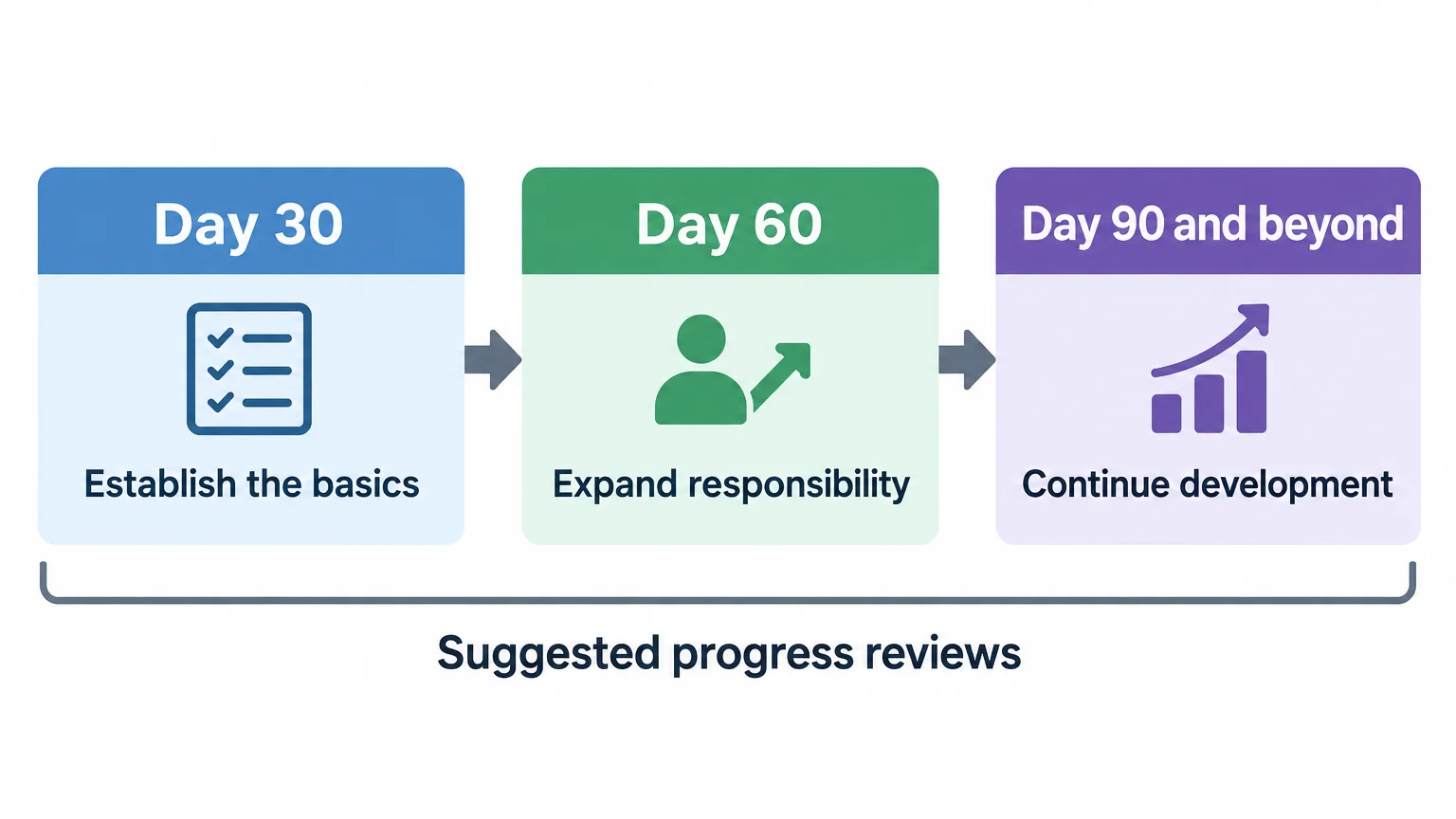
First month and day 30: establish the basics
- Manager: Hold regular one-on-ones to review work, questions, and changing priorities.
- Trainer: Confirm foundational training and observe the employee applying it to actual tasks.
- Employee: Complete an agreed assignment and discuss the reviewer’s feedback.
- Manager: Check whether the employee understands responsibilities and knows where to obtain help.
- HR: Ask what was missing, confusing, or difficult during onboarding.
Suppose a support hire’s goal is to resolve ten routine tickets using the approved policy. A trainer reviews each response and records any corrections needed before expanding the employee’s workload.
Day 60: expand responsibility
- Manager: Increase assignment complexity when observed work supports that change.
- Employee: Coordinate an assignment with relevant coworkers or another department.
- Manager: Review recurring errors and agree on targeted coaching or additional training.
- Buddy: Check whether the employee has established useful working relationships.
If reviewed refund responses consistently meet the agreed standard, the employee could send routine replies directly. Continue escalating exceptions outside the refund policy to the designated approver.
Day 90 and beyond: agree on continuing development
- Manager: Review progress against the original role expectations and agreed goals.
- Employee: Share feedback on equipment, training, introductions, and manager support.
- Manager: Set the next development goals and confirm the ongoing feedback schedule.
- HR: Assign owners to onboarding improvements and any unfinished requirements.
Continue coaching wherever gaps remain. A calendar milestone should trigger a review; completion should reflect demonstrated readiness for the role.
U.S. new hire paperwork and compliance checklist
A U.S. new hire paperwork checklist should distinguish federal forms from state requirements and company documents. The items below provide a federal starting point; add requirements for the employee’s jurisdiction and role.
Federal verification and payroll tasks
- Employee and HR: Complete Form I-9 Section 1 no later than the first day of employment. The employee may complete it after accepting the offer, according to USCIS Section 1 instructions.
- Employer or authorized representative: Complete I-9 Section 2 within three business days of the hire date. For a Monday start, the ordinary deadline is Thursday of that week. Jobs lasting less than three days require completion by the first day of paid work. Employees choose acceptable List A documents or a List B and List C combination. Physical examination generally applies; remote examination requires an authorized alternative procedure, as USCIS Section 2 instructions explain.
- Payroll: Request a signed Form W-4 when the employee starts work and apply it to the first wage payment. Collect the employee’s name and Social Security number for wage reporting under IRS hiring guidance.
Assign the verification appointment separately from general orientation so the deadline remains visible.
State requirements, notices, and company records
- HR: Report the new hire within 20 days of hire under the federal rule; some states require earlier reporting. Follow the applicable state deadline and retain submission confirmation, consistent with federal new hire reporting requirements.
- Payroll: Collect applicable state or local withholding forms alongside federal payroll information.
- HR: Determine applicable E-Verify obligations, required employment notices, and role-specific compliance training requirements.
- HR: Determine whether the coverage-options notice applies and provide the appropriate employer version. The Department of Labor supplies versions for employers with and without health plans.
- HR: Collect emergency contacts, applicable agreements, handbook acknowledgments, and payment instructions through the company’s approved process.
Keep identity documents, tax forms, and bank details in approved restricted storage. Use the shared tracker to record completion and the authorized reviewer, without copying sensitive information into task notes.
Assign owners and track completion
Assign one accountable owner to each onboarding task, with a due date and observable completion evidence. HR can maintain the shared tracker while managers coordinate role-specific preparation and training.
Copy the checkboxes above into your employee onboarding checklist template, then add the columns shown below. These sample tracker rows demonstrate the format; add a row for every applicable task. Replace relative dates with actual deadlines once the employee’s start date is confirmed.
| Task | Accountable owner | Due date | Completion evidence |
|---|---|---|---|
| Prepare equipment | IT | Before arrival | Required device configured and delivery confirmed |
| Confirm application access | IT | First day | Employee opens the required workspace |
| Review first assignment | Manager | First week | Output, reviewer, and quality standard recorded |
| Complete I-9 verification | HR or designated representative | Applicable legal deadline | Authorized reviewer confirms completion |
| Review early progress | Manager | Agreed milestone | Feedback and next actions documented |
The manager owns expectations and work feedback; HR coordinates paperwork and applicable requirements. IT owns technology readiness, and facilities handles workspace and building access.
Track each task as pending, in progress, blocked, complete, or not applicable. A blocked task needs a named resolver and a next action. For an unnecessary task, record the reason and who approved its removal.
Close training tasks with evidence of learning where practical, such as an observed demonstration. Regular performance conversations and training adjustments can continue after the initial checklist ends.
Review onboarding feedback for process changes. If a new hire could not find the leave-request instructions, add their location to orientation and assign an owner to verify that change.
FAQ: Employee onboarding
What are the four key areas of employee onboarding?
Talya Bauer’s four-C onboarding framework covers compliance, clarification, culture, and connection. These areas address rules, job expectations, workplace norms, and working relationships. Audit your checklist against those areas so paperwork does not become its only focus.
What are the five C’s of employee onboarding?
Talya Bauer’s five-C framework includes compliance, clarification, culture, connection, and confidence. Confidence concerns the employee’s belief in their ability to perform the job, adding a distinct dimension to the four-C framework. Include supervised practice and constructive feedback alongside instruction to support that dimension.
Last updated: October 13, 2026