AI Overviews Tracker: What It Measures and How to Track AI Overviews
What an AI Overviews tracker measures, what Search Console misses, and 7 trackers compared on price, free checks and update rhythm. Prices checked Nov 2026.
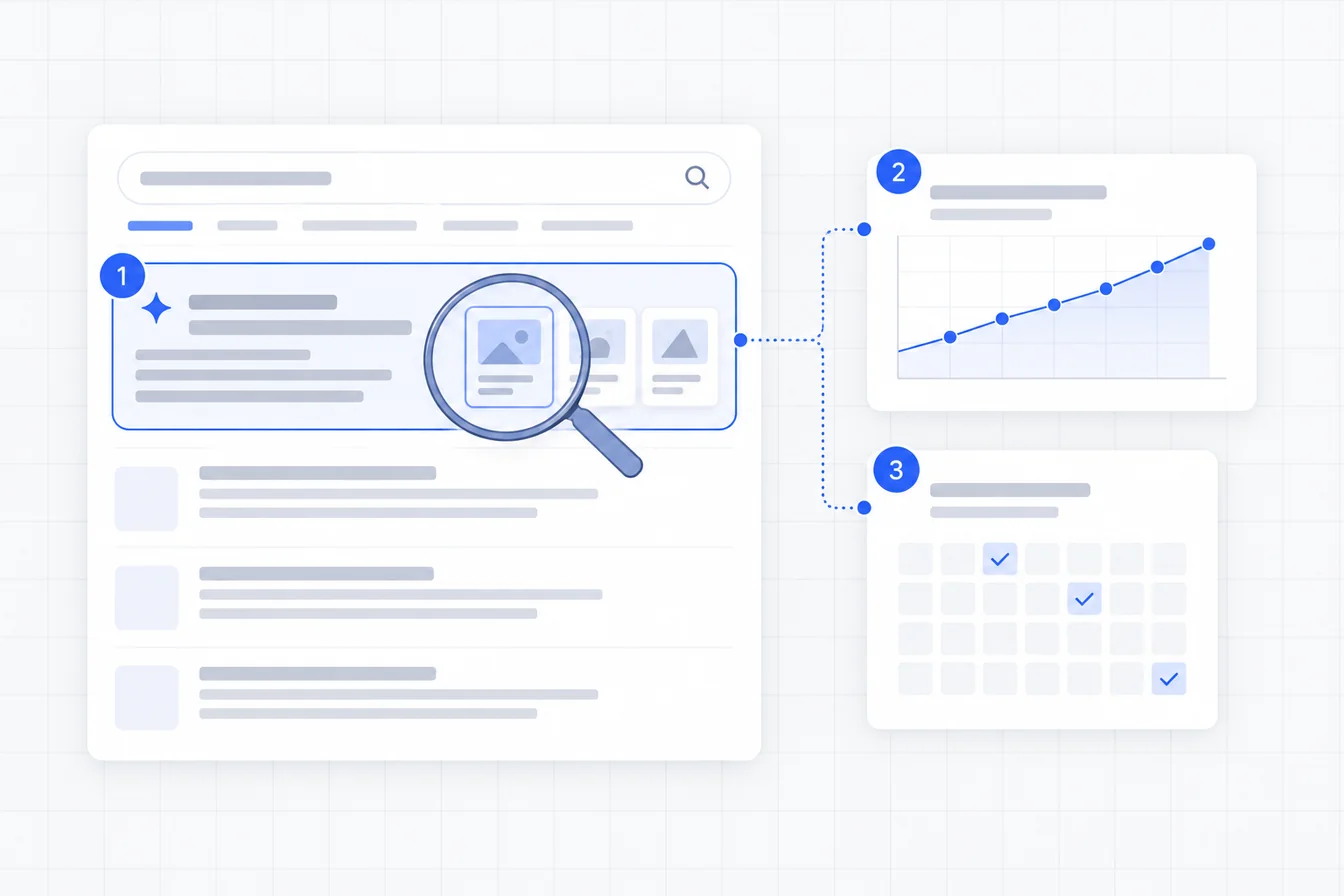
An AI Overviews tracker is a tool that runs your keywords through Google on a schedule and records three things: whether an AI Overview appears, whether it mentions your brand or cites your page, and which sites it cites instead. You need one because Google Search Console only reports on your own pages: its Generative AI performance report counts how often your URLs appeared in AI features such as AI Overviews and AI Mode, but it does not show which keywords trigger an AI Overview or which competitors are cited next to you. Because AI Overviews change from one check to the next, you also need the same keywords checked repeatedly, not a single look.
TL;DR
- What it measures: trigger rate (does an AI Overview show for the keyword), mentions (your brand named in the text), citations (your URL linked as a source), the order of sources and the competitors cited next to you.
- Why Search Console is not enough: its Generative AI performance report counts only impressions of your pages, by page, country, device and date. AI Overview clicks stay inside the "Web" search type, and every link in an AI Overview gets the same position.
- Why one check is not enough: Ahrefs measured a 70% chance that an AI Overview changes between observations, with nearly half (45.5%) of cited sources new each time.
- Free options: the Ahrefs and SE Ranking free checkers, Seobility's free plan (presence only) and manual checks in a logged-out browser.
- Paid trackers on the live pricing pages range from €59.90 a month (Seobility Premium) to $189 a month (aiclicks Pro); Citapult Visibility checks Google AI Overviews and AI Mode plus three other AI searches weekly for $59 per website.
What an AI Overviews tracker measures
AI Overviews are the AI-generated summaries Google shows above (and sometimes below) the regular results, with links to the pages it used. Google says they appear "only when our systems determine that it is additive to classic Search, and as such, often don't trigger." A tracker turns that unpredictable box into numbers you can compare week over week.
Most tools report the same core set of metrics, even if the names differ:
| Metric | What it tells you | Typical label |
|---|---|---|
| Trigger rate | Share of your keywords where Google shows an AI Overview at all | "AI Overview presence", "SERP feature: AI Overview" |
| Mention | Your brand or product is named in the AI Overview text, with or without a link | "Mentions" |
| Citation | Your page is linked as a source; only this can send a click | "Citations", "Cited pages" |
| Source order | Where your link sits among the cited sources | "Position in AI Overview" |
| Competitor share | How often rival domains are mentioned or cited for the same keywords | "Share of voice", "Others only" |
| Change over time | Gains and losses since the last check | "Mentions over time", daily or weekly trend |
The difference between a mention and a citation matters more than it looks. HubSpot puts it this way: "Citations carry a link and the potential for referral traffic; mentions may influence brand perception without driving any click-through." A tracker that only reports one of them gives you half the picture.
Some trackers also store the full text of the AI Overview. Seobility's Premium report, for example, shows "the full text of the AI Overview", "all websites cited inside the answer" and "the order of the cited URLs." That text is useful later, when you want to know what the answer actually says about you.
Why Search Console cannot track AI Overviews for you
Google does count AI Overview traffic in Search Console, and since August 31, 2026 every site also gets a Generative AI performance report. Neither shows you what a tracker shows.
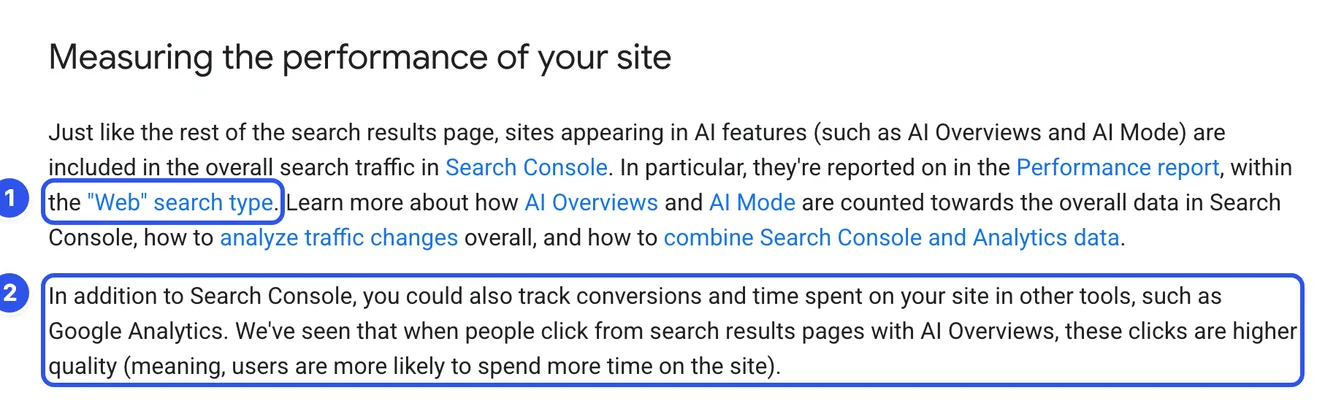
- AI Overviews and AI Mode are reported in the Performance report "within the 'Web' search type", mixed in with the regular results.
- Google points to Google Analytics for conversions and time on site, and claims that clicks from results pages with AI Overviews "are higher quality."
The Generative AI performance report, which Google rolled out to all websites worldwide on August 31, 2026, fills part of the gap. It shows how often URLs from your site appeared in generative AI features on Search, such as AI Overviews and AI Mode. Impressions are its only metric, broken down by page, country, device and date. That tells you which of your pages get seen in AI answers. It does not tell you which keywords trigger an AI Overview, whether your brand is named without a link, or which competitors are cited next to you.
The Search Console help page on performance data adds two details that change how you read the report. A click on a link inside an AI Overview counts as a click. And "an AI Overview occupies a single position in search results, and all links in the AI Overview are assigned that same position." So if your page is the fifth source in an AI Overview at the top of the page, Search Console can report it at the same position as the first source. Search Labs experiments are left out of the data entirely.
Google Analytics does not help either. HubSpot notes that "GA4 doesn't receive a distinct referral parameter that identifies an AI Overview as the source," so those visits look like ordinary organic traffic.
The workaround people use in the r/GEO_optimization thread on AI Overview tracking is a proxy: look for queries where impressions grow but clicks do not, or where CTR is unusually low for a high position. That can hint that an AI Overview answers the query before anyone scrolls. It cannot tell you whether you are cited. For that you need a tracker that looks at the results page itself.
Why bother at all? Pew Research Center analyzed the browsing data of 900 U.S. adults in March 2025. Users who saw an AI summary clicked a traditional result in 8% of visits, against 15% without one. They clicked a link inside the summary in just 1% of visits. If AI Overviews take clicks away from your rankings, you want to know on which keywords, and whether you are at least one of the cited sources.
Why one check is not enough: AI Overviews change all the time
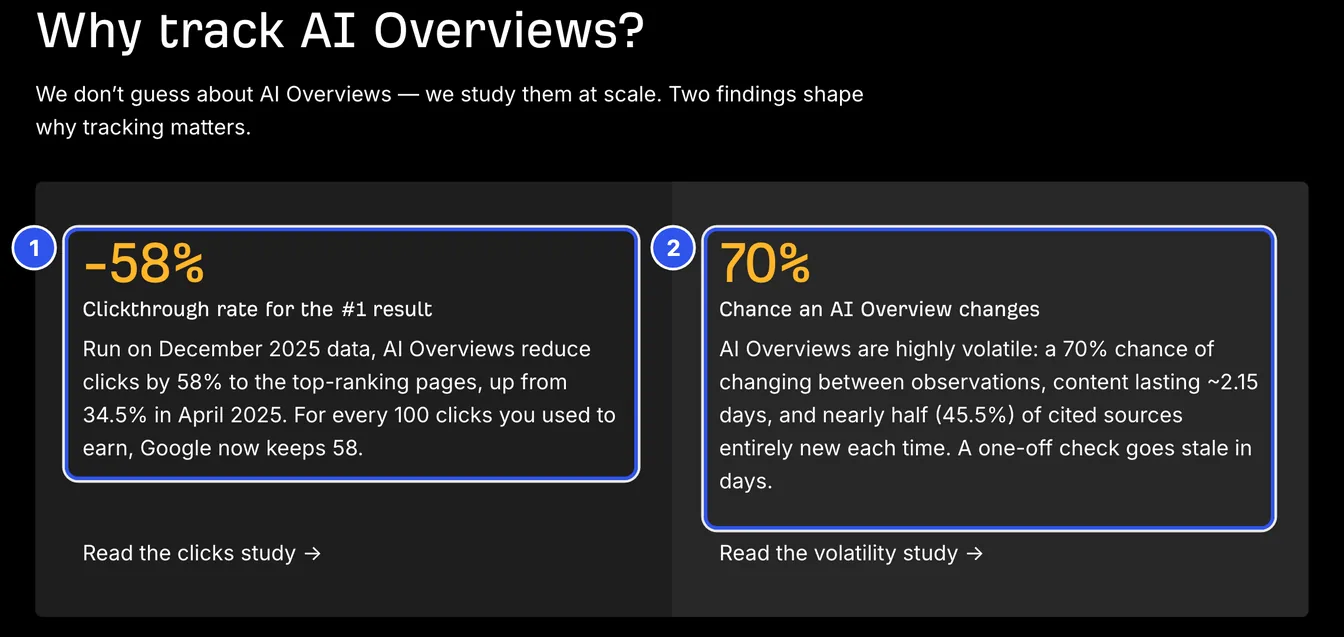
- Ahrefs' clicks study: on December 2025 data, AI Overviews reduce clicks to the top-ranking pages by 58%, up from 34.5% in April 2025.
- Ahrefs' volatility study: a 70% chance that an AI Overview changes between observations, content lasting about 2.15 days, and nearly half (45.5%) of cited sources new each time. In Ahrefs' words, "A one-off check goes stale in days."
This is the main reason to use a tracker instead of searching your keywords by hand once a month. A citation you saw on Monday may be gone on Wednesday and back on Friday. What matters is how often you are cited across many checks, which is why trackers report shares and trends, not single snapshots.
Three more things make AI Overview data noisy:
- Location, device and account. Advanced Web Ranking notes that AI Overview presence and content "can vary depending on the search query, location, device, and other factors," and tracks non-personalized results on desktop and mobile separately. If you check by hand while signed in, you see a personalized page.
- AI Overviews and AI Mode are different surfaces. Google says the two "may use different models and techniques, so the set of responses and links they show will vary." Ahrefs adds that a brand that wins one "can be invisible in the other." Tracking AI Overviews does not tell you how you do in AI Mode.
- The keyword set decides the trigger rate. Every study counts on a different set of queries, so the share of searches with an AI Overview varies widely:
| Source | Share of searches with an AI Overview | What was measured |
|---|---|---|
| Pew Research Center | 18% | All Google searches by 900 U.S. adults, March 2025 |
| BrightEdge (cited by Advanced Web Ranking) | about 48% | Tracked queries, February 2026, up from roughly 30% a year earlier |
| Semrush | over 50% | Queries in Semrush Sensor |
| SE Ranking | 64% | Keywords in SE Ranking's own research |
Pew also shows why: just 8% of one- or two-word searches produced an AI summary, against 53% of searches with 10 words or more, and 60% of searches that started with a question word such as "who," "what," "when" or "why." If you only track short head terms, your tracker will tell you AI Overviews barely matter. Add the questions your customers actually type.
How AI Overviews tracking works, step by step
Whether you use a tool or a spreadsheet, tracking AI Overviews comes down to the same routine. HubSpot summarizes it as running "a defined set of keywords through a tracking tool or via manual SERP capture on a consistent cadence, recording whether an AI Overview appears, whether your domain is cited, and where in the overview your content is referenced."
- Pick the keywords and questions. Start with the keywords that bring you leads or sales, then add question versions of them. Pew's data above shows that question phrasing triggers AI Overviews far more often.
- Fix the market. Choose one country, language and device per keyword list, and keep them the same between checks. Compare desktop and mobile separately.
- Capture the results page logged out. Trackers fetch non-personalized pages. Advanced Web Ranking even runs a dedicated engine for this, because AI Overviews load dynamically and need an extra query to capture reliably (it uses twice the keyword units of a standard engine).
- Record trigger, mention, citation and source order. Write down who else is cited. Those pages are your benchmark.
- Repeat on a schedule. Daily if you need to catch every swing, weekly if you want a stable trend. Keep the questions identical so the weeks are comparable.
- Act on the gaps. Keywords where competitors are cited and you are not become content tasks (more on that below).
You can do steps 1 to 5 for free with a handful of keywords. For anything beyond that, a free checker or a tracker saves you hours.
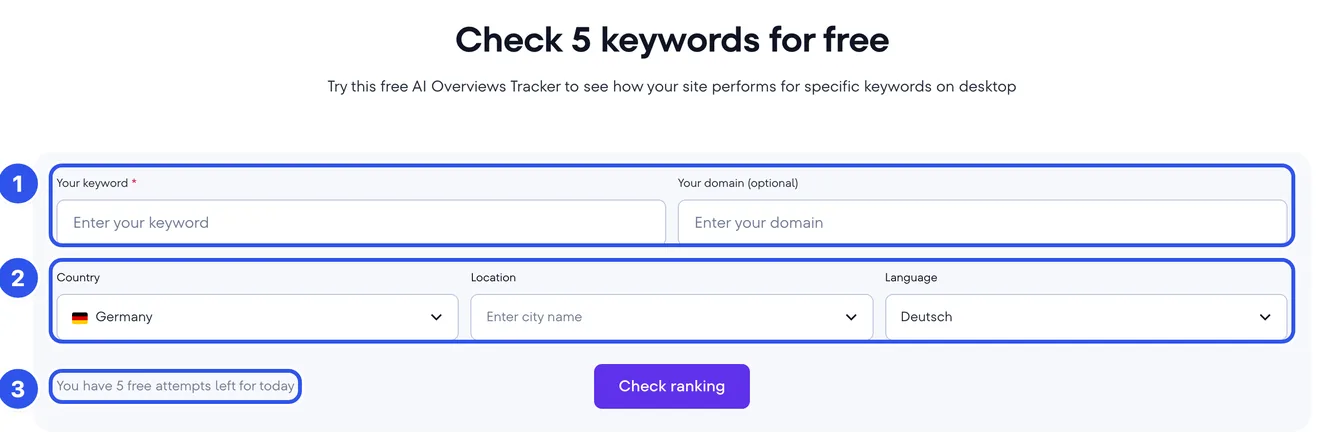
- Enter a keyword and, optionally, your domain to see whether it is cited.
- Pick the country, city and language. The same keyword can show a different AI Overview, or none, in another market.
- The free version allows 5 checks per day.
Ahrefs' free tool works the other way around: you enter a brand name instead of a keyword. It needs no signup and returns how many AI Overviews mention your brand across the keywords and prompts in Ahrefs' index, your mentions over time, and the top 5 topics, cited domains and cited pages. Ahrefs notes that its coverage is strongest in English.
AI Overviews trackers compared
All prices below come from each vendor's live page on November 12, 2026. Some showed euro prices because of our location, so you may see a different currency or tax treatment.
| Tool | Free option | Paid entry (live page) | Update rhythm | Tracks beyond AI Overviews |
|---|---|---|---|---|
| Ahrefs (free tracker, Brand Radar) | Brand check, no signup | Brand Radar from €179/mo for selected platforms | Daily in Brand Radar | AI Mode, ChatGPT, Perplexity, Copilot, Gemini |
| SE Ranking | 5 keyword checks per day | Plans from €87.20/mo | Day by day | AI answers via SE Visible |
| Seobility | Free Basic plan shows whether an AI Overview appears | Premium €59.90/mo plus VAT, 300 keywords | Daily with Premium | ChatGPT, Gemini (AI Visibility Tracking, beta) |
| Semrush | None for the AI Visibility Toolkit | AI Visibility Toolkit $99/mo | Daily | AI Mode, ChatGPT and more |
| Advanced Web Ranking | 7-day free trial | Pro $139/mo, 7,000 keywords | Weekly by default, daily costs 7x the units | AI visibility tracking |
| aiclicks | 3-day trial | Pro $189/mo, 150 prompts | Daily | 4 LLMs of your choice |
| Citapult Visibility | One free check (10 prompts, 25 keywords) | $59/mo per website, 25 prompts | Weekly | AI Mode, ChatGPT, Perplexity, Gemini, Google positions to 100 |
How to choose:
- You want a quick look today: the free Ahrefs and SE Ranking checkers, or Seobility's free plan for presence only.
- You already pay for an SEO suite: turn on the AI Overview data there first. Semrush lets you filter Organic Rankings by "Domain ranks" > "AI Overview," and Seobility shows AI Overviews inside its Ranking Monitoring next to your classic rankings.
- You need daily data across many keywords and locations: Advanced Web Ranking (down to ZIP code level) or SE Ranking.
- You care about more than Google: Ahrefs Brand Radar, Semrush, aiclicks or Citapult. For a wider view of these tools, see our comparison of answer engine optimization tools and the list of leading software for AI visibility.
Citapult is our own product, so here is what it does and where it stops. Citapult Visibility asks your questions in Google AI Overview, Google AI Mode, ChatGPT, Perplexity and Gemini once a week and checks your Google positions down to 100.
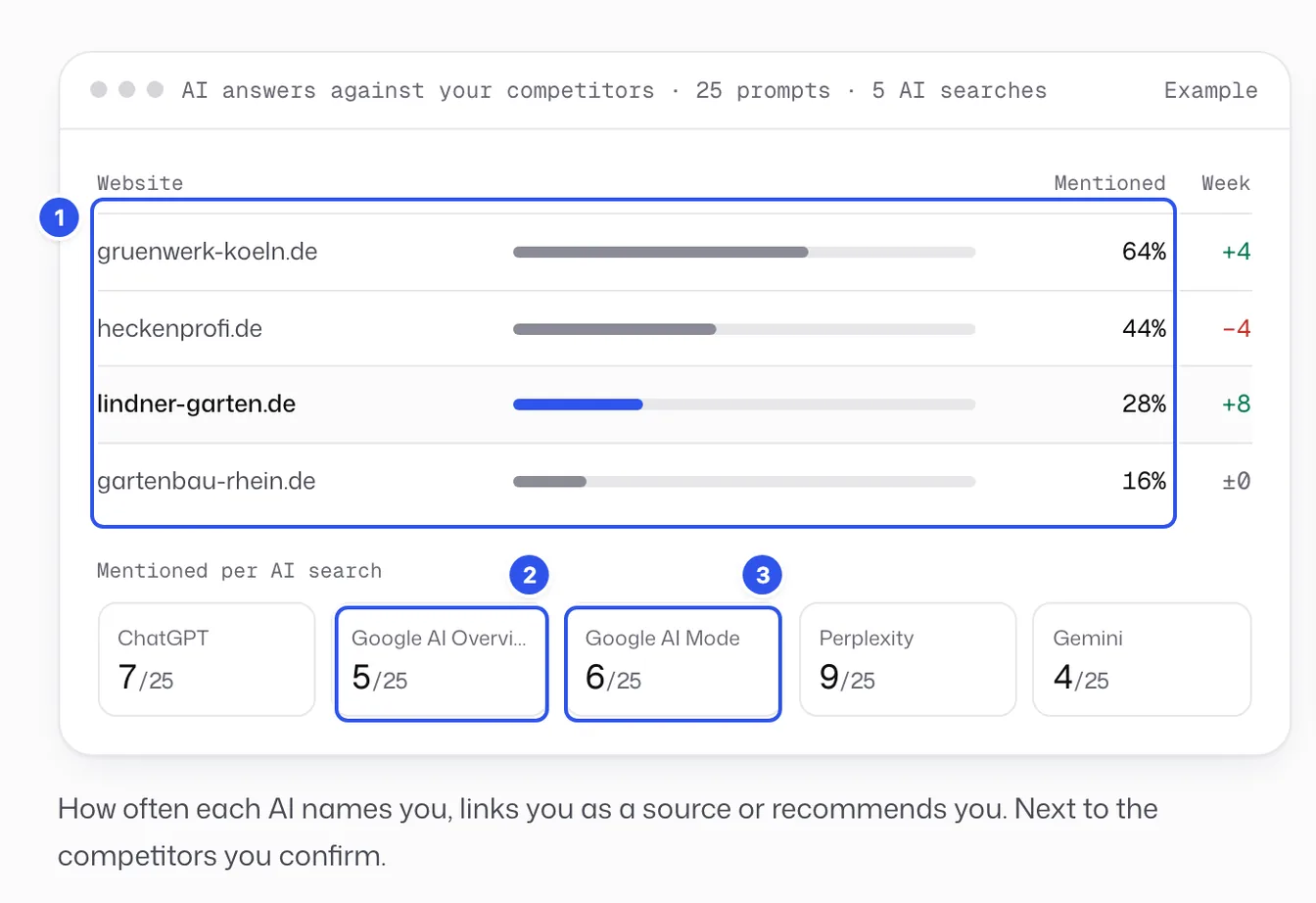
- Your share of AI answers next to the competitors you confirm, with the change since last week in the column to the right.
- Google AI Overview on its own: the example site is named in 5 of 25 prompts.
- Google AI Mode, reported separately (6 of 25), because the two surfaces cite different sources.
Basic costs $59 per website a month for 25 prompts, 100 keywords, 3 competitors and 2 languages; Plus costs $119 for 50 prompts, 250 keywords, 5 competitors and 5 languages. If you connect Search Console, you also see clicks and impressions per keyword. Where it fits less well: it checks weekly, so if you need to catch daily swings in AI Overviews, a daily tracker like Seobility, SE Ranking or Brand Radar is the better pick.
How to read AI Overview data without fooling yourself
Trackers make AI Overviews measurable, but the numbers are easy to misread. These are the mistakes we see most often:
- Treating one check as the truth. With a 70% chance of change between observations, look at the share of checks where you are cited, over at least a few weeks.
- Mixing up mentions and citations. A mention can shape what people think of you. Only a citation carries a link. Report them separately.
- Reading AI Overview positions like rankings. In Search Console all links in an AI Overview share one position. In a tracker, "position 3 in the AI Overview" means third source, not third result.
- Comparing trigger rates across tools. 18% and 64% can both be right, as the table above shows. Compare your own numbers over time, with the same tool and the same keywords.
- Tracking only head terms. Long questions trigger AI Overviews far more often. Track the questions your buyers ask, not only the two-word keywords from your rank tracker.
- Ignoring AI Mode. It is a separate surface with its own sources. If your tracker covers both, look at both.
For alerts, HubSpot suggests a simple rule worth copying: flag "a drop in citation coverage of 10% or more across Tier 1 keywords within a single week."
What to do when a competitor is cited instead of you
A tracker shows you the gap. Closing it is content work. Google's position is that "there are no additional requirements to appear in AI Overviews or AI Mode." A page must be indexed and eligible to be shown with a snippet, and the usual SEO fundamentals apply. You do not need special schema or "AI text files," as the same Google page puts it.
In practice, start with the pages that are cited for your keywords:
- Open every cited page for a keyword where you are missing. Note what they answer that you do not, and how early they answer it.
- Lead with the answer. Ahrefs' advice from its own research: "Put the direct answer at the top of each section, not buried below setup."
- Keep pages fresh. Ahrefs reports that Gemini, which powers AI Overviews, prefers fresher content.
- Cover the long-tail questions around the topic, since those trigger AI Overviews most often.
- Earn mentions elsewhere. In Ahrefs' study of 75,000 brands, branded web mentions had the strongest link to AI visibility, and Semrush found Reddit and Quora among the most-cited domains in AI Overviews.
Our guide on how to rank in AI Overviews goes through these steps in detail, and the LLM SEO guide covers the same work for ChatGPT, Perplexity and Gemini.
This is also where Citapult connects the two halves. When Visibility finds a prompt where AI cites a competitor, it turns it into a suggestion. If you also use Articles, approving it means the agent writes the post with sources. Those GEO articles open with a TL;DR that answers the query in 2 to 3 sentences and start every heading with its answer, which is the format AI Overviews like to lift.
FAQ
Can Google Search Console track AI Overviews?
Partly. Its Generative AI performance report shows how often your pages appeared in AI features such as AI Overviews and AI Mode, as impressions by page, country, device and date. Clicks from AI Overviews are counted in the Performance report under the "Web" search type, where all links in an AI Overview share one position. To see which keywords trigger an AI Overview and whether you are cited, you need a tracker or manual checks.
Is there a free AI Overviews tracker?
Yes, with limits. Ahrefs' free AI Overviews tracker checks a brand name without signup, SE Ranking allows 5 free keyword checks per day, and Seobility's free Basic plan shows whether an AI Overview appears for your monitored keywords. For daily or weekly tracking of a full keyword list, you need a paid plan.
What are some effective AI Overview tracking tools?
For Google-focused tracking with classic rankings next to it: Seobility, SE Ranking, Semrush and Advanced Web Ranking. For brand visibility across Google and AI chatbots: Ahrefs Brand Radar, aiclicks and Citapult Visibility. The right pick depends on how many keywords you track, how often, and whether you need AI Mode and ChatGPT too.
How do I see an AI Overview?
Search on Google in a country and language where AI Overviews are available. They show up when Google's systems decide generative AI is especially helpful, most often for longer questions. Advanced Web Ranking notes that clicking "Show more" in an AI Overview reveals an "Ask anything" box that takes you into AI Mode.
Where are AI Overviews available?
Google keeps the current list of countries, territories and languages on its AI Overviews help page. SE Ranking's tracker, for example, supports markets such as the United States, United Kingdom, Germany, Netherlands, Belgium, Spain and Portugal.
Should you trust AI Overviews?
Check them. Google's own help page says "AI Overviews can and will make mistakes" and recommends checking important information in more than one place. For brands this is one more reason to track: Ahrefs advises checking what AI Overviews say about you and fixing inconsistent brand information they could pull from.
Sources
- 1developers.google.comAI features and your website
- 2support.google.comPerformance report data: clicks, impressions and position
- 3developers.google.comIntroducing Search Generative AI performance reports in Search Console
- 4support.google.comAI Overviews in Google Search
- 5pewresearch.orgGoogle users are less likely to click on links when an AI summary appears in the results
- 6ahrefs.comFree Google AI Overviews Tracker
- 7seranking.comAI Overviews Tracker
- 8seobility.netAI Overview Tracker
- 9seobility.netPricing
- 10semrush.comHow to track AI Overviews with Semrush
- 11semrush.comAI Visibility Toolkit
- 12advancedwebranking.comAI Overviews Tracking: The Complete Guide
- 13advancedwebranking.comPricing
- 14aiclicks.ioAI Overviews Tracker
- 15blog.hubspot.comTracking AI Overviews: What the data actually shows
- 16reddit.comHow are you tracking Google AI Overview visibility?
- 17citapult.comAI visibility
- 18citapult.comGEO articles