ChatGPT for SEO: What It Does Well, Where It Fails and How to Use It
How to use ChatGPT for SEO: keyword ideas, outlines, titles, schema and regex, what we caught it getting wrong, and how to get your pages into ChatGPT answers.
ChatGPT is good for SEO work that needs words and structure: keyword ideas, outlines, title drafts, schema markup, regex and robots.txt rules. It is bad at anything that needs measured data, such as search volumes, and it gets small facts like character counts wrong. Use it as a fast assistant, check every number it gives you, and add the experience it cannot have.
TL;DR
- Use ChatGPT for brainstorming, clustering, outlines, first drafts, title variants, JSON-LD, regex and hreflang. Do not use it as a keyword tool: in our test it gave the same search volume to two different keywords in one table.
- Google does not penalize AI-assisted content as such. It penalizes pages made "for the primary purpose of manipulating ranking", including many AI pages that add no value.
- Fact-check everything, including titles, meta descriptions and structured data. Google's own guidance says so.
- SEO for ChatGPT is a separate job: allow OAI-SearchBot, rank in classic search, and measure your mentions, because ChatGPT's placement "is not guaranteed".
We tested the claims in this guide on ChatGPT itself (logged out, November 12, 2026) and checked them against Google's and OpenAI's documentation. The screenshots below are from those runs.
Can ChatGPT do SEO?
Partly. ChatGPT can do the writing and formatting parts of SEO quickly, but it cannot see your rankings, your traffic or real keyword data unless you give them to it. Backlinko puts it plainly: the base version "doesn't have access to any keyword search volume data at all." Google's guidance on generative AI adds why its facts need checking: generative models "don't retrieve facts, but predict a likely sequence of words based on their training data."
| SEO task | Is ChatGPT good at it? | What to check |
|---|---|---|
| Keyword ideas and long-tail variants | Yes | Volumes and difficulty in a real keyword tool |
| Grouping keywords by search intent | Yes, as a first pass | Whether the same pages rank for both keywords |
| Outlines and content briefs | Yes | What the current top results actually cover |
| First drafts | Usable | Facts, sources, your own examples |
| Title tags and meta descriptions | Good drafts | Length (count it yourself) |
| Schema markup (JSON-LD) | Yes | Google's Rich Results Test |
| Regex, robots.txt rules, hreflang tags | Yes | Test before you deploy |
| Search volumes, rankings, backlinks | No | Use a tool with real data |
The rest of this guide follows those rows in the order you would use them, then covers the other meaning of "ChatGPT SEO": getting your pages shown in ChatGPT's answers.
Step 1: Use ChatGPT for keyword ideas, not keyword data
Ask for ideas around a seed topic and an audience. ChatGPT is quick at long-tail variants, question keywords and angles you had not thought of. We asked it for "15 long-tail keyword ideas for a blog about home espresso machines", grouped by intent and with "the monthly US search volume for each". We sent the same prompt four times.
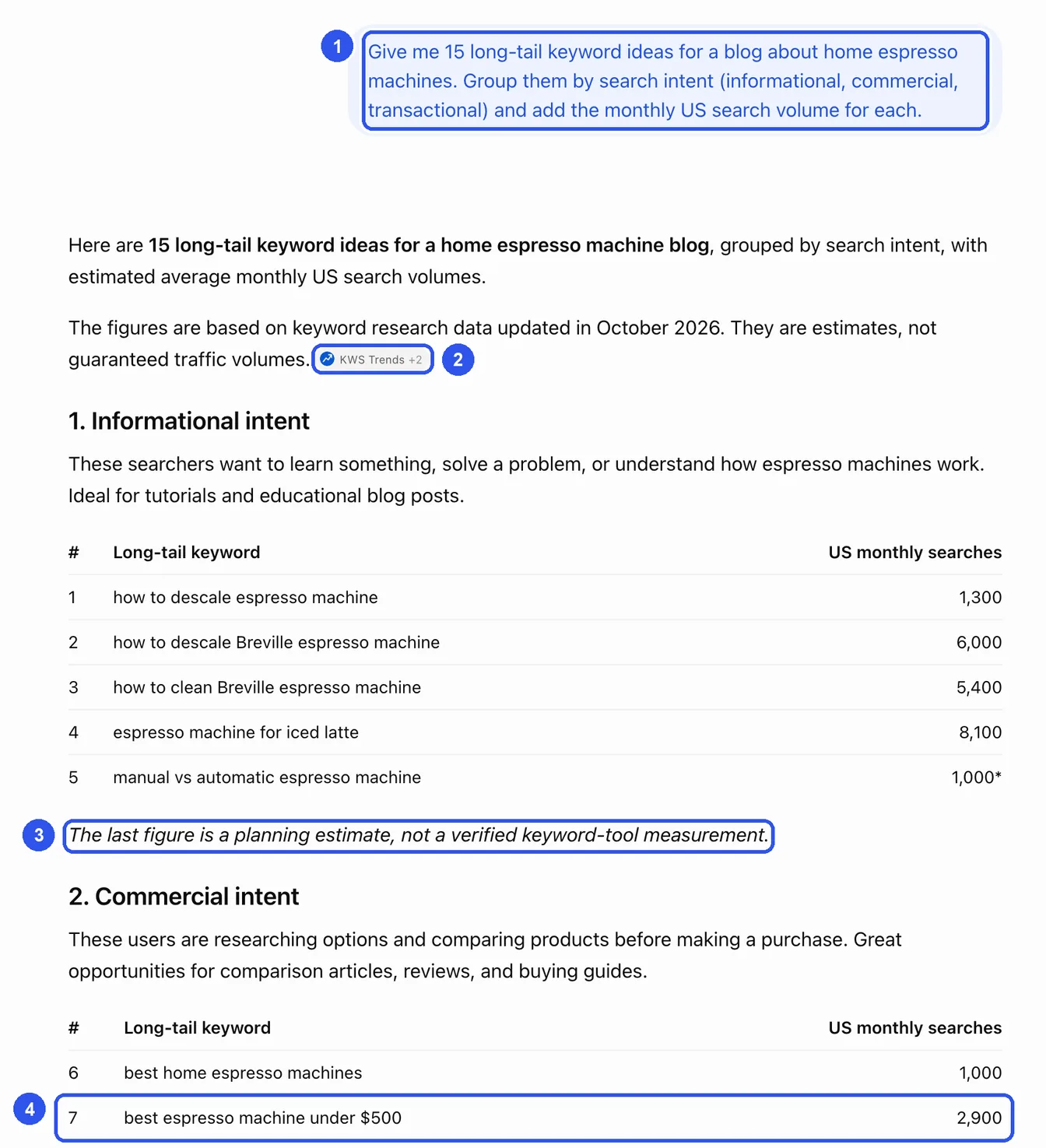
- The prompt: 15 long-tail keywords for home espresso machines, grouped by intent, with monthly US search volume.
- The source chip (KWS Trends) ChatGPT attached to the volumes. Above the table it says the figures come from "keyword research data updated in October 2026" and calls them estimates.
- ChatGPT's own footnote: "The last figure is a planning estimate, not a verified keyword-tool measurement."
- "best espresso machine under $500" at 2,900 searches a month.
The ideas were useful. The numbers were not reliable:
- Every run returned a different list of 15 keywords.
- In one run, ChatGPT gave 2,900 to "Best espresso coffee machine for home" and to "Best espresso machine under $500" in the same table.
- In the run above it marked one figure as a guess, and at the end it told us to "validate the final list in Google Keyword Planner, Ahrefs, or Semrush before committing to your content calendar."
That last line is the right workflow. Take the ideas from ChatGPT, then pull volume and difficulty from a tool that measures them. For a short list, paste the measured numbers back into the chat and ask ChatGPT to sort the keywords by intent and effort.
This is the step Citapult automates: its keyword research pulls ideas with real volume and difficulty from DataForSEO, then plans 30 days of articles with one article per search intent. For more prompt wording, see our SEO prompts for ChatGPT.
Step 2: Group keywords by intent and cluster them
ChatGPT can sort a keyword list into informational, commercial and transactional intent, and it can suggest which keywords belong on one page. Treat that as a first draft. Two keywords belong in one article when Google answers both with the same pages, and ChatGPT cannot see those results unless it searches.
A quick way to check: search both keywords and compare the top 10. If several of the same URLs rank for both, write one page. If the results are different, write two. Backlinko warns about the same problem from the other side: read ChatGPT's suggested titles before you build pages for them, because some "will cannibalize with each other, or there might be no search volume for them."
Step 3: Build briefs and outlines from what already ranks
An outline prompt works best when you give ChatGPT the material instead of asking it to guess. Paste in the headings of the top three results for your keyword and the "People also ask" questions, then ask:
Here are the H2s of the three top-ranking pages for "[keyword]" and the questions Google shows for it. List what all three cover, what none of them answers, and suggest an outline that covers both. Keep my audience in mind: [audience].
This gives you a brief based on the real search results rather than ChatGPT's idea of what the page should contain. Add the gaps as their own sections; they are your reason to exist next to the pages that already rank.
Step 4: Draft with ChatGPT, then add what only you know
ChatGPT can write a readable first draft, and Google does not object to that on principle. Its guidance from 2023 says that "appropriate use of AI or automation is not against our guidelines." The line Google draws is about purpose and scale.
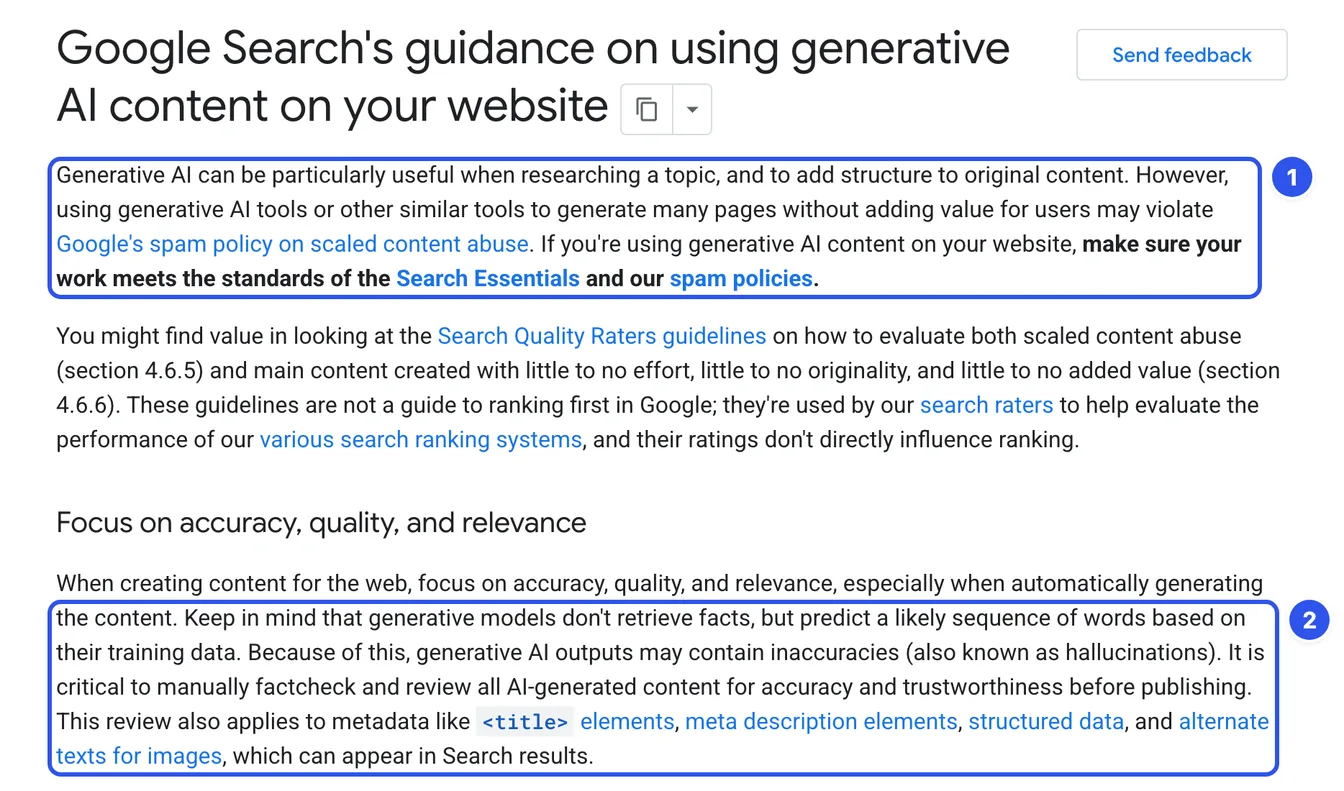
- Generative AI is "particularly useful when researching a topic, and to add structure to original content." Generating many pages without adding value "may violate Google's spam policy on scaled content abuse."
- The review rule: "It is critical to manually factcheck and review all AI-generated content", and that includes titles, meta descriptions, structured data and image alt text.
So the draft is the start. What makes the page worth ranking is what ChatGPT cannot produce: your numbers, your mistakes, the screenshots from your own account, the opinion you formed from doing the work. Google's ranking systems reward content that shows "expertise, experience, authoritativeness, and trustworthiness" (E-E-A-T), and a generic draft shows none of it.
A practical routine:
- Write down three things you know from experience before you prompt: a number, a mistake, a method.
- Give ChatGPT the outline and those notes and ask for a draft in your voice.
- Check every claim against a source you opened, and link the source.
- Rewrite the intro and the conclusions yourself.
Citapult's article agent works the same way at scale: it reads the top 10 results, the "People also ask" questions and the AI Overview for your keyword, asks you four questions about real numbers, common mistakes and how you do the work, and cites the sources it fetched.
Step 5: Write title tags and meta descriptions, then count them yourself
ChatGPT is good at producing title and description variants. It is bad at counting characters. We asked it for "5 title tags under 60 characters" for a post about descaling an espresso machine and to "show the exact character count next to each title".
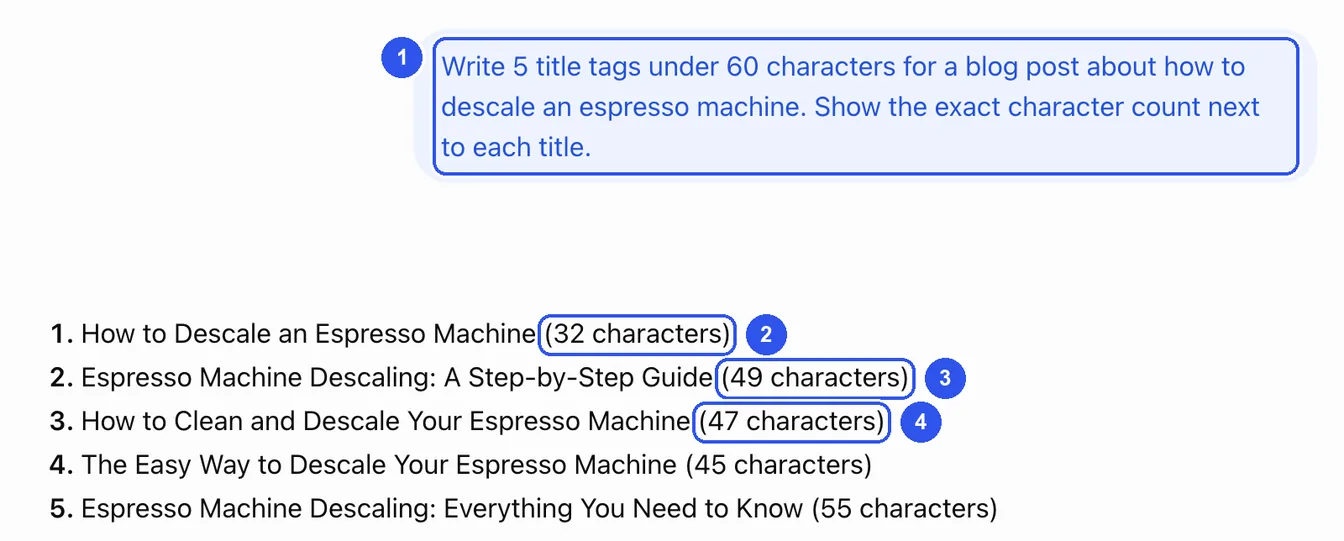
- The prompt, asking for titles under 60 characters with exact counts.
- "How to Descale an Espresso Machine" is listed as 32 characters. It has 34.
- "Espresso Machine Descaling: A Step-by-Step Guide" is listed as 49. It has 48.
- "How to Clean and Descale Your Espresso Machine" is listed as 47. It has 46.
Three of the five counts were wrong. The titles themselves were fine and all of them fit the limit, so the fix is simple: keep the drafts, count with a script, your CMS or a character counter.
Two facts from Google help you judge the drafts:
- There is no fixed title length. Google says "there's no limit on how long a <title> element can be"; the title link is cut "as needed, typically to fit the device width."
- Meta descriptions are optional input. Google writes snippets "primarily" from page content and "sometimes uses the meta description" when it describes the page better.
Ask ChatGPT for five variants, pick the one that matches the search intent best, and put the main keyword near the front.
Step 6: Generate schema markup and validate it
Ask for JSON-LD, not Microdata. Google says it supports three formats but recommends the one "easiest for you to implement and maintain (in most cases, that's JSON-LD)". A good prompt names the type and gives the facts:
Write JSON-LD for an Article with this headline, author, publish date and image URL: [details]. Add a FAQPage block for these questions and answers: [Q and A].
Then test it. Google's documentation asks you to "check your structured data using the Rich Results Test during development", and to watch the Rich result status reports after the page goes live, because markup can break after deployment.
Step 7: Plan internal links
ChatGPT can suggest internal links if you give it your page list, for example a pasted sitemap with titles. Without that list it can only guess your URLs. Ask it to "suggest three internal links from this article to pages on this list only, with anchor text" and check every URL before you publish.
Citapult's internal links feature does this check for you: it reads your sitemap, gives each article only pages in the same language to choose from, and fails any link to a URL that is not on that list.
Step 8: Hand ChatGPT the technical chores
This is where ChatGPT saves the most time per prompt. HubSpot calls it "surprisingly capable with technical SEO tasks" such as FAQ schema, hreflang tags and RegEx filters. Backlinko lists writing regex, creating hreflang tags and generating robots.txt rules.
| Task | Prompt to start with | Check before use |
|---|---|---|
| Regex for Search Console | "Write a regex that matches queries starting with how, what, why or can" | Test it on the filter and spot-check matches |
| robots.txt rules | "Write robots.txt rules that block /cart/ and /search/ for all bots but allow everything else" | Make sure you did not block pages you want indexed |
| hreflang tags | "Write hreflang tags for this page in English (US) and German, with x-default to English: [URLs]" | Every URL and language code |
| Redirect map | "Match each old URL to the closest new URL from this list: [lists]" | Every target returns a 200 |
| Explaining code | "Explain what this robots.txt does, line by line: [file]" | Compare with the official documentation |
Never paste credentials, private customer data or unpublished financial figures into a prompt.
Is ChatGPT content bad for SEO?
Not by itself. Google's position: using automation, including AI, to generate content "with the primary purpose of manipulating ranking in search results is a violation of our spam policies." The spam policy on scaled content abuse lists "using generative AI tools or other similar tools to generate many pages without adding value for users" as its first example.
So the risk is not that ChatGPT wrote a sentence. The risk is publishing a lot of pages that say what every other page says, without facts you checked or experience you have. For automatically generated content, Google even suggests "adding information on how your content was created in a way that makes sense for your audience."
If ChatGPT content is ranking poorly, it is usually for ordinary reasons: the page answers the query less well than the pages above it, it repeats them, or it contains a mistake a reader would spot.
SEO for ChatGPT: how to show up in its answers
The other half of the "chatgpt seo" query is about visibility inside ChatGPT. When ChatGPT searches the web, it "rewrites your query into one or more targeted queries" and sends them to search providers. Your page has to be reachable by OpenAI's crawler and rank well enough in those searches to be picked.
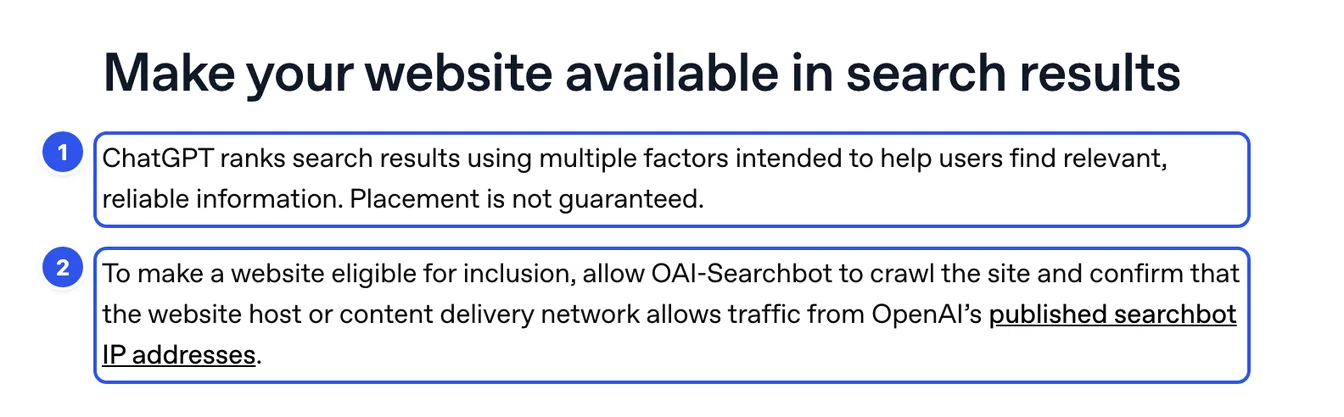
- "ChatGPT ranks search results using multiple factors intended to help users find relevant, reliable information. Placement is not guaranteed."
- The eligibility rule: allow OAI-Searchbot to crawl the site and make sure your host or CDN allows traffic from OpenAI's published searchbot IP addresses.
OpenAI runs separate crawlers for separate jobs, so check your robots.txt against each:
| Crawler | What it does | If you block it |
|---|---|---|
| OAI-SearchBot | Surfaces sites in ChatGPT's search features | Your pages "will not be shown in ChatGPT search answers", though they can still appear as navigational links |
| GPTBot | Crawls content that may be used to train OpenAI's models | Your content should not be used for training; search is not affected |
| ChatGPT-User | Visits a page when a user's question in ChatGPT needs it; not used for automatic crawling | OpenAI notes robots.txt rules "may not apply" to these user-initiated visits |
After a robots.txt change, OpenAI says it can take about 24 hours for its systems to adjust.
Ranking in classic search matters too. Semrush looked at the pages ChatGPT cited for one brand and found that 85% of them also ranked for at least one keyword in Google. Write pages that answer the question in the first lines, cite sources and state numbers clearly; our LLM SEO guide covers the full checklist, and how to optimize content for AI search engines goes deeper on page structure. For Google's side of AI answers, see how to rank in AI Overviews.
Then measure. HubSpot notes there is "no direct equivalent of Google Search Console for ChatGPT", so you have to ask the questions your customers ask and record whether you appear. Citapult's AI visibility check does that every week across five AI searches, including ChatGPT, and shows for each answer whether your site is mentioned, cited or recommended.
Common mistakes when using ChatGPT for SEO
- Trusting its search volumes. Our test showed changing lists, duplicate numbers and figures ChatGPT itself called estimates.
- Publishing the first draft. Google asks for manual fact-checking of everything, metadata included.
- Trusting its counts and URLs. Character counts were wrong three times out of five; internal link suggestions without a page list are guesses.
- Scaling before checking. Many similar pages with no added value is exactly what the scaled content abuse policy describes.
- Blocking the wrong bot. Blocking GPTBot keeps you out of training data; blocking OAI-SearchBot keeps you out of ChatGPT search.
- Not measuring. Without regular checks you will not know whether ChatGPT mentions you or your competitors.
If you want tools built around these jobs rather than a general chat window, our list of ChatGPT SEO tools compares the options.
FAQ
How can ChatGPT be used for SEO?
ChatGPT is useful for keyword brainstorming, sorting keywords by intent, outlines, first drafts, title and meta description variants, JSON-LD schema, regex, robots.txt rules and hreflang tags. It is not a source of search volumes, rankings or backlink data, so pair it with a tool that measures those.
Is ChatGPT content good for SEO?
It can be, if a person checks and improves it. Google says appropriate use of AI is not against its guidelines, but content made mainly to manipulate rankings is spam. Pages that add your own facts, examples and checked sources do well regardless of whether ChatGPT helped write them.
Can ChatGPT generate SEO content?
Yes, it can write drafts that are structured for a keyword. Treat them as drafts: Google's guidance says to fact-check and review all AI-generated content, including titles, meta descriptions, structured data and image alt text, before publishing.
What are the best ChatGPT prompts for SEO?
The best prompts give ChatGPT real input instead of asking it to guess: the top-ranking headings for an outline, your measured keyword list for clustering, your page list for internal links. Ask for a specific format (a table, JSON-LD, five variants) and then check the output.
Which AI is best for SEO?
It depends on the job. General chat assistants like ChatGPT are flexible for writing and technical chores. Tools with keyword databases, rank tracking or AI visibility checks are better for anything that needs measured data. Our list of ChatGPT SEO tools compares options by task.
Is SEO dead or evolving in 2026?
Evolving. ChatGPT search still builds on classic search: it sends rewritten queries to search providers, and in Semrush's analysis of one brand, 85% of the pages ChatGPT cited also ranked in Google. The new work is making sure AI crawlers can reach your site and measuring whether AI answers mention you.
Sources
- 1developers.google.comGoogle Search's guidance on using generative AI content on your website
- 2developers.google.comGoogle Search's guidance about AI-generated content
- 3developers.google.comSpam policies for Google web search
- 4developers.google.comInfluencing title links in Google Search
- 5developers.google.comHow to write meta descriptions
- 6developers.google.comIntro to how structured data markup works
- 7help.openai.comSearching the web with ChatGPT
- 8developers.openai.comOverview of OpenAI crawlers
- 9backlinko.comChatGPT for SEO: Ultimate Guide, Tips & Prompts for 2026
- 10blog.hubspot.comChatGPT for SEO: Everything We Know So Far
- 11semrush.comChatGPT SEO: How to Show Up in ChatGPT Responses