SEO Automation: What to Automate, What to Keep Human, and How to Start
SEO automation explained: which tasks to automate fully, where Google expects human review of AI content, and a six-step plan to automate SEO with AI.

SEO automation is the use of software to run repeatable SEO work on a schedule or a trigger instead of by hand: site crawls, Search Console reports, sitemaps, keyword research, content drafts, internal links and publishing. Google has no rule against automation itself. Its rule is against pages made mainly to manipulate rankings, so the safe split is simple: automate monitoring and plumbing completely, and automate content up to a human review step.
TL;DR
- Automate the checks first: scheduled crawls, Search Console exports, rank and index monitoring. They carry no ranking risk and save the most hours.
- Content can be automated from keyword research to publishing, but Google asks you to fact-check every AI-generated page, including titles, meta descriptions and alt text, before it goes live.
- Google's scaled content abuse policy targets "many pages" made to manipulate rankings "no matter how it's created". Volume without added value is the risk, not the tool.
- Some popular automations do nothing for Google: the Indexing API only covers job postings and livestreams, IndexNow is not supported by Google, and sitemap
priorityandchangefreqare ignored. - A good setup puts a person at three points: choosing what to target, reviewing before publishing and deciding what to fix.
This guide explains what SEO automation is, what Google says about automated content, which tasks you can hand to software and how far, and a six-step plan to automate SEO with AI without ending up on the wrong side of a spam policy.
What is SEO automation?
SEO automation means a task runs without someone starting it each time. A crawler checks your site every Monday, a script pulls Search Console data into a sheet every morning, your CMS rebuilds the sitemap when you publish, or an AI agent researches a keyword and drafts an article for review.
In practice, it comes in three layers, and most teams use all three:
| Layer | How it works | Examples | Risk to rankings |
|---|---|---|---|
| Schedules and triggers | A rule fires at a set time or on an event | Weekly crawl, sitemap rebuilt on publish, alert when a page drops | None |
| Data pipelines | APIs move data between tools | Search Console API into a sheet, daily export to BigQuery, crawl summary into Google Sheets | None |
| AI agents | A language model does research or writing steps | Keyword clustering, briefs from top results, article drafts, meta descriptions, alt text | Depends on review |
The first two layers are plain software and have been around for years. The third is what most people mean by "AI SEO automation" today, and it is the only layer where automation can hurt you, because it produces pages that people and Google read.
What Google says about automated content
Google's position has two halves, and you need both.
The first half is permissive. In its 2023 post on AI-generated content, Google wrote that "appropriate use of AI or automation is not against our guidelines" and pointed out that automation "has long been used to generate helpful content, such as sports scores, weather forecasts, and transcripts." The same post says Google focuses on "the quality of content, rather than how content is produced."
The second half is the limit. On March 5, 2024, Google announced three new spam policies, one of them against scaled content abuse. It builds on Google's older policy on "automatically-generated content", so that Google can act "no matter whether content is produced through automation, human efforts, or some combination of human and automated processes."
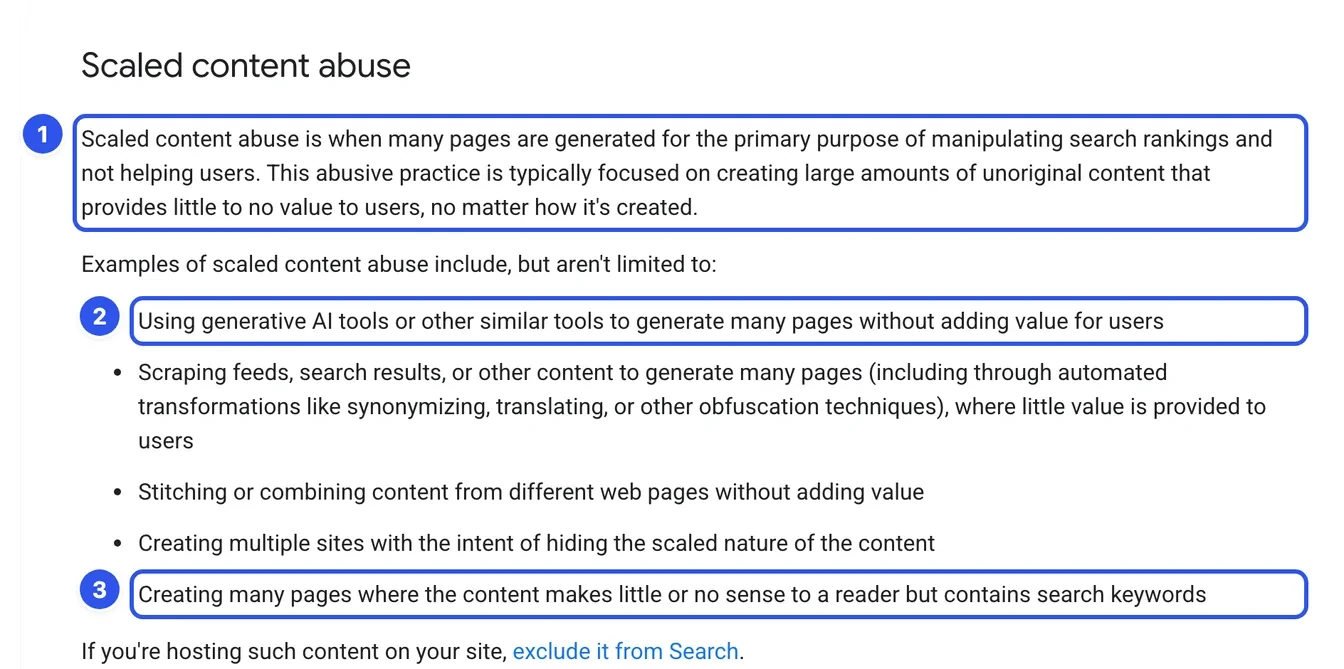
- The definition: many pages generated "for the primary purpose of manipulating search rankings and not helping users", which applies "no matter how it's created".
- The example that matters most for SEO automation: "using generative AI tools or other similar tools to generate many pages without adding value for users".
- The keyword-stuffing variant: pages that make "little or no sense to a reader but contain search keywords".
Google's separate guidance on generative AI content, last updated in October 2026, turns this into a working rule for anyone who automates writing.
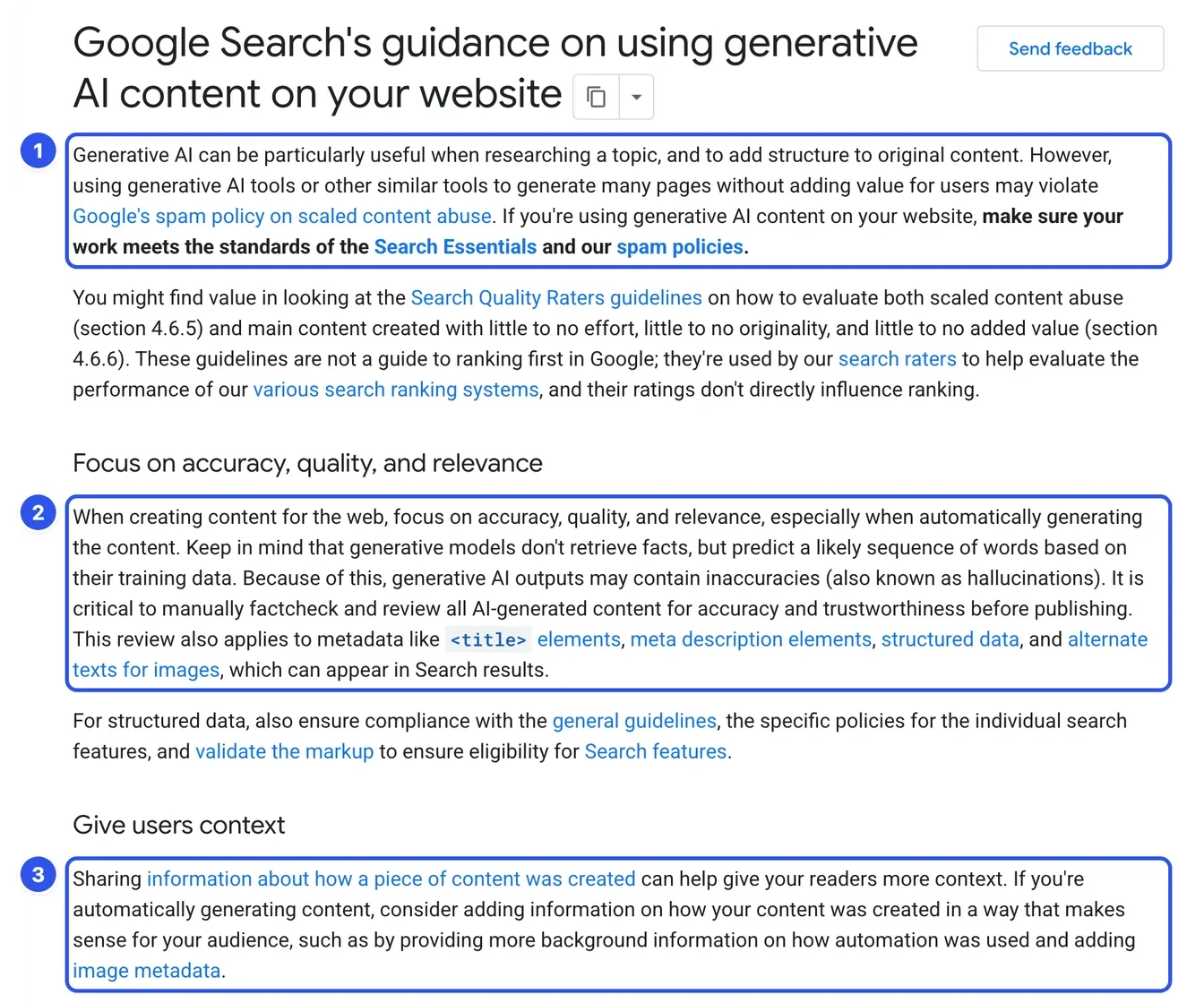
- AI is described as useful "when researching a topic, and to add structure to original content", with the scaled content abuse warning right behind it.
- The review requirement: it is "critical to manually factcheck and review all AI-generated content" before publishing, and that includes title elements, meta descriptions, structured data and image alt text.
- Context for readers: if you generate content automatically, consider explaining how automation was used.
Google's people-first content checklist adds a question every automated content program should run against itself: "Are you using extensive automation to produce content on many topics?" A yes is listed as a warning sign. So the test is not whether a tool was involved. It is whether each page adds something a reader could not get from the pages already ranking.
Which SEO tasks you can automate, and how far
Some tasks can run completely on their own. Others can be automated up to a draft or a suggestion, with a person making the call. The table below is the split we would use.
| Task | How far to automate | What stays human | How |
|---|---|---|---|
| Technical crawls and audits | Fully, on a schedule | Deciding which issues to fix first | Scheduled crawler runs |
| Search Console reporting | Fully | Reading the trend and acting on it | Search Console API or bulk export to BigQuery |
| Index status checks | Fully, within quota | Fixing why a page is not indexed | URL Inspection API |
| XML sitemaps | Fully | Nothing, once set up | CMS or SEO plugin |
| Rank and visibility tracking | Fully | Choosing what to track | Rank tracker or AI visibility tracker |
| Keyword research and clustering | Mostly | Picking topics that fit your business | Keyword tools, AI clustering |
| Content briefs | Mostly | Adding your angle and experience | AI reads the current top results |
| Article drafts | Up to a draft | Fact-check, first-hand detail, approval | AI writing agent with a review step |
| Meta titles, descriptions, alt text | Up to a draft | Review (Google names these explicitly) | Generated with the draft |
| Internal links | Mostly | Spot checks | Links chosen from a list of real pages |
| Publishing | Fully, after approval | The approval itself | CMS integration, scheduled publishing |
| Content refresh | Detection fully, rewrite up to a draft | Approving the revision | Search Console comparisons trigger a rewrite |
| Link building | Prospect research only | Outreach and relationships | Backlink tools |
| Strategy | Not at all | All of it | You |
The pattern: the closer a task sits to what readers see, the more it needs a person at the end. Data collection can run unattended. Published words should not.
Automate the technical side first
Monitoring is the best place to start. It changes nothing on your site, so it cannot cause a penalty, and it replaces the most tedious manual work: opening the same reports every week.
Scheduled site crawls
A desktop crawler like Screaming Frog's SEO Spider can run crawls "as a one-off, or at chosen intervals" from File > Scheduling. Scheduling is part of the paid licence, and when a scheduled crawl exports data, the SEO Spider runs in headless mode, meaning without an interface.
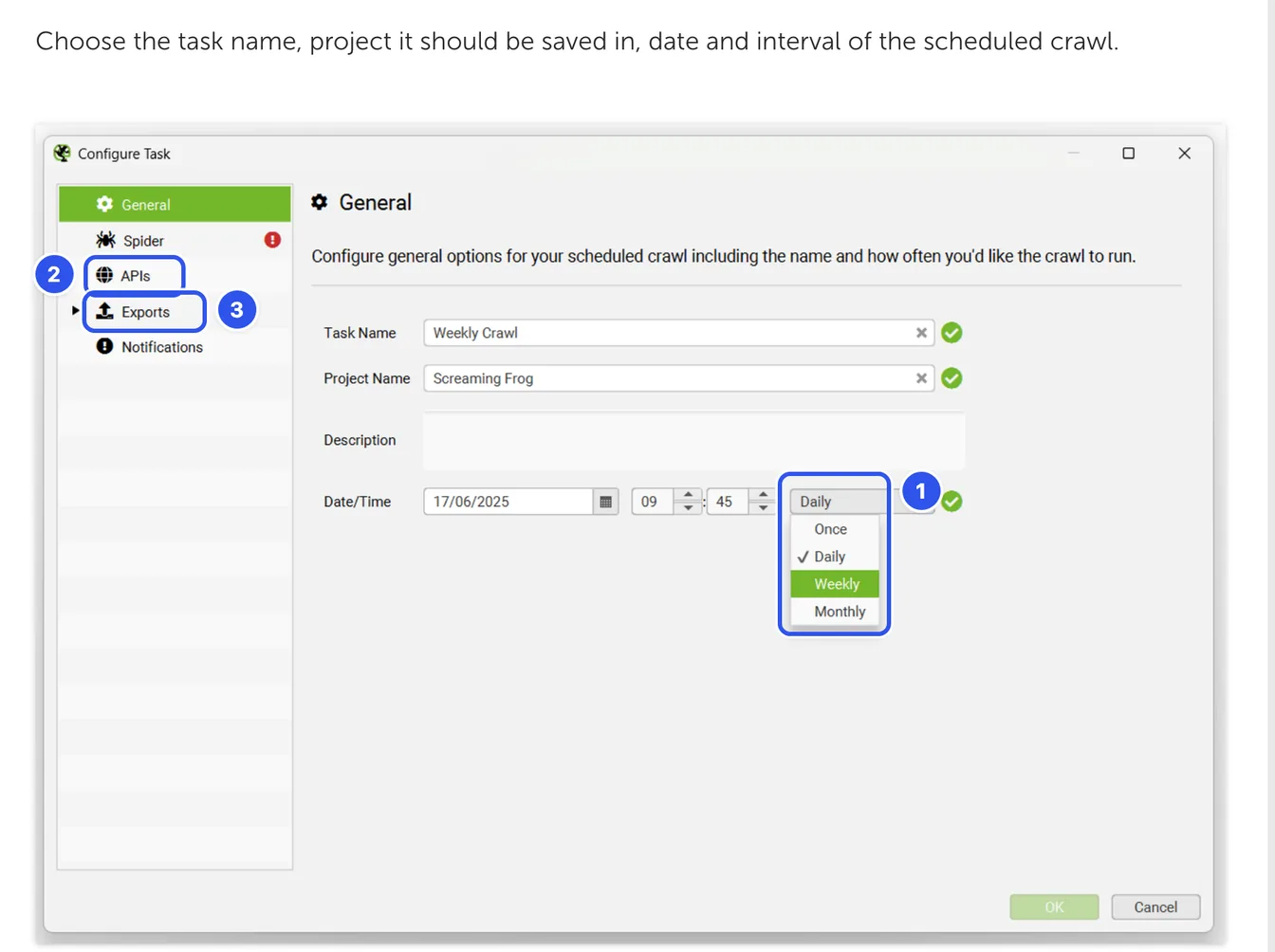
- How often the crawl runs: once, daily, weekly or monthly.
- The APIs tab pulls data from Google Analytics, Search Console, PageSpeed Insights, Majestic, Ahrefs and Moz into the scheduled crawl.
- Exports can go to Google Sheets, where each new scheduled export is appended as a new row in the same sheet, so you get a time series without copying anything by hand.
That last point is the useful one. A weekly crawl nobody opens is wasted. A sheet that shows broken links or non-indexable pages going up week by week tells you something changed.
Search Console data on a schedule
The Search Console interface is built for looking, not for tracking. For automation there are two routes:
- The Search Console API. One Search Analytics query returns between 1 and 25,000 rows (1,000 by default), and you page through larger results with
startRow. The quota is 1,200 queries per minute per site. Requests withdataStateset to "all" include fresh, not yet finalized data. - Bulk data export to BigQuery. Search Console can schedule a daily export of all performance data for a property to BigQuery, "with the exception of anonymized queries". This suits large sites and anyone who wants to join search data with other data.
For index monitoring, the URL Inspection API has its own quota: 2,000 checks per day and 600 per minute per site. That is enough to check your most important pages daily on a small or medium site, not to check every URL of a large one.
Sitemaps and indexing pings
Sitemaps are the easiest task to automate and the one people most often over-engineer. In WordPress, Yoast SEO's sitemaps "are updated automatically as you add or remove content", and post types set to noindex stay out. Three facts from Google's sitemap documentation save you work:
- Google ignores
<priority>and<changefreq>. Tuning them by script does nothing. - Google uses
<lastmod>only if it is "consistently and verifiably" accurate. Update it when the main content, structured data or links change, not when the copyright year does. - One sitemap holds at most 50,000 URLs or 50MB uncompressed. Above that, split it and use a sitemap index.
Two indexing shortcuts get misused. Google's Indexing API only works for pages with JobPosting or BroadcastEvent markup, so it is not a way to push blog posts into Google. And IndexNow, which pings search engines when a URL changes, lists Microsoft Bing, Naver, Seznam.cz, Yandex and Yep as supporters. Google is not on that list, so for Google an accurate sitemap remains the automation that matters.
SEO content automation, with a review step
Content is where most of the time goes, and where automation helps or hurts the most. A complete pipeline has these stages:
- Keyword research. Find keywords your site can realistically rank for, grouped so that one search intent gets one article.
- Brief. Read the pages that currently rank for the keyword and note what they all cover, what they miss and how long they are.
- Draft. Write the article from the brief, with sources for every claim.
- First-hand input. Add what only you know: your numbers, your process, the mistakes you have seen.
- Images and internal links. Add images and link to pages that exist on your site.
- Review. A person checks facts, metadata and tone, then approves.
- Publish. The CMS gets the article, title, meta description and images.
- Refresh. When an article loses positions, it is compared with what ranks now and revised.
Steps 4 and 6 are the ones Google's guidance points at. Step 4 is how an automated article adds something the top 10 does not have, and step 6 is the manual fact-check Google calls critical.
Citapult automates the other steps around those two. Its article agent reads the top 10 results for a keyword, the questions Google shows for it and the AI Overview if there is one, and turns them into a brief. Before writing, it asks you up to four optional questions about your real numbers and methods, and every finished draft is checked against more than 20 fixed rules, including sources for every number and no links to competitors.
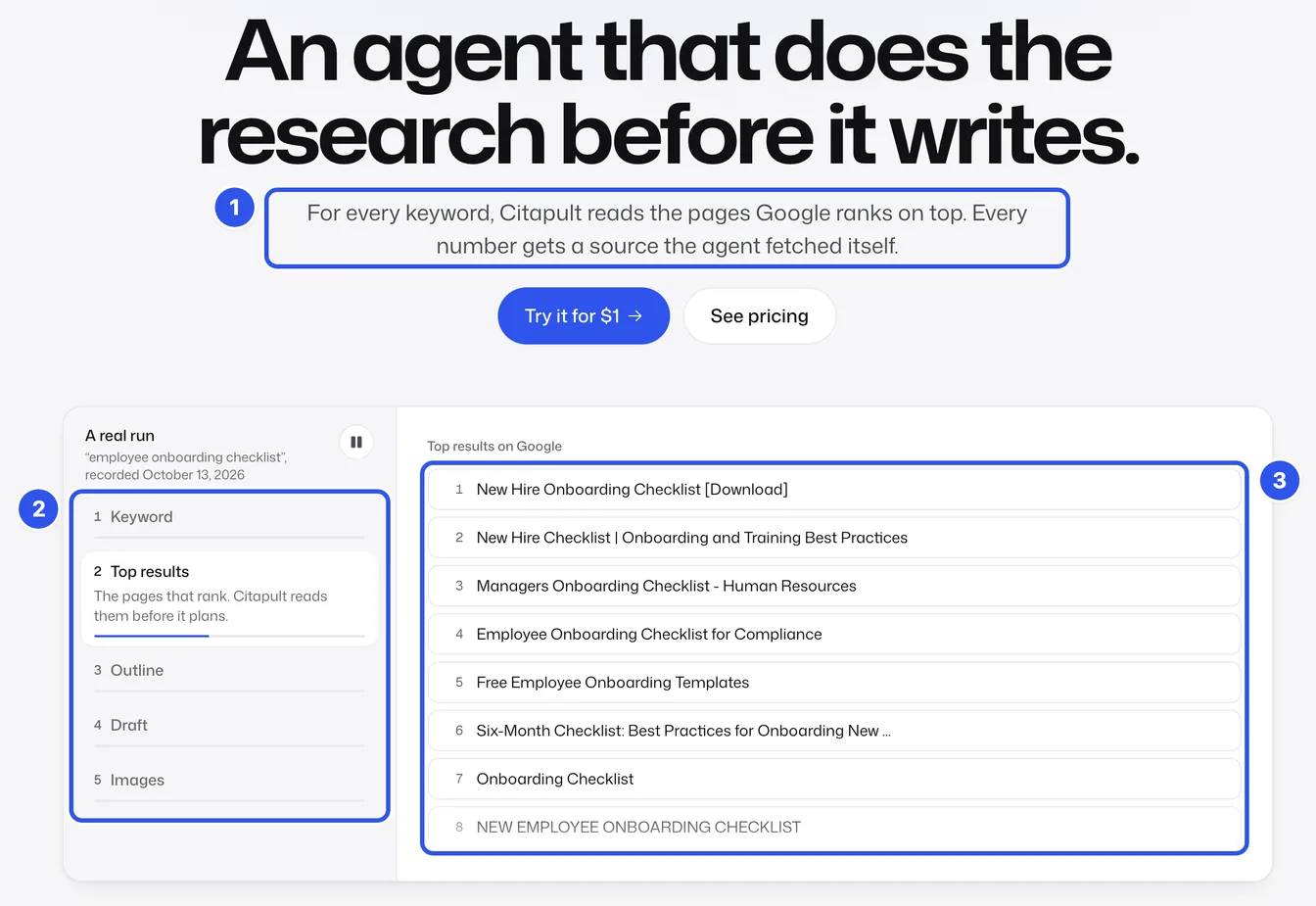
- Every number in the article gets a source the agent fetched itself.
- The steps of a run: keyword, top results, outline, draft, images.
- The top Google results it reads before it plans anything, here for "employee onboarding checklist".
You can read unedited output on the example articles page before deciding whether that level of automation fits your site.
Internal links without guesswork
Automated internal linking fails in a predictable way: the tool invents a plausible URL that does not exist, or links into the wrong language version. The fix is to pick links only from a list of real pages. Citapult's internal linking works from your sitemap, places 3 to 5 links per article by default and fails the check if a link is not on that list.
Automatic SEO on WordPress
"Automatic SEO" in WordPress usually means an SEO plugin handling the technical layer: sitemaps, title templates and meta fields. That is useful, but it does not research or write anything. To automate the content itself, the article has to arrive in WordPress with its SEO fields filled in. Citapult's WordPress plugin creates the post with the featured image, the images in your media library, and the SEO title and meta description in Yoast SEO, Rank Math, SEOPress or All in One SEO. With publishing set to "Publish automatically", an approved article goes out on its calendar day. Without it, every article waits as "Needs review" until you publish it.
How to automate SEO with AI: a six-step plan
- List your recurring tasks and the time each takes. Anything you do weekly in the same way is a candidate. Anything you do once a quarter probably is not worth automating yet.
- Automate reporting and monitoring first. Set up a scheduled crawl and a Search Console export. You will learn what your baseline looks like before you change anything.
- Add alerts, not dashboards. Decide which change should reach a person (a drop in clicks, a page leaving the index, a spike in 404s) and send only that.
- Automate research and briefs. Let AI cluster keywords and read the current top results. Review the topic list, since a cluster that fits the search data can still be off-topic for your business.
- Automate drafting with a fixed review checklist. Check every number against its source, read the title and meta description, add one detail from your own experience and decide whether a note on how the article was made makes sense for your readers.
- Automate publishing and refreshes, then measure. Publish on a schedule, compare each article's last 28 days with the 28 before, and revise the ones that slip.
Step 6 is where most setups stop too early. Publishing is automated, but nobody checks which articles are losing ground. Citapult's Search Console integration syncs daily at 04:00 UTC, flags articles that fall in that 28-day comparison and drafts a revision, and nothing changes on your site until you approve it.
Common SEO automation mistakes
- Publishing unreviewed AI pages in bulk. This is the exact example in Google's scaled content abuse policy. Volume is not the problem. Volume without added value is.
- Using the Indexing API for normal pages. It is limited to job postings and livestream videos.
- Faking freshness. Google's own checklist asks: "Are you changing the date of pages to make them seem fresh when the content has not substantially changed?" A script that bumps
lastmodor the visible date every week does exactly that. - Writing to a word count. Google's checklist asks whether you write to a set length "because you've heard or read that Google has a preferred word count" and answers it: "No, we don't." Let length follow what the topic needs.
- Letting AI write metadata unchecked. Titles, meta descriptions, structured data and alt text can appear in search results, which is why Google includes them in the review requirement.
- Automating reports nobody reads. If an export does not lead to a decision, delete it.
SEO automation tools by job
You do not need one tool for everything. Most stacks combine one tool from each row:
| Job | Tool type | Examples |
|---|---|---|
| Crawl and audit | Desktop or cloud crawler with scheduling | Screaming Frog SEO Spider |
| Performance data | Google's own APIs and exports | Search Console API, bulk export to BigQuery |
| Glue between tools | Workflow builders | Make and similar no-code platforms |
| Sitemaps and on-page fields | CMS SEO plugin | Yoast SEO, Rank Math |
| Content pipeline | AI writing agent with research and publishing | Article agents such as the one described above |
For a full comparison of platforms, see our guide to SEO automation software. If your main goal is a steady stream of articles, automated blogging covers that setup in detail, and how an SEO AI agent works explains what happens inside the content pipeline. For a broader look at AI across all SEO tasks, read how to use AI for SEO.
FAQ
What is SEO automation?
SEO automation is the use of software to run repeatable SEO tasks on a schedule or trigger instead of by hand. Typical examples are scheduled site crawls, Search Console reports, automatic sitemaps, keyword clustering, AI-drafted articles, internal linking and scheduled publishing.
Can SEO be fully automated?
The data side can: crawls, reporting, sitemaps and monitoring can run without anyone touching them. Content can be automated up to a reviewed draft, but Google says it is critical to manually fact-check and review all AI-generated content before publishing. Strategy, meaning which topics matter for your business, stays a human decision.
Can ChatGPT do SEO?
A general chatbot can help with parts of SEO, such as brainstorming keywords, outlining or drafting meta descriptions. It does not crawl your site, read your Search Console data or publish to your CMS on its own, so it covers single steps rather than the whole workflow. Whatever it writes still needs the fact-check Google asks for.
Is SEO still relevant in 2026?
Yes. Google still publishes and updates its guidance for site owners; the generative AI page shown above was last updated in October 2026. Its people-first content page states that SEO "can be a helpful activity when it is applied to people-first content". What has changed is that publishing lots of thin pages, by hand or by AI, is now explicitly covered by a spam policy.
Can a beginner automate SEO?
Yes, and automation helps beginners most when it handles the parts that need tooling knowledge: crawling, reporting and publishing. Start with the free options, Search Console and an SEO plugin that builds your sitemap, and add an AI content tool once you know which keywords you want to target.
How can I automate SEO for free?
Use Google Search Console with its API or the bulk export to BigQuery for performance data, let your CMS or a free SEO plugin generate the sitemap, and connect them with a workflow builder's free tier if you need alerts. Content automation is the part that usually costs money, because it needs research, writing and publishing in one place.
Sources
- 1developers.google.comSpam Policies for Google Web Search
- 2developers.google.comGoogle Search's guidance on using generative AI content on your website
- 3developers.google.comGoogle Search's guidance about AI-generated content
- 4developers.google.comWhat web creators should know about our March 2024 core update and new spam policies
- 5developers.google.comCreating helpful, reliable, people-first content
- 6developers.google.comSearch Analytics: query
- 7developers.google.comUsage limits
- 8support.google.comAbout bulk data export of Search Console data to BigQuery
- 9developers.google.comBuild and submit a sitemap
- 10developers.google.comIndexing API quickstart
- 11indexnow.orgIndexNow
- 12screamingfrog.co.ukSEO Spider user guide: general
- 13yoast.comXML sitemaps in the Yoast SEO plugin