AI-Driven SEO Strategies: 8 That Hold Up With Google and AI Search
Eight AI-driven SEO strategies that hold up with Google and AI search: what to hand to AI, what humans must check, and what the GEO research says works.
AI-driven SEO strategies use AI in two ways: to do the slow parts of SEO faster (reading the results, clustering keywords, drafting, linking, refreshing) and to make your pages the ones AI answers cite. Google's position is that AI content is judged like any other content: "Using AI doesn't give content any special gains. It's just content." So the strategies that work use AI for speed and keep humans in charge of facts, experience and judgment.
TL;DR
- Google ranks AI-assisted pages on quality, not on how they were produced, but mass-produced pages "without adding value for users" fall under its scaled content abuse policy.
- AI search changed what a ranking is worth: in Pew Research data, people clicked a result in 8% of visits when an AI summary showed, against 15% without one.
- The eight strategies below split the work: AI reads, clusters, drafts, links and monitors; you add experience, check every number and decide what gets published.
- For AI answers, the strongest tested levers are citing sources, adding quotations and adding statistics. Keyword stuffing did not help in the GEO study.
- You need no special files, markup or schema to appear in Google's AI Overviews or AI Mode, according to Google.
What "AI-driven SEO" means in practice
The phrase covers two jobs that often get mixed up.
- AI for SEO work. You use language models and automation to research keywords, read the pages that rank, write briefs and drafts, suggest internal links and spot pages that are losing traffic. The goal is the same as always, ranking in Google, just with less manual work.
- SEO for AI answers. You shape pages so that Google's AI Overviews, AI Mode, ChatGPT and Perplexity pick them as sources. This is often called generative engine optimization (GEO), a term from a 2023 research paper by Aggarwal and colleagues at Princeton and other institutions. (More on the labels in what SEO for AI is called.)
A complete strategy needs both. The first saves time, the second decides whether that time pays off in a search landscape where many questions are answered on the results page. The table shows where AI helps and where a person still has to do the work.
| SEO task | What AI does well | What stays with you |
|---|---|---|
| Keyword research | Expands seed terms, groups keywords that share results | Picks topics that match what you sell |
| SERP analysis | Reads the top 10, lists what every page covers and what they miss | Decides which angle you can own |
| Drafting | Writes a structured first draft from the brief | Adds experience, numbers and examples only you have |
| Fact-checking | Flags claims that lack a source | Checks every number against the source before publishing |
| Internal links | Matches new articles to existing pages | Sets priority pages and reviews anchors |
| Content refreshes | Detects falling pages, compares them with today's top results | Approves or rejects the changes |
| AI visibility | Asks AI assistants your customers' questions every week | Decides which gaps are worth an article |
If you are looking for the broader picture of automating these steps, the pillar guide on SEO automation covers the whole pipeline. This article stays with strategy: what to hand to AI, what not to, and what the evidence says.
What Google says about AI-generated content
Google has given the same answer since February 2023, when Danny Sullivan and Chris Nelson published its guidance on AI-generated content: the question is quality, not production method. "Appropriate use of AI or automation is not against our guidelines," the post says, as long as it is not used "to generate content primarily to manipulate search rankings."
The current documentation for site owners spells out where the line sits.
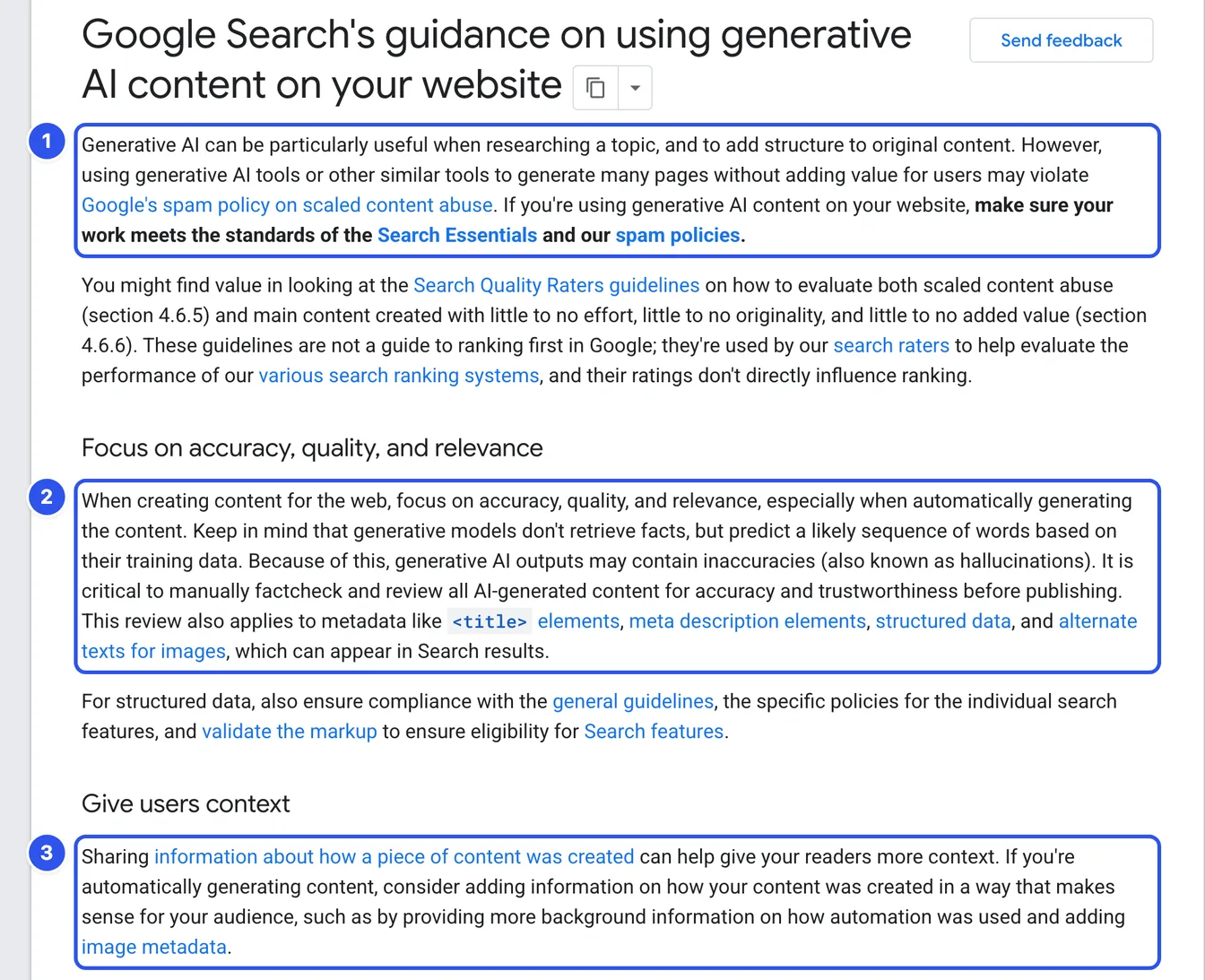
- AI is "particularly useful when researching a topic, and to add structure to original content." Generating "many pages without adding value for users" may violate the spam policy on scaled content abuse.
- Models "don't retrieve facts, but predict a likely sequence of words," so Google calls it "critical to manually factcheck and review all AI-generated content." That review includes title elements, meta descriptions, structured data and image alt text.
- If you automate content, Google suggests telling readers how it was made, for example with background on how automation was used.
The spam policy defines scaled content abuse as "when many pages are generated for the primary purpose of manipulating search rankings and not helping users," and adds "no matter how it's created." Google's helpful content page gives you a self-test for the gray zone: ask "Who, How, and Why" about each page. Who wrote it (is there a byline where readers expect one)? How was it made (did you explain the role of automation)? Why does it exist (to help a reader, or to catch traffic)?
For the related question of whether AI will make SEO work unnecessary, see will AI replace SEO.
Why AI search changes the strategy
Rankings still matter, but a first position earns fewer clicks when an AI answer sits above it. Two independent data sets show the size of the effect.
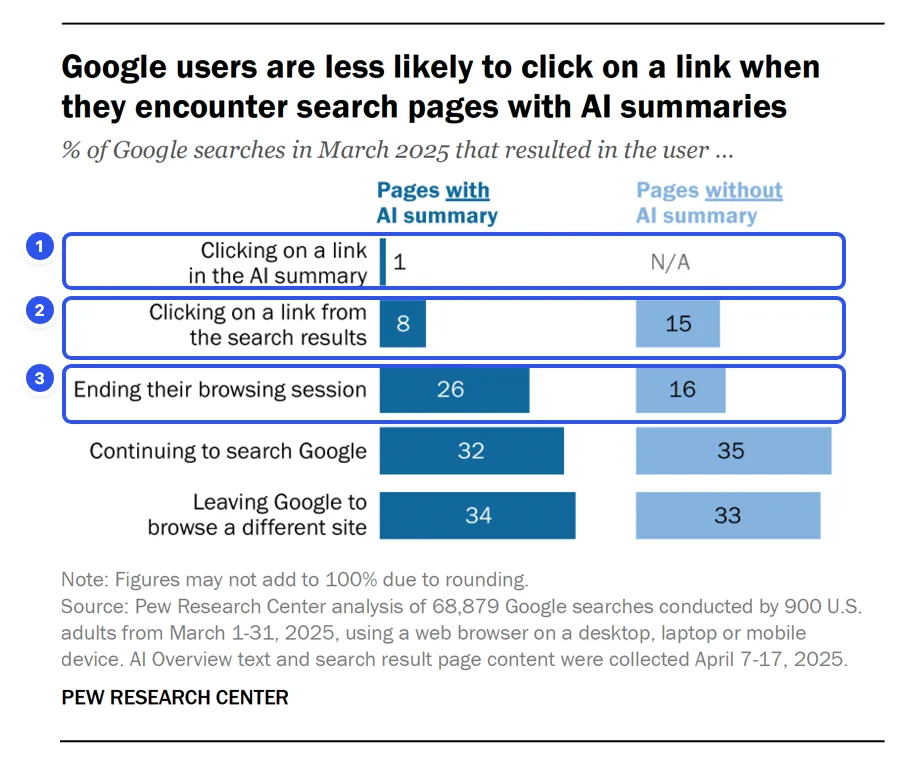
- Links inside the AI summary were clicked in just 1% of visits to pages that showed one.
- People clicked a traditional result in 8% of visits with an AI summary, compared with 15% without one.
- Sessions ended on 26% of pages with an AI summary, against 16% of pages with only traditional results.
Pew's data comes from 900 U.S. adults who shared their browsing in March 2025. In that sample, 18% of all Google searches produced an AI summary, and 88% of those summaries cited three or more sources. Longer and question-style searches triggered them far more often: 8% of one- or two-word searches did, against 53% of searches with 10 words or more, and 60% of searches starting with words like "who," "what" or "why."
Ahrefs reached a similar conclusion from a different angle. Ryan Law's team compared 300,000 keywords and found that an AI Overview correlated with a 34.5% lower average clickthrough rate for the top-ranking page. They also found that 99.2% of keywords triggering AI Overviews were informational.
The practical takeaway: for informational queries, being cited inside the answer becomes as important as ranking under it. Google's own documentation makes the entry ticket clear.
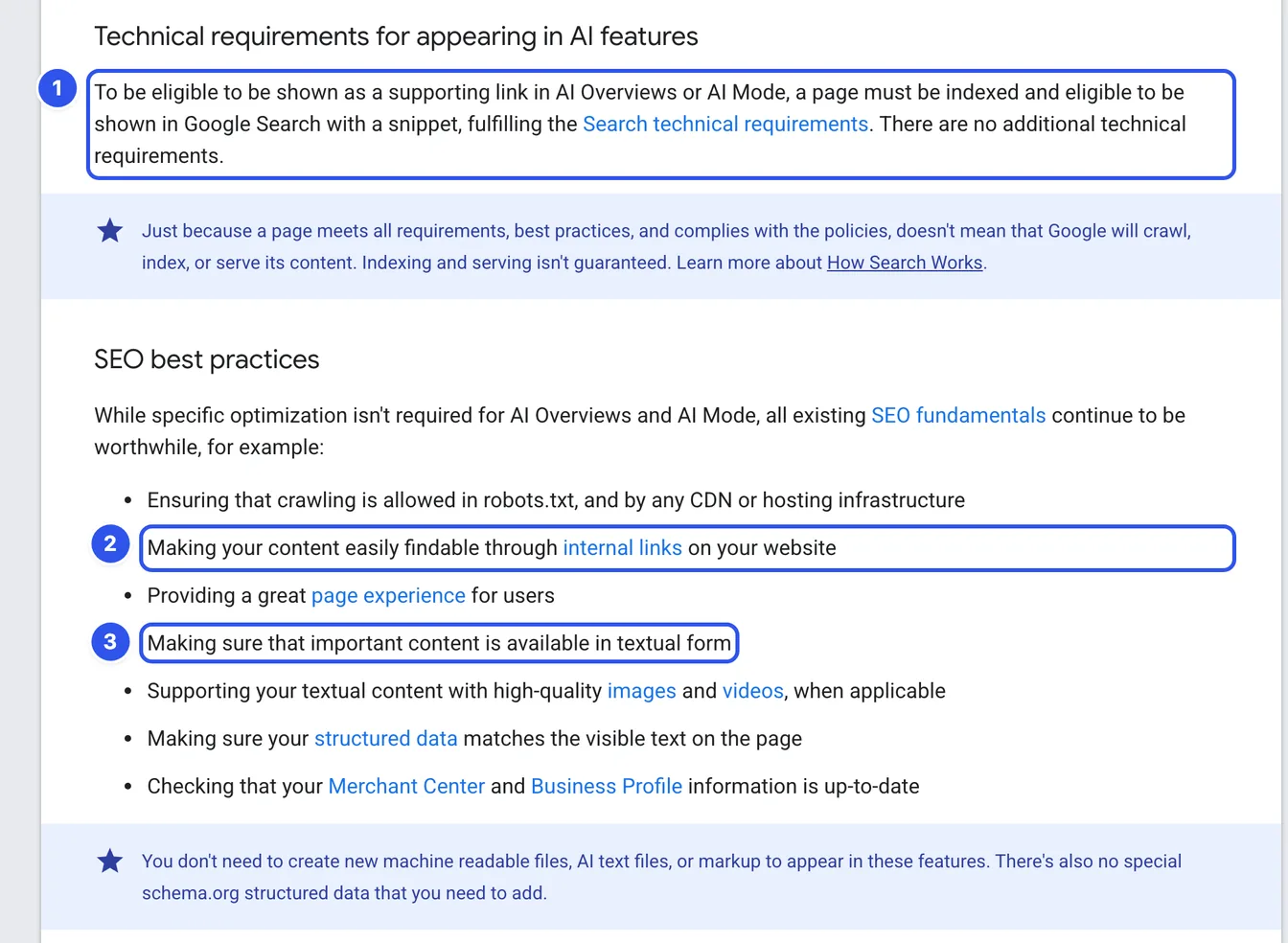
- To appear as a supporting link in AI Overviews or AI Mode, a page must be indexed and eligible for a snippet. "There are no additional technical requirements."
- Internal links stay on Google's list of fundamentals that matter for AI features.
- So does making sure important content is available as text, not locked in images or scripts.
The blue note at the bottom (left unmarked) is worth reading twice: you do not need "new machine readable files, AI text files, or markup" and there is "no special schema.org structured data" for these features. Google also explains that AI Overviews and AI Mode may use "query fan-out," issuing several related searches across subtopics, which is one more reason to answer the follow-up questions around your main topic.
8 AI-driven SEO strategies that work
Each strategy names the part AI handles and the part you keep. The order follows the life of an article, from research to monitoring.
1. Let AI read the results before anyone writes
The fastest win is research, not writing. A model can read the 10 pages that rank for a keyword, the questions Google shows for it and the AI Overview, then summarize what every page covers, what all of them miss and how long they are. That summary becomes the brief. Writing without it is how you end up with an article that repeats the top results and adds nothing.
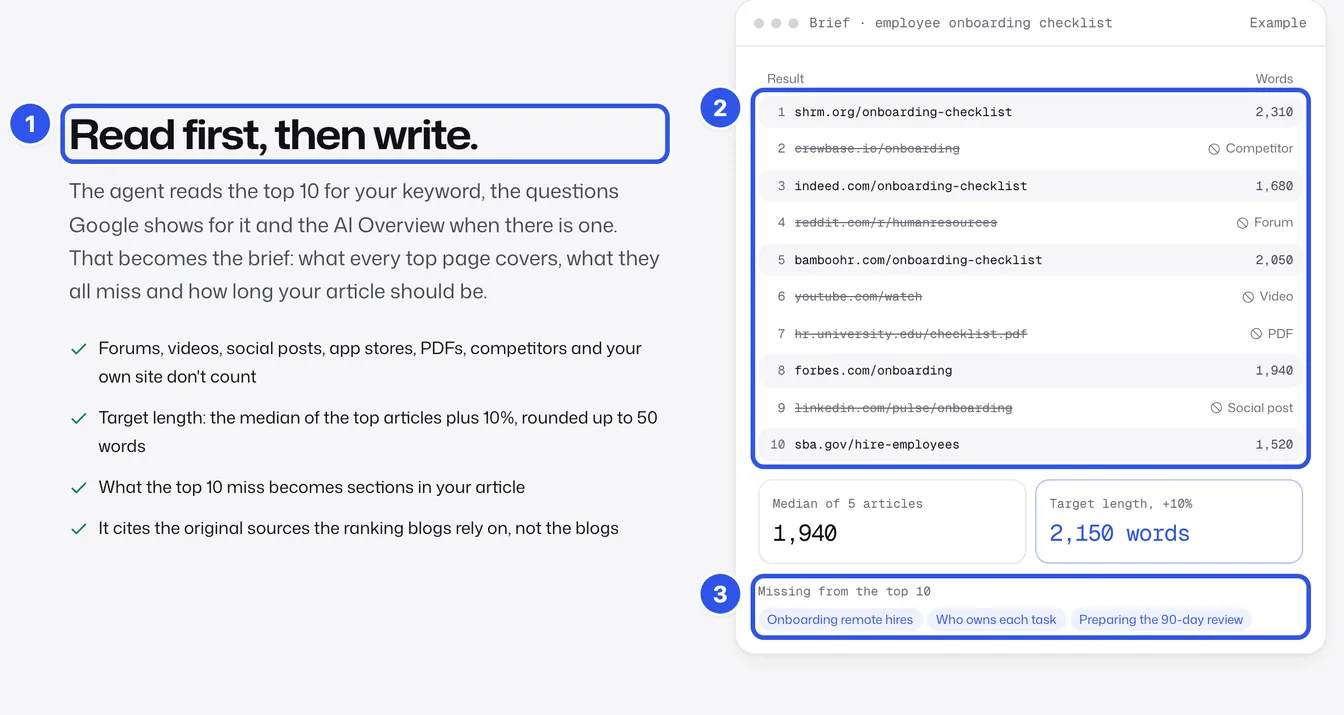
- This is how Citapult's article agent starts every article: it reads the top 10, the questions Google shows and the AI Overview when there is one.
- Forums, videos, PDFs, social posts and competitors are struck from the list, so the brief is built from comparable articles only. The target length is the median of those articles plus 10%.
- Topics none of the top 10 cover become sections of the new article.
What you keep: the angle. A brief tells you what exists. Only you know which gap your business can fill credibly.
2. Cluster keywords by the results they share
AI keyword tools produce long lists, and the trap is writing one article per keyword. If Google answers two keywords with largely the same pages, it treats them as one search intent, and two articles will compete with each other. Compare the top 10 for both keywords: when they share several results, they belong in one article with one main keyword and the rest as variants.
What you keep: the business filter. A keyword with volume that has nothing to do with what you sell is traffic you pay for in writing time and never convert.
3. Draft with AI, then add what only you know
Google's guidance asks whether content shows "first-hand expertise and a depth of knowledge," and its ranking systems look for experience, expertise, authoritativeness and trustworthiness (E-E-A-T). A draft built from the top 10 cannot show experience on its own, because experience is not in the top 10. Before or after drafting, answer a few questions in writing: What number do you see in your own work? What goes wrong most often? How do you actually do it? Put those answers into the text.
What you keep: the examples, the numbers from your own work and an author with a real name and role. Google's helpful content checklist asks plainly: "Do pages carry a byline, where one might be expected?"
4. Fact-check every number, including the metadata
Hallucinated statistics are the most common way AI content damages trust. Google's guidance says the review also covers metadata such as title elements, meta descriptions, structured data and image alt text, because those can appear in search results. A workable rule: every number in the article links to the page it came from, and someone has opened that page. If a number has no source, cut it.
What you keep: the final read. Tools can flag unsourced claims, but a person signs off before publishing.
5. Write so AI answers can quote you
The GEO paper (Aggarwal et al., accepted to KDD 2024) is the best public test of what makes a page visible in generative answers. The authors rewrote source pages with nine methods and measured how much of each page showed up in the AI responses.
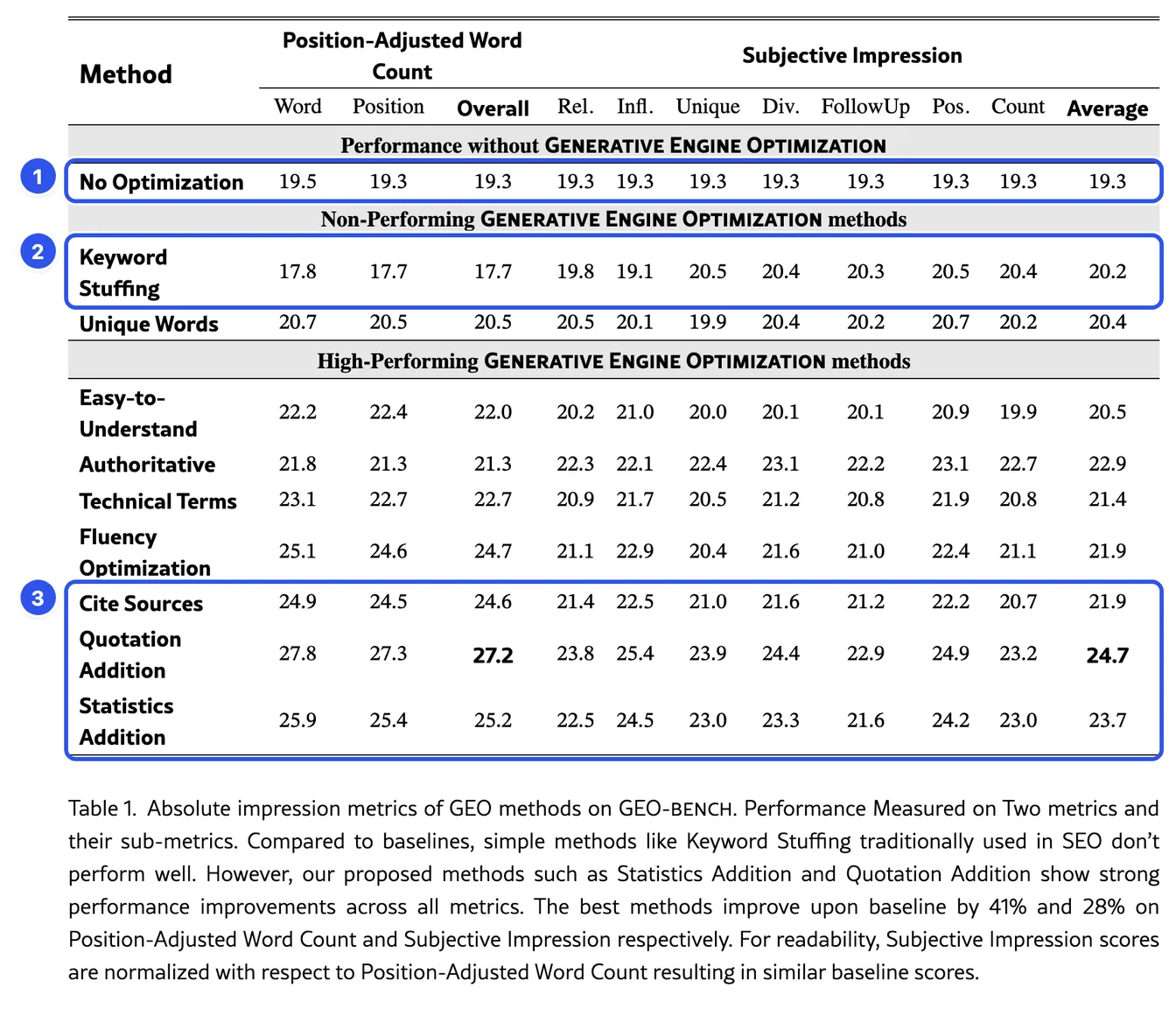
- The baseline without optimization scores 19.3 on the overall visibility metric.
- Keyword stuffing, the classic SEO move, scores 17.7, below the baseline. The authors found it offers "little to no improvement."
- Citing sources, adding quotations and adding statistics were the top performers, with a relative improvement of 30 to 40% on the main metric. Quotation addition reached 27.2.
Two more findings matter for smaller sites. Lower-ranked pages benefited most: citing sources raised visibility by 115.1% for the site ranked fifth, while the top-ranked site lost 30.3% on average when everyone optimized. And the methods worked differently by topic: statistics helped most on law and government questions, quotations on history and explanations.
In practice this means: put the direct answer in the first two or three sentences, back claims with a named source in the same sentence, quote experts where a quote carries weight and use numbers instead of vague words. If you want the content side of this in more detail, read AI SEO content writing.
What you keep: the choice of sources. AI can find a statistic, but you decide whether the source deserves to be quoted.
6. Link new articles to pages that actually exist
Google lists internal links among the fundamentals for AI features (mark ② in the screenshot above). AI is good at matching a new article to related pages, and bad at knowing which URLs exist; a model left alone will invent plausible paths. Give it your sitemap as the only allowed list and check every link against it. Also restrict it to pages in the article's language, so an English article never links a German page.
What you keep: the priorities. Decide which pages (a product page, a calculator, a pillar guide) should get links first.
7. Refresh pages before they fall off
Most traffic losses are slow: a page drifts from position 4 to 7, clicks halve, and nobody notices for months. AI can watch for this and compare a falling page with what ranks today, then propose what to add. A simple trigger: compare the last 28 days with the 28 before in Search Console and look at every page that lost several positions or a large share of its clicks.
What you keep: the approval. Nothing should change on a live page without a person reading the diff.
8. Track AI visibility separately from rankings
Google counts clicks from AI Overviews and AI Mode inside the normal Search Console Performance report, under the "Web" search type, so you cannot see those clicks on their own. Since August 31, 2026, every site also has a generative AI performance report that shows how often your pages appeared in AI Overviews and AI Mode, by page, country, device and date, but it has no click data. ChatGPT and Perplexity do not report to you at all. The workaround is to ask them directly: write down the questions your customers ask, run them in several AI assistants every week and record who gets named and who gets cited as a source. Where a competitor is cited and you are not, you have your next article.
Citapult Visibility automates that loop: it asks five AI searches your customers' questions every week, checks your Google positions alongside and shows where AI cites others instead of you. With Citapult Articles, it then writes the matching post with sources once you approve it.
What you keep: the list of questions and competitors. They define what "visible" means for your business.
AI SEO strategies that backfire
These come up in almost every "AI SEO" discussion and fail against Google's own documentation or the GEO data.
| Tactic | Why it fails | Source |
|---|---|---|
| Publishing hundreds of unreviewed AI pages | Matches Google's definition of scaled content abuse | Google spam policies |
| Keyword stuffing for AI answers | Scored below the baseline in the GEO benchmark | GEO paper, Table 1 |
| Special "AI files" or schema to get into AI Overviews | Google says none are needed and there is no special schema | Google, AI features and your website |
| Letting AI write titles, descriptions and alt text unchecked | Google's review requirement explicitly covers metadata | Google, generative AI guidance |
| Anonymous articles on topics where readers ask "who wrote this?" | Google recommends accurate bylines where readers expect them | Google, AI content guidance |
The pattern behind all five: they treat AI as a way to produce more pages, while everything Google and the research reward is about making each page more useful and easier to verify.
How to start with AI-driven SEO this month
You do not need all eight strategies at once. A realistic order for a small team:
- Week 1: Pick 10 keywords close to what you sell. Have AI read the top 10 for each and write briefs (strategy 1), and merge keywords that share results (strategy 2).
- Week 2: Draft 2 or 3 articles with AI, add your own numbers and experience, and check every source before publishing (strategies 3 and 4).
- Week 3: Rework the intro and key sections of your best existing pages so they answer first and cite sources (strategy 5). Fix internal links to point at real, current pages (strategy 6).
- Week 4: Write down 20 to 25 customer questions, run them in ChatGPT, Perplexity and Google, and note who gets cited (strategy 8). Set up a monthly check for falling pages (strategy 7).
If you want to see what the AI part produces before you commit, Citapult's example articles show unedited output, written through the same steps described here. For a step-by-step walkthrough of the tools themselves, see how to use AI for SEO.
FAQ
What are some effective AI-based SEO tactics?
The tactics with the best evidence are letting AI read the top results to build a brief, clustering keywords by shared results, drafting with AI and then adding first-hand experience, fact-checking every number, and writing so AI answers can quote you (sources, quotations, statistics). In the GEO benchmark, citing sources, adding quotations and adding statistics improved visibility in AI answers by 30 to 40%.
Is there an AI that can do SEO?
AI can do most of the execution: keyword research, SERP analysis, drafting, internal linking, publishing and monitoring rankings. It cannot supply your experience or verify facts on its own, and Google says it is "critical to manually factcheck and review all AI-generated content." The workable setup is AI doing the work and a person approving what goes live.
Does Google penalize AI-generated content?
Not for being AI-generated. Google says "appropriate use of AI or automation is not against our guidelines." What it penalizes is scaled content abuse: many pages made "for the primary purpose of manipulating search rankings and not helping users," no matter how they were created.
Is SEO dead or evolving in 2026?
Evolving. Google states that "the best practices for SEO remain relevant" for AI Overviews and AI Mode, and a page must be indexed and eligible for a snippet to be cited there. What changed is the value of a click: Pew found people clicked a result in 8% of visits when an AI summary appeared, against 15% without one. So SEO now includes being the cited source, not only the top link.
What is AI SEO called now?
The most common name is GEO, generative engine optimization, from the 2023 research paper that introduced the term. You will also see AEO (answer engine optimization) and similar labels. They all describe the same goal: getting your pages used and cited in AI-generated answers.
Do I need special AI files or schema to appear in AI Overviews?
No. Google says you don't need to create "new machine readable files, AI text files, or markup" to appear in AI Overviews or AI Mode, and there is "no special schema.org structured data" for them. Standard SEO fundamentals apply: crawlable pages, internal links, important content in text form, and structured data that matches the visible text.
Sources
- 1developers.google.comGoogle Search's guidance on using generative AI content on your website
- 2developers.google.comGoogle Search's guidance about AI-generated content
- 3developers.google.comSpam policies for Google web search
- 4developers.google.comCreating helpful, reliable, people-first content
- 5developers.google.comAI features and your website
- 6pewresearch.orgGoogle users are less likely to click on links when an AI summary appears in the results
- 7ahrefs.comAI Overviews Reduce Clicks by 34.5%
- 8arxiv.orgGEO: Generative Engine Optimization
- 9siteimprove.comAI SEO Tools: How to Use AI for Faster, Smarter Optimization
- 10support.google.comGenerative AI performance report (Search)
- 11arxiv.org